

Photo Collage Maker, Editor

1M+
Installs
GAM Mobile App
Developer
-
Generative AI
Category
-
Rated for 3+
Content Rating
-
philiptran0308@gmail.com
Developer Email
-
https://sites.google.com/view/gampolicy2023
Privacy Policy
Screenshots
editor reviews
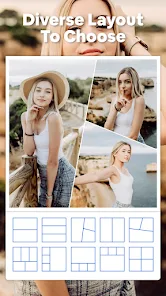
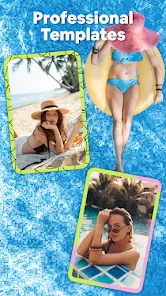
Photo Collage Maker, Editor (from GAM Mobile App) is one of those straightforward collage builders you grab from Google Play when you want to combine multiple photos into a single frame without opening a full desktop editor. It falls under the photo editing and collage making genre, and its main job is to let you pick several pictures from your gallery, slap them into a preset layout, and maybe add some stickers or text before sharing. With over 10 million installs listed on the Play Store, it's clearly been downloaded by a decent amount of people. The download itself is free, and honestly, that catches your eye because you don't want to pay for something simple like this. After launching it for the first time, you get this very typical mobile app feel: a grid showing collage templates, a few tabs at the top, and a big button to start selecting photos. It doesn't force you to sign up or log in straight away, which is already a big plus for casual users like me. You can just jump in and try making a collage within seconds.
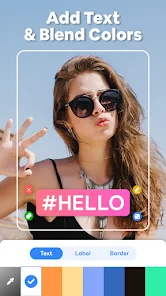
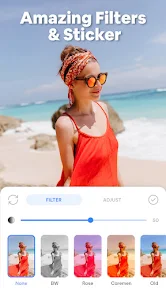
The hands-on experience starts with tapping "Layouts" and choosing a template size like 2x2 or 3x1. Once you pick photos from your gallery, the app arranges them into the chosen frame, and you can drag each photo around to adjust the crop. The interface is not super modern or smooth, but it gets the job done. There is a simple toolbar at the bottom where you can add text, switch backgrounds, apply filters, or throw in some stickers. One thing I noticed: the sticker selection is pretty limited and mostly generic stuff like hearts or stars, nothing fancy. The editing tools for individual photos are also very barebones, you can only rotate or flip them, no real fine-tuning. After customizing the collage to your taste, you hit the save button, and it exports the image to your gallery. A small tip: if you want better quality, make sure to check the export resolution setting in the menu, because the default might come out a bit blurry on bigger screens. Overall, the app moves along fine without major lag, but sometimes the ads pop up right when you are trying to tap something, which gets annoying quickly.
After using Photo Collage Maker for a few days, I think it's fine for someone who just needs a quick, no-fuss collage tool on their phone. It works well enough if you are making simple photo grids for Instagram stories or WhatsApp statuses. But if you need more flexibility, like adjusting spacing between photos individually, or adding text with a lot of font options, you will feel limited pretty fast. Compared to something like PicsArt or Canva, this app feels very basic, almost like a stripped-down version of a collage feature inside a larger editor. That being said, the lack of mandatory login and the free entry point are big reasons someone might keep it installed as a backup tool. But the frequent ads and the slightly dated design make it a candidate for deletion once you find a better alternative. People who like to edit photos heavily will probably uninstall it after a week; casual users who just want a quick collage once a month might keep it around.
features
- 📷 The app focuses purely on collage making with preset layouts, while PicsArt offers a full editing suite that can also do collages. The main difference is that this app is faster for simple grids since you don't have to navigate many menus.
- 🎨 It provides a basic set of stickers, text fonts, and filters. In contrast, Canva has thousands of templates and assets. The outstanding feature here is that all layout adjustments are done on a single screen without switching tabs, making it less overwhelming for new users.
- 🖼️ The interface is straightforward and only asks for photo permissions when needed, unlike some apps that request access to contacts or location. This focused approach is its best quality for privacy-conscious users.
pros
- 🌟 No registration required. You can just download it and start making collages immediately. Many photo editors like PicsArt or Adobe Express try to push you into creating an account first.
- 🌟 Very lightweight app. It does not eat up your phone storage or slow down your device compared to something like Canva, which tends to cache a lot of assets.
- 🌟 Quick export. Saving a collage takes only a few seconds, and the image quality is decent for social media use. It's faster than using Instagram's built-in collage tool, which often compresses images badly.
cons
- ⚠️ Too many ads. You frequently get full-screen ads between saving and editing, which makes the experience feel clunky. Free apps like Layout from Instagram have zero ads in comparison.
- ⚠️ Very limited editing tools. You cannot adjust brightness, contrast, or saturation on individual photos. Even basic editors like Snapseed let you tweak each image before combining them.
- ⚠️ No cloud sync or backup. If you switch phones, all your projects are gone. Apps like Canva save your work online automatically, which is a major advantage for frequent users.
Recommended Apps
![]()
16Personalities
16Personalities4
![]()
Zodiac Palm Reader: MagicWay
Reatility Media4.6
![]()
Moblo - 3D furniture modeling
MYTIforge4.1![]()
Magnifier Plus with Flashlight
Digitalchemy, LLC4.6![]()
QR Code Scanner
QR Code Scanner & Barcode Reader4.7![]()
FalFal: Astrology, Tarot, Love
FalFal Team4.8![]()
Christmas Photo Frames
PhotoFramesApps4.6![]()
AI Video Art Creator - Livensa
FERASET4.5![]()
Horoscope of Birth
Denimaks4.4![]()
Make Me Bald Prank
AppTornado2.5![]()
Kling AI: AI Image&Video Maker
Lohas Games Pte. Ltd.4.4![]()
Japan Timetable & Route Search
NAVITIME JAPAN CO., LTD.4.3![]()
Prank Call & Funny Video
TeH Software0![]()
Parallax 3D Live Wallpapers
TarrySoft4.3![]()
AI Chatbot - Nova
ScaleUp4.7















Disclaimer
1.AppInfoLibrary does not represent any developer, nor is it the developer of any App or game.
2.AppInfoLibrary provide custom reviews of Apps written by our own reviewers, and detailed information of these Apps, such as developer contacts, ratings and screenshots.
3.All trademarks, registered trademarks, product names and company names or logos appearing on the site are the property of their respective owners.
4. AppInfoLibrary abides by the federal Digital Millennium Copyright Act (DMCA) by responding to notices of alleged infringement that complies with the DMCA and other applicable laws.
5.If you are the owner or copyright representative and want to delete your information, please contact us info@appinfolibrary.com.
6.All the information on this website is strictly observed all the terms and conditions of Google Ads Advertising policies and Google Unwanted Software policy .














