
Cool Fonts Keyboard & Themes

500K+
Installs
Art Maker Studio
Developer
-
Productivity
Category
-
Rated for 3+
Content Rating
-
yushaojian11@gmail.com
Developer Email
-
https://wallpaper-4da20.web.app/privacy_policy
Privacy Policy
Screenshots


editor reviews
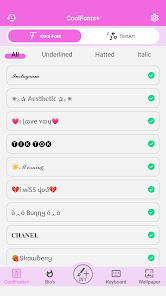
Cool Fonts Keyboard & Themes is a customization app, specifically a third-party keyboard app designed to change how your typing looks and feels. You download it when you're bored with the standard boring fonts on your phone and want to spice up your texts, bios, or social media posts. After installing it from Google Play, the first impression is that it's visually packed - the opening screen throws a ton of font styles, colorful themes, and emoji combos at you. There's no forced registration, which is a relief, but you quickly notice that many of the cooler options are locked behind a premium upgrade. Ads pop up here and there, which feels a bit heavy for an app just starting out, but the sheer variety of fonts keeps you tapping around.
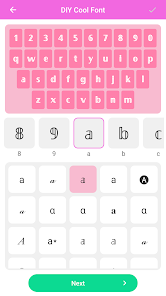
Once you actually set it as your default keyboard, the real experience kicks in. The interface is a bit cluttered at first, with all the font categories and theme packs crammed into the top bar. Switching between fonts isn't instant - it takes a second to apply, which can be annoying if you're trying things out quickly. The typing itself feels standard, but the novelty of seeing your words in a different style, like a handwritten cursive or a bold blocky font, is genuinely fun. There's a handy floating toolbar that lets you access the font gallery or emoji library without leaving your current app. A small tip: if you're using it for Instagram bios, test the font in a message first because some styles don't render well outside the keyboard.
After a couple of weeks, my judgment is mixed. People who love customizing every inch of their phone will probably enjoy messing with all the themes and font packs. But if you just want a clean, fast typing tool, this app will feel overwhelming and slow. Compared to more minimal options like Gboard or SwiftKey, this one gives you way more visual flair but lacks smoothness and predictive typing quality. The constant ads and the push for in-app purchases get old fast, and some fonts are more gimmicky than practical. I kept it installed for quick bio edits on social media, but I wouldn't use it for regular daily typing. It's more of a fun tool than a serious keyboard replacement.
features
- 😎 Font Variety for Social Bios: The main reason you'd pick this over Gboard or a basic keyboard is the sheer number of font styles. You get over 200 different fonts, from elegant scripts to edgy graffiti styles. It's perfect for making your TikTok bio or Instagram story stand out without any extra effort. Just tap a font, and your text changes instantly.
- 🎨 All-in-One Theme Store: Unlike SwiftKey, which has nice themes but a limited free selection, this app bundles themes with each font pack. You can match your keyboard's background, key colors, and even the sound effects to the font you're using. It saves you the trouble of mixing and matching different apps for the same effect.
- 🔍 Copy-Paste Ready Gallery: What sets it apart is the built-in font gallery that shows you how each style looks before you type. You can browse through dozens of fonts, tap one to copy the sample text, and paste it directly into any app. It skips the whole process of switching keyboards back and forth.
pros
- ⭐ Huge Free Selection: Most font keyboard apps lock almost everything behind a paywall, but Cool Fonts gives you a solid chunk of free fonts and themes right off the bat. You can change your keyboard look dozens of times without spending a penny, which beats apps like Fonts Art Keyboards.
- ⭐ Easy One-Tap Apply: Switching fonts doesn't require digging through menus or restarting the keyboard. You just tap a font in the gallery, and it's applied. It's much faster than Gboard's cumbersome font extension setup.
- ⭐ Unique Emoji Combos: The built-in emoji library lets you combine emojis to create cute artwork. This is a feature you won't find in most standard keyboards, and it's surprisingly addictive for decorating chats.
cons
- 🔴 Heavy Ad Interruption: Between theme changes and font selections, ads pop up constantly. It's more aggressive than SwiftKey or Gboard, which feel cleaner and more straightforward. You'll be tapping close buttons more often than you'd like.
- 🔴 Slow Font Switching: When you're trying out different fonts, each switch takes a couple of seconds to load. Compared to apps like FancyKey, which switch instantly, this lag gets annoying if you're experimenting.
- 🔴 Limited Practical Use: Many of the fancy fonts don't work well in regular apps like messaging. They might show up as boxes or plain text. So while it looks cool in the gallery, the actual usability for everyday typing is low.
- 🔴 Cluttered Interface: The main screen feels cramped with ads, font packs, theme suggestions, and promo banners. It's not as clean or intuitive as the more polished keyboard apps on the market.
Recommended Apps
![]()
16Personalities
16Personalities4
![]()
Zodiac Palm Reader: MagicWay
Reatility Media4.6
![]()
Moblo - 3D furniture modeling
MYTIforge4.1![]()
Magnifier Plus with Flashlight
Digitalchemy, LLC4.6![]()
QR Code Scanner
QR Code Scanner & Barcode Reader4.7![]()
FalFal: Astrology, Tarot, Love
FalFal Team4.8![]()
Christmas Photo Frames
PhotoFramesApps4.6![]()
AI Video Art Creator - Livensa
FERASET4.5![]()
Horoscope of Birth
Denimaks4.4![]()
Make Me Bald Prank
AppTornado2.5![]()
Kling AI: AI Image&Video Maker
Lohas Games Pte. Ltd.4.4![]()
Japan Timetable & Route Search
NAVITIME JAPAN CO., LTD.4.3![]()
Prank Call & Funny Video
TeH Software0![]()
Parallax 3D Live Wallpapers
TarrySoft4.3![]()
AI Chatbot - Nova
ScaleUp4.7















Disclaimer
1.AppInfoLibrary does not represent any developer, nor is it the developer of any App or game.
2.AppInfoLibrary provide custom reviews of Apps written by our own reviewers, and detailed information of these Apps, such as developer contacts, ratings and screenshots.
3.All trademarks, registered trademarks, product names and company names or logos appearing on the site are the property of their respective owners.
4. AppInfoLibrary abides by the federal Digital Millennium Copyright Act (DMCA) by responding to notices of alleged infringement that complies with the DMCA and other applicable laws.
5.If you are the owner or copyright representative and want to delete your information, please contact us info@appinfolibrary.com.
6.All the information on this website is strictly observed all the terms and conditions of Google Ads Advertising policies and Google Unwanted Software policy .














