

Google Gemini

100M+
Installs
Google LLC
Developer
-
Generative AI
Category
-
Teen
Content Rating
-
apps-help@google.com
Developer Email
-
https://support.google.com/bard/answer/13594961
Privacy Policy
Screenshots
editor reviews
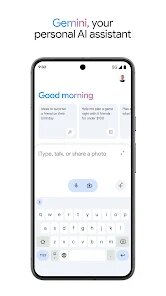
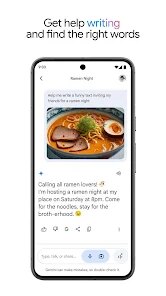
I've been using Google Gemini for a few months now, and honestly, it feels like Google's big swing at making a truly useful AI assistant. It belongs squarely in the AI chatbot and productivity app category, sitting right alongside tools like ChatGPT and Microsoft Copilot. Basically, you can chat with it to get answers, brainstorm ideas, summarize long documents, or even generate images, all without leaving the app. I downloaded it from the Google Play Store because I kept hearing about how it's baked right into Android, and the install was a no-brainer since it's completely free. The first thing I noticed after launching it was how clean the interface is – just a simple text bar and a floating microphone button. There's no immediate nudge to sign up for anything premium, though you can opt into Gemini Advanced for a monthly fee if you want access to the latest models. Ads are pretty nonexistent in the core experience, which is refreshing compared to some other Google apps.
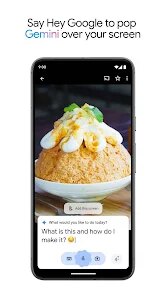
Once I started actually using it, the hands-on feel surprised me. The onboarding is minimal – you get a quick “try asking me something” prompt, and then you're off. I usually start by typing a complex question, like “compare the specs of the Pixel 9 and iPhone 16 in a table,” and it spits out a formatted answer almost instantly. The interface stays responsive, even when I throw in a follow-up. A smooth moment that stood out was using Gemini to pull a schedule from a messy email chain and paste it right into Google Calendar – it just worked. But there was definitely a confusing moment when I tried to analyze a PDF directly in the app. It didn't support it, and I had to upload it to Google Drive first, then ask Gemini to read it from there. The daily routine for me usually involves voice queries hands-free while driving or summarizing YouTube videos, which Gemini does without much lag. A small tip I picked up: you can tap the microphone icon instead of typing for faster input, especially useful when your hands are full.
After using it consistently, here's my take. I think Gemini shines for anyone already deep in Google's ecosystem – if you live in Gmail, Docs, and Drive, it feels like a native extension, not a separate tool. People who just need quick, no-fuss answers or task automation will probably keep it installed. On the flip side, if you're a heavy user of custom GPTs or dedicated creative tools like Midjourney, Gemini might feel a bit rigid. Compared to ChatGPT, Gemini's integration with Google services is a clear win for day-to-day productivity, but ChatGPT feels more conversational when you're just bullshitting or brainstorming wild ideas. For me, the real differentiator is the speed – Gemini is noticeably faster at pulling up real-time info, like sports scores or traffic conditions, because it's got Google Search under the hood. But I'll be honest – when I need a deep, nuanced essay or creative fiction, I still find myself going back to ChatGPT. Gemini is handy, but it's more about utility than spark.
features
- 🌐 Real-time Search Integration – Gemini pulls live data from Google Search effortlessly. Unlike ChatGPT, which often has a knowledge cutoff and needs browsing plugins toggled on, Gemini just answers “how's the weather today?” or “what's the latest news?” without missing a beat. That's a killer feature for anyone needing up-to-date info without extra steps.
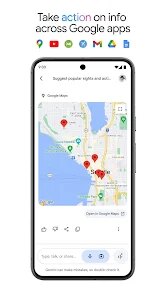
- 📱 Seamless Ecosystem Hookup – You can ask Gemini to “find my last email from Sarah” or “add a reminder for tomorrow,” and it does it without fiddling with menus. ChatGPT can do some of this with plugins, but it's clunky and paid. Gemini feels native on Android, especially for managing calendars, Drive files, and YouTube summaries.
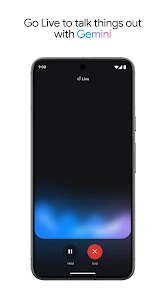
- ✋ Hands-Free, No App Switching – Gemini's voice mode is incredibly responsive, letting you set timers, send texts, or ask random trivia while you're cooking or driving. It's basically replacing Google Assistant for me. Compared to Copilot, which feels more screen-dependent, Gemini's voice-first design is its standout.
pros
- ⚡ Blazing Fast Responses – Gemini processes queries way quicker than ChatGPT 3.5, especially for straightforward fact checks or math problems. I rarely feel that awkward “thinking” pause.
- 🔗 Free Tier is Generous – Unlike Copilot, which locks image generation and longer conversations behind a Microsoft 365 subscription, Gemini's free version gives you solid image creation, voice input, and large file uploads without paying a dime.
- 🧠 Context Window Capacity – Gemini keeps track of long conversations without losing thread. I've thrown multi-part research queries at it, and it still remembers earlier points. Claude struggles with this more in my experience, especially in free mode.
cons
- 📚 Creative Writing Feels Sterile – When I ask Gemini to write a story or a poem, it often spits out text that feels too formulaic or “safe.” ChatGPT's free version does a better job of injecting personality and narrative flair, which makes a big difference for personal projects.
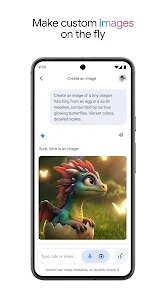
- 🖼️ Image Generation is Mediocre – Gemini's built-in image output is nowhere near DALL-E 3's quality inside ChatGPT. Details look smudged or inconsistent, and it sometimes refuses perfectly safe prompts for no clear reason, which gets annoying fast.
- 🔒 No Real Customization – You can't build custom GPTs or fine-tune behavior like you can in the paid ChatGPT plan. Gemini is more of a one-size-fits-all tool, which can feel limiting if you have very specific workflows or niche use cases.
Recommended Apps
![]()
16Personalities
16Personalities4
![]()
Zodiac Palm Reader: MagicWay
Reatility Media4.6
![]()
Moblo - 3D furniture modeling
MYTIforge4.1![]()
Magnifier Plus with Flashlight
Digitalchemy, LLC4.6![]()
QR Code Scanner
QR Code Scanner & Barcode Reader4.7![]()
FalFal: Astrology, Tarot, Love
FalFal Team4.8![]()
Christmas Photo Frames
PhotoFramesApps4.6![]()
AI Video Art Creator - Livensa
FERASET4.5![]()
Horoscope of Birth
Denimaks4.4![]()
Make Me Bald Prank
AppTornado2.5![]()
Kling AI: AI Image&Video Maker
Lohas Games Pte. Ltd.4.4![]()
Japan Timetable & Route Search
NAVITIME JAPAN CO., LTD.4.3![]()
Prank Call & Funny Video
TeH Software0![]()
Parallax 3D Live Wallpapers
TarrySoft4.3![]()
AI Chatbot - Nova
ScaleUp4.7















Disclaimer
1.AppInfoLibrary does not represent any developer, nor is it the developer of any App or game.
2.AppInfoLibrary provide custom reviews of Apps written by our own reviewers, and detailed information of these Apps, such as developer contacts, ratings and screenshots.
3.All trademarks, registered trademarks, product names and company names or logos appearing on the site are the property of their respective owners.
4. AppInfoLibrary abides by the federal Digital Millennium Copyright Act (DMCA) by responding to notices of alleged infringement that complies with the DMCA and other applicable laws.
5.If you are the owner or copyright representative and want to delete your information, please contact us info@appinfolibrary.com.
6.All the information on this website is strictly observed all the terms and conditions of Google Ads Advertising policies and Google Unwanted Software policy .














