
Skins Clothes Maker for Roblox

5M+
Installs
Pixelvoid Games Ltd
Developer
-
Entertainment
Category
-
Everyone
Content Rating
-
support@pixelvoidgames.com
Developer Email
-
http://craftstruff.com/privacy.html
Privacy Policy
Screenshots


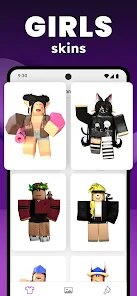
editor reviews
I stumbled onto Skins Clothes Maker for Roblox after seeing a few people mention it in a Discord server. It's basically a design tool, not a game itself, that lets you create custom outfits and skins specifically for your Roblox avatar. You download it from Google Play or the App Store, install it, and it's free to launch. There was an optional sign-up prompt, but I skipped it and got straight to the blank canvas. First thing I noticed was how clean everything looked, no clutter, just a simple workspace and a toolbar at the bottom. It felt more like a stripped-down version of something like GIMP than a typical mobile app, which honestly surprised me in a good way. You can tell right away it's meant for people who actually want to make things, not just slap filters on photos.
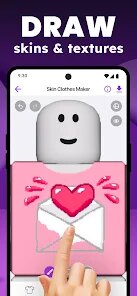
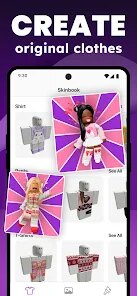
Once you start using it, the workflow is pretty straightforward. You pick a base template, like a shirt or pants, and then you get a layered editing area. The main actions are drawing, coloring, and placing shapes, all done with your finger. I spent about ten minutes figuring out the layer system, it's not super obvious at first because the icons are tiny, but after a couple tries it clicks. You can zoom in with two fingers to get pixel-level detail, which is great for adding tiny logos or patterns. One annoying thing is that there's no undo button in the obvious spot, it's hidden in a submenu. But once you learn that, the rest flows smoothly. You export your design as a PNG, then upload it to Roblox manually. It's not a one-tap thing, but that's probably for the best since Roblox needs verification anyway.
After using it for a few weeks, I think it's perfect for younger creators or anyone who wants to make simple custom skins without learning a full graphics suite. The lack of advanced features like gradient fills or text tools means you won't get super complex results, but that's not really the point. Compared to apps like Picsart or even Roblox's own catalog, this one feels more focused, it does one thing and does it decently. I could see someone keeping it installed if they regularly change their avatar look or make outfits for friends. On the flip side, if you just want to buy existing skins and move on, you'll probably delete it after one try. It's a solid little tool, but it knows its audience and doesn't pretend to be more.
features
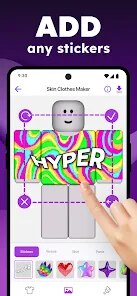
- 🎨 The layering system here feels much more intuitive than similar apps like Pixel Art for Roblox, where layers get jumbled easily. You can move, hide, and merge layers with simple taps, and each layer shows a thumbnail preview, so you're not guessing what's underneath. It's a small thing, but it saves a ton of time when you're working on a complicated shirt design with multiple colors and patterns.
- 🖌️ The drawing brushes are surprisingly good for a free tool. You get a solid range of sizes and opacity options, and the stroke smoothing is just right, not too aggressive like some apps that round off every corner, and not too jittery. I could make clean lines for a simple logo without it looking shaky, which is rare on mobile.
- 📦 The export quality is clean and consistent. Every PNG I exported matched the canvas colors exactly, no weird compression artifacts or color shifts. That matters a lot when you're uploading to Roblox, because even slight changes can make your design look off in the game. Other tools I've tried sometimes mess up the transparency or desaturate colors, but this one kept everything crisp.
pros
- 👍 No annoying ads popping up every two minutes, which is rare for free design apps on mobile. Compare that to something like Design It! for Roblox, where you get a full-screen ad after every export. Here, you can just work without interruptions.
- 👍 The interface keeps things simple without being dumbed down. Apps like Roblox Avatar Designer try to cram too many options into one screen, making it overwhelming. This one gives you just enough tools to get the job done, and the layout stays consistent.
- 👍 The app is lightweight and doesn't drain your battery too fast. I made three full outfits in one sitting and still had plenty of juice left. Some similar tools, like Skin Creator for Roblox, heat up your phone after ten minutes and drain battery like crazy.
cons
- 👎 There's no cloud backup or account sync. If you uninstall the app or switch devices, all your saved templates are gone. Apps like Picsart let you save to the cloud, so this feels like a step backward for anyone who works on multiple devices.
- 👎 The color picker is basic. You only get a preset palette and a simple slider for hue, no hex code input or eyedropper tool. If you want to match a specific color from a reference image, you're stuck guessing, which is frustrating compared to tools like Pixel Studio that offer full RGB input.
- 👎 No text tool at all. You can't add words or numbers to your designs, which limits you to purely visual patterns and shapes. If you wanted to make a shirt with a username or a slogan, you'd have to draw each letter manually, which looks messy.
- 👎 The app hasn't been updated in a while. The last patch note I saw was from several months ago, and there are still small bugs like the export button sometimes freezing for a second. It feels abandoned compared to regularly updated alternatives like Roblox Skin Designer.
Recommended Apps
![]()
16Personalities
16Personalities4
![]()
Zodiac Palm Reader: MagicWay
Reatility Media4.6
![]()
Moblo - 3D furniture modeling
MYTIforge4.1![]()
Magnifier Plus with Flashlight
Digitalchemy, LLC4.6![]()
QR Code Scanner
QR Code Scanner & Barcode Reader4.7![]()
FalFal: Astrology, Tarot, Love
FalFal Team4.8![]()
Christmas Photo Frames
PhotoFramesApps4.6![]()
AI Video Art Creator - Livensa
FERASET4.5![]()
Horoscope of Birth
Denimaks4.4![]()
Make Me Bald Prank
AppTornado2.5![]()
Kling AI: AI Image&Video Maker
Lohas Games Pte. Ltd.4.4![]()
Japan Timetable & Route Search
NAVITIME JAPAN CO., LTD.4.3![]()
Prank Call & Funny Video
TeH Software0![]()
Parallax 3D Live Wallpapers
TarrySoft4.3![]()
AI Chatbot - Nova
ScaleUp4.7















Disclaimer
1.AppInfoLibrary does not represent any developer, nor is it the developer of any App or game.
2.AppInfoLibrary provide custom reviews of Apps written by our own reviewers, and detailed information of these Apps, such as developer contacts, ratings and screenshots.
3.All trademarks, registered trademarks, product names and company names or logos appearing on the site are the property of their respective owners.
4. AppInfoLibrary abides by the federal Digital Millennium Copyright Act (DMCA) by responding to notices of alleged infringement that complies with the DMCA and other applicable laws.
5.If you are the owner or copyright representative and want to delete your information, please contact us info@appinfolibrary.com.
6.All the information on this website is strictly observed all the terms and conditions of Google Ads Advertising policies and Google Unwanted Software policy .














