

NAMA: Flower language keyboard

10K+
Installs
Andromeda App
Developer
-
Productivity
Category
-
Rated for 3+
Content Rating
-
elaineeyui@gmail.com
Developer Email
-
https://sites.google.com/view/andromedalab/home
Privacy Policy
Screenshots
editor reviews
I came across the Flower Language Keyboard on Google Play after looking for something a bit more personal than my usual swipe keyboard. It's a themed keyboard app created by Andromeda App, designed entirely around floral aesthetics and the meanings behind different blooms. The idea is you can type with a keyboard that not only looks like a garden but also lets you attach flower meanings to your messages. I downloaded it for free, and after a quick install, the first thing that hit me was how lush and detailed the default skin looked—it's full of soft petals and pastel colors, and the home screen immediately asked me to pick a flower as my “mood” for the day. There's a registration prompt, but you can skip it and start typing right away, though some fancier flower packs and ad-free mode are locked behind in-app purchases.
Opening the app for the first time, the interface is pretty but a little busy with extra icons for flower meanings and emoji replacements. The onboarding walks you through enabling the keyboard in your system settings, which is standard for any third-party keyboard, and then it shows you how to add a flower symbol after each typed word. Once it's set up, typing feels smooth enough, though the keys are slightly smaller than I'm used to on Gboard. In daily use, I found myself pressing the flower icon next to the space bar, which brings up a small menu of blooms with their meanings—like sending a rose when I wanted to say “love” or a daisy for “innocence.” A small practical tip: you can long-press a flower to see a short description pop up, which saves you from guessing. However, the prediction bar sometimes lags, and the auto-correct occasionally changes flower names to regular words, which can mess up a romantic message.
After using it for a couple of weeks, I think this app is a charming niche pick for people who love sending symbolic messages or enjoy floral designs. It's not for everyone—if you rely on fast, error-free typing for work, it might frustrate you compared to something like SwiftKey. What makes it different is how it turns texting into a little art project, and you can tell the developer put thought into the flower encyclopedia built into the keyboard. I'd keep it installed if I were in a playful mood, but for daily typing, I switched back to my regular keyboard because the ads pop up too often when you access the settings menu. A fun experiment, but not a permanent replacement.
features
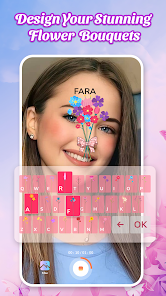
- 🌸 The standout feature is the ability to insert flowers with meanings directly from the keyboard. Instead of just typing “I miss you,” you can add a forget-me-not symbol, which feels more expressive. It's like having a tiny floral language translator built into your phone, something apps like Gboard don't offer at all.
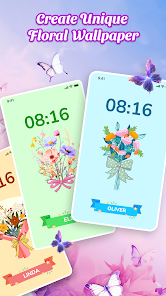
- 🌸 The keyboard comes with multiple high-quality floral themes and live wallpapers that change based on the time of day, showing morning glories in the AM and moonflowers at night. Compared to standard themes on SwiftKey, these are noticeably more detailed and inspired by real botany.
- 🌸 There's a built-in flower dictionary with over 100 entries, each explaining the symbolism. I often found myself browsing it just for fun, learning that a yellow carnation means “disappointment.” This turns typing into a little learning moment, which is unique among keyboard apps.
pros
- ✨ It's incredibly unique in the keyboard market. While Microsoft SwiftKey focuses on prediction and customization through color, Flower Language Keyboard focuses on emotion and symbolism, making it a refreshing alternative for poetic or romantic users.
- ✨ The visual design is a clear strength. The floral themes are not just wallpapers; they include custom key fonts and subtle animations like falling petals. You don't get this level of thematic consistency in more general apps like Gboard.
- ✨ The free version offers a lot of content without forcing payment upfront. You can use most flowers and themes with only occasional ads, which is more generous than many niche apps that lock everything behind a paywall immediately.
cons
- 🌧️ The typing prediction is noticeably weaker than in Gboard or SwiftKey. It often mispredicts common words, especially when you mix in flower symbols, making fast typing a hassle if you're used to top-tier prediction engines.
- 🌧️ Ads are placed in annoying spots. Unlike other keyboards that only show ads in a settings page, this app sometimes pauses typing to show a full-screen ad when you switch themes, which feels intrusive.
- 🌧️ The keyboard size and key spacing aren't adjustable in the free version. On a large screen phone, the keys feel cramped compared to the flexible resizing options in Chrooma or other popular keyboards.
Recommended Apps
![]()
16Personalities
16Personalities4
![]()
Zodiac Palm Reader: MagicWay
Reatility Media4.6
![]()
Moblo - 3D furniture modeling
MYTIforge4.1![]()
Magnifier Plus with Flashlight
Digitalchemy, LLC4.6![]()
QR Code Scanner
QR Code Scanner & Barcode Reader4.7![]()
FalFal: Astrology, Tarot, Love
FalFal Team4.8![]()
Christmas Photo Frames
PhotoFramesApps4.6![]()
AI Video Art Creator - Livensa
FERASET4.5![]()
Horoscope of Birth
Denimaks4.4![]()
Make Me Bald Prank
AppTornado2.5![]()
Kling AI: AI Image&Video Maker
Lohas Games Pte. Ltd.4.4![]()
Japan Timetable & Route Search
NAVITIME JAPAN CO., LTD.4.3![]()
Prank Call & Funny Video
TeH Software0![]()
Parallax 3D Live Wallpapers
TarrySoft4.3![]()
AI Chatbot - Nova
ScaleUp4.7















Disclaimer
1.AppInfoLibrary does not represent any developer, nor is it the developer of any App or game.
2.AppInfoLibrary provide custom reviews of Apps written by our own reviewers, and detailed information of these Apps, such as developer contacts, ratings and screenshots.
3.All trademarks, registered trademarks, product names and company names or logos appearing on the site are the property of their respective owners.
4. AppInfoLibrary abides by the federal Digital Millennium Copyright Act (DMCA) by responding to notices of alleged infringement that complies with the DMCA and other applicable laws.
5.If you are the owner or copyright representative and want to delete your information, please contact us info@appinfolibrary.com.
6.All the information on this website is strictly observed all the terms and conditions of Google Ads Advertising policies and Google Unwanted Software policy .














