
Flower Language Keyboard

500K+
Installs
SOKAR
Developer
-
Productivity
Category
-
Rated for 3+
Content Rating
-
khanhvangirl0921@gmail.com
Developer Email
-
http://sokar.site/privacy-policy.html?app=Flower%20Language%20Keyboard&store=SOKAR
Privacy Policy
Screenshots
editor reviews
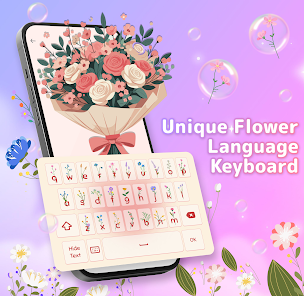
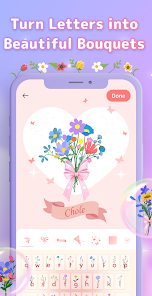
Flower Language Keyboard is exactly what it sounds like — a specialized keyboard app that turns your regular typing into floral-themed messages. It's not your everyday typing tool; it belongs to the niche category of decorative keyboard apps often found on Google Play. Basically, you can type out a sentence, and the app replaces or decorates each letter with flower symbols, plant emojis, or other botanical elements. A normal user might download this because they want to spice up their Instagram captions, WhatsApp chats, or even just send something cute to a friend. After launching it for the first time, the initial impression is pretty cheerful — the interface is full of pastel colors and flower icons, which makes it feel more like a playful accessory than a serious productivity tool. I don't have the exact install count, but it's got a modest number of downloads, and it's free to grab from the app store. There's no complex registration, though you might bump into a few ads while switching between styles.
Once you actually start using it, the experience is fairly straightforward. You tap on the text field, select your desired flower style from a small toolbar at the top, and then type as you normally would. The app transforms your words on the fly, so you can see the floral version immediately. Onboarding is simple — just enable the keyboard in your phone's settings under input methods. I found it smooth for the most part, but there were occasional moments where switching between styles felt a bit sluggish. A small tip: if you want to send a message with mixed flower types, you'll have to manually switch styles mid-typing, which can get a tad annoying. The keyboard also includes a couple of default flower sets, but you can unlock more through small in-app purchases. For daily use, it's not something you'd keep as your main keyboard, but it's fun to pull out when you want to surprise someone.
After using Flower Language Keyboard for a while, I'd say it's best suited for people who love customizing their digital communication — think teens, social media enthusiasts, or anyone who enjoys a bit of whimsy. If you're someone who values speed and efficiency in typing, this probably isn't for you. What makes it different from apps like Bitmoji or more standard emoji keyboards is that it focuses entirely on visuals tied to flowers, rather than stickers or GIFs. Compared to something like FancyKey, which offers vast theme customization, this feels more limited but also more focused. I could see someone keeping it installed for occasional use, especially around spring holidays or when sending heartfelt messages. But if you're not into floral aesthetics, it's likely to get uninstalled after a few tries — it just doesn't have enough versatility to stay on your phone long-term.
features
- 🌸 Keyboard with real-time floral text conversion: Unlike Gboard or SwiftKey, which focus on predictive text and quick typing, Flower Language Keyboard lets you type a message and instantly see it transformed into symbols like roses, daisies, or tulips. It's less about speed and more about visual flair.
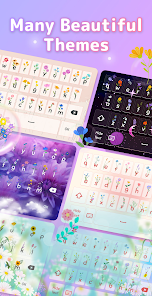
- 🌸 Multiple flower style packs: While most standard keyboards offer color themes or fonts, this app gives you separate style packs like ‘Spring Blossom' or ‘Tropical Leaves.' Each pack changes the look of every character, so your text feels more like a botanical pattern than plain writing.
- 🌸 Easy access toolbar above the keyboard: There's a small bar that sits on top of the keys, letting you switch between flower styles without digging into settings. It's a thoughtful touch compared to some other decorative keyboards that bury these options in menus.
- 🌸 Preview before sending: You can see the final floral version in a preview box before you hit send. This helps avoid awkward surprises, which is something apps like Bitmoji don't offer when mixing custom stickers with text.
pros
- 🌻 Fun and unique aesthetic: The biggest draw is how different it makes your messages look. Compared to Emoji Keyboard, which just adds tiny icons next to words, this app fully integrates flowers into the letters themselves.
- 🌻 Low learning curve: You don't need to watch tutorials or learn new gestures. Just enable it as a keyboard and start typing — much simpler than apps like PhotoKeyboard, which require background image setup.
- 🌻 Free with optional extras: The base styles are free, and the paid packs are cheap. Unlike many themed keyboards that lock basic features behind a paywall, this one gives you enough to play with without spending a dime.
cons
- 🌿 Limited practical use: It's more of a novelty than a daily driver. While Gboard handles everything from typing to search, this app fails as a regular keyboard because it slows down typical conversations.
- 🌿 Occasional lag when switching styles: When you jump between flower packs, the keyboard sometimes freezes for a second or two. This is a problem you won't face in SwiftKey, which stays consistently smooth.
- 🌿 No multilingual support: If you type in languages other than English, the floral transformation may break or show random symbols. Apps like Fleksy handle multiple languages far better.
- 🌿 Ads can be intrusive: A banner ad appears at the top of the preview area, which can be distracting. In comparison, Microsoft SwiftKey is ad-free and feels cleaner for regular use.
Recommended Apps
![]()
16Personalities
16Personalities4
![]()
Zodiac Palm Reader: MagicWay
Reatility Media4.6
![]()
Moblo - 3D furniture modeling
MYTIforge4.1![]()
Magnifier Plus with Flashlight
Digitalchemy, LLC4.6![]()
QR Code Scanner
QR Code Scanner & Barcode Reader4.7![]()
FalFal: Astrology, Tarot, Love
FalFal Team4.8![]()
Christmas Photo Frames
PhotoFramesApps4.6![]()
AI Video Art Creator - Livensa
FERASET4.5![]()
Horoscope of Birth
Denimaks4.4![]()
Make Me Bald Prank
AppTornado2.5![]()
Kling AI: AI Image&Video Maker
Lohas Games Pte. Ltd.4.4![]()
Japan Timetable & Route Search
NAVITIME JAPAN CO., LTD.4.3![]()
Prank Call & Funny Video
TeH Software0![]()
Parallax 3D Live Wallpapers
TarrySoft4.3![]()
AI Chatbot - Nova
ScaleUp4.7















Disclaimer
1.AppInfoLibrary does not represent any developer, nor is it the developer of any App or game.
2.AppInfoLibrary provide custom reviews of Apps written by our own reviewers, and detailed information of these Apps, such as developer contacts, ratings and screenshots.
3.All trademarks, registered trademarks, product names and company names or logos appearing on the site are the property of their respective owners.
4. AppInfoLibrary abides by the federal Digital Millennium Copyright Act (DMCA) by responding to notices of alleged infringement that complies with the DMCA and other applicable laws.
5.If you are the owner or copyright representative and want to delete your information, please contact us info@appinfolibrary.com.
6.All the information on this website is strictly observed all the terms and conditions of Google Ads Advertising policies and Google Unwanted Software policy .














