

SoundHound - Music Discovery

100,000,000+
Installs
SoundHound Inc.
Developer
-
Entertainment
Category
-
Rated for 12+
Content Rating
-
SoundHound-Support@SoundHound.com
Developer Email
-
http://soundhound.com/soundhound-privacy
Privacy Policy
Screenshots
editor reviews
SoundHound is a music recognition and discovery app, sitting right alongside other audio-identifying tools. You use it to figure out what song is playing by just letting your phone “listen” to a few seconds. I first downloaded it from the App Store because I kept hearing tracks on the radio or in cafes and couldn't place them. The install was quick, and the app is free to use, though there are in-app purchases for an ad-free experience and extra features. Right after launching, the interface feels pretty straightforward — a big central button just waiting for a tap. No account required to start, which is nice. My first impression was that it looked clean and responsive, not cluttered with unnecessary stuff. It does show ads from time to time, but they're not too intrusive during the main use. The app has been around for years and has millions of downloads, and that experience shows in how reliable it feels right from the start.
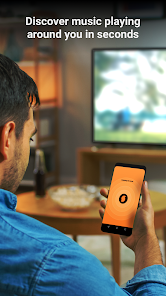
When you actually use it, the hands-on experience is mostly smooth. You open the app, tap the big button, and within a few seconds it usually identifies the song. During onboarding, it asks for microphone permission, which makes sense, and then you're good to go. There's a small history tab that logs everything you've identified, which is handy if you want to go back and revisit a track. The interface is simple, but I did notice a few moments where the app felt a bit slow when switching between tabs, and the search function for typing a song name works fine but isn't as fast as dedicated streaming apps. A small practical tip: if you hold the phone closer to the speaker in a noisy room, recognition improves noticeably. For daily use, it's mostly: listen, tap, and check results. No complex steps, no learning curve. The app also lets you see lyrics in real-time and play song previews through connected services, which adds value beyond just identification.
After using SoundHound for a while, I'd say it's great for people who often hear songs they don't know — commuters, shoppers, or anyone who listens to radio or visits venues with background music. You might not need it if you only listen to playlists you've made yourself or use streaming apps with built-in “now playing” features. What makes SoundHound different is that it still works when you just hum or sing a tune yourself, which is a neat trick that not all competitors have. It also shows rich info like artist bios and related tracks, which makes discovery feel deeper. I keep it installed because it's small and genuinely useful a few times a week. But I can see someone uninstalling it if they already pay for something like Shazam, which does the same thing and is now built into iPhones and Android. It's a solid app, but not an essential one if you're already inside another ecosystem.
features
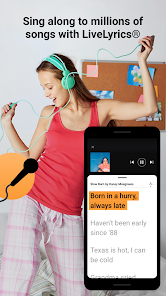
- 🎵 Real-time lyrics display — When a song is identified, SoundHound shows the lyrics scrolling in sync with the music, which is more interactive than what you get with Shazam. That makes it feel like you're following along, not just finding a name. Most other apps just jump to search results or a static page. This feature turns recognition into engagement
- 🫢 Hum or sing recognition — If you forget the title but remember the tune, you can hum, whistle, or sing a melody and SoundHound will still try to match it. Shazam doesn't offer this kind of input, and it's a lifesaver for those awkward moments when a song is stuck in your head but you can't describe it to a search engine
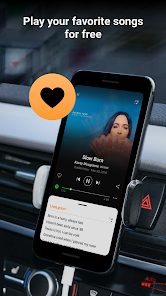
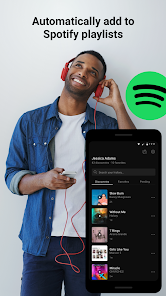
- 🔗 Multi-platform integration — SoundHound connects with Spotify, Apple Music, and YouTube, so you can listen to full tracks right from the app without jumping between apps. It also saves your history across sessions, which makes building playlists from discovered songs much easier. This beats standalone recognition tools that just dump you to a link
pros
- ⚡ Speed and accuracy in quiet settings — SoundHound often identifies songs faster than Shazam when there's minimal background noise. In a car or a silent room, it's almost instantaneous, and the match rate feels higher for older or less mainstream tracks
- 🌐 Wide genre support — It handles everything from classical instrumentals to obscure indie tracks, whereas some alternatives like Google Sound Search struggle with niche recordings or live versions. I've matched obscure 80s B-sides that Shazam just flagged as “unrecognized”
- 🧩 Integrated lyric search — You can even search by typing a line from a song's lyrics, which is something neither Shazam nor MusicID offer. This helps when you only remember a phrase, not the melody or artist name
cons
- 🔋 Battery drain during continuous use — If you leave SoundHound running in the background or keep identifying songs back-to-back, it noticeably drains battery faster than Shazam or the built-in iOS music recognition tool. Not ideal for long outings
- 📵 Poor performance in loud environments — In crowded bars or concerts, it often fails where Shazam still finds a match. For noisy public spaces, SoundHound feels less reliable, which limits its usefulness in the very situations you'd need it most
- 📡 No offline recognition — Unlike Shazam's recent ability to buffer audio and identify later without internet, SoundHound requires a constant connection. That's frustrating when you're in a subway or area with spotty signal
- 📺 Interface ads can feel cluttered — The free version has banner ads at the bottom and occasional pop-ups for premium subscriptions, which break the flow when you just want quick results. Competing apps tend to be less commercial in the free tier
Recommended Apps
![]()
16Personalities
16Personalities4
![]()
Zodiac Palm Reader: MagicWay
Reatility Media4.6
![]()
Moblo - 3D furniture modeling
MYTIforge4.1![]()
Magnifier Plus with Flashlight
Digitalchemy, LLC4.6![]()
QR Code Scanner
QR Code Scanner & Barcode Reader4.7![]()
FalFal: Astrology, Tarot, Love
FalFal Team4.8![]()
Christmas Photo Frames
PhotoFramesApps4.6![]()
AI Video Art Creator - Livensa
FERASET4.5![]()
Horoscope of Birth
Denimaks4.4![]()
Make Me Bald Prank
AppTornado2.5![]()
Kling AI: AI Image&Video Maker
Lohas Games Pte. Ltd.4.4![]()
Japan Timetable & Route Search
NAVITIME JAPAN CO., LTD.4.3![]()
Prank Call & Funny Video
TeH Software0![]()
Parallax 3D Live Wallpapers
TarrySoft4.3![]()
AI Chatbot - Nova
ScaleUp4.7















Disclaimer
1.AppInfoLibrary does not represent any developer, nor is it the developer of any App or game.
2.AppInfoLibrary provide custom reviews of Apps written by our own reviewers, and detailed information of these Apps, such as developer contacts, ratings and screenshots.
3.All trademarks, registered trademarks, product names and company names or logos appearing on the site are the property of their respective owners.
4. AppInfoLibrary abides by the federal Digital Millennium Copyright Act (DMCA) by responding to notices of alleged infringement that complies with the DMCA and other applicable laws.
5.If you are the owner or copyright representative and want to delete your information, please contact us info@appinfolibrary.com.
6.All the information on this website is strictly observed all the terms and conditions of Google Ads Advertising policies and Google Unwanted Software policy .














