

Voice Recorder

10,000,000+
Installs
quality apps (recorder, weather, music)
Developer
-
Entertainment
Category
-
Rated for 3+
Content Rating
-
summer.mobile.apps@gmail.com
Developer Email
-
https://sites.google.com/view/voicerecorderpivacy
Privacy Policy
Screenshots
editor reviews
Voice Recorder by Quality Apps is exactly what it sounds like - a straightforward audio recording tool you can grab off Google Play. It falls into the productivity and utility category, perfect for anyone who needs to quickly capture lectures, meetings, or personal memos without fussing over complicated settings. I downloaded it because I kept scrambling for a recorder before calls, and the first impression after launch was a clean, no-nonsense screen with a big red button right in the middle. It's been downloaded over 10 million times, which gave me some confidence, and it's free with optional in-app purchases to remove ads or unlock extras like cloud uploads. No registration required, so you're recording within seconds of installing.
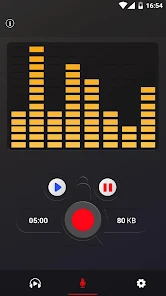
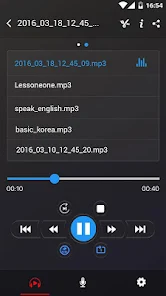
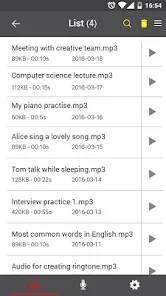
Once I started using it, the experience felt surprisingly smooth for such a simple app. After tapping that red button, recording begins instantly with a waveform bouncing along the screen, which is oddly satisfying to watch. You can pause and resume mid-session, and when you're done, the file gets saved automatically to a list sorted by date. I tested it during a 45-minute team meeting, and the audio came out clear even from across the table. Moving through the app is intuitive - swipe left to see your recordings, tap one to play, rename, or trim it, and hit the share icon to send it via email or WhatsApp. One small tip: if you're in a noisy spot, you can toggle the high-quality mode in settings to reduce background hum, though it does eat up more storage.
After using it for a couple of weeks, I'd say this voice recorder nails the basics without overpromising. Students recording lectures, journalists taking quick notes, or anyone who just needs a reliable backup for important conversations will appreciate it. But if you're after advanced editing, automatic transcription, or seamless cloud syncing like what Otter.ai offers, this won't cut it. What sets it apart from other simple recorders is how lightweight it feels - no bloat, no confusing menus, just record and go. I kept it installed because it's become my go-to for quick memos, though I can see heavy users uninstalling it once they hit the paywall for features like background recording or longer sessions without ads.
features
- 😊 Instant start: Tap the record button and you're rolling in under a second, no countdown or setup screens getting in the way. Compared to Rev Voice Recorder, which sometimes lags on launch, this app feels snappier for quick captures.
- 😊 Simple file management: All recordings are listed by date and duration, and you can rename or delete them in two taps. Smart Recorder makes you dig through folders, but this keeps everything in one tidy list.
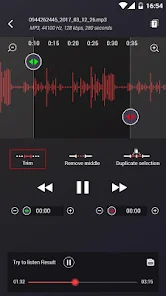
- 😊 Built-in trimmer: You can cut out silence or mistakes right from the playback screen without exporting to another app. Voice Recorder Pro requires a separate editor for that, saving you a step here.
- 😊 Background recording support: Even when you switch apps or lock the phone, it keeps going - perfect for long interviews. ASR Voice Recorder stops if you accidentally minimize it, which makes this a clear win.
pros
- ⏱ Super lightweight size: Takes under 5MB of storage, so it won't slow down older phones like the heavier Dolby On recorder does with its audio effects.
- ⏱ Clean interface: No learning curve at all - the layout is obvious even for non-techy users, unlike Easy Voice Recorder which buries settings in multiple menus.
- ⏱ Quick sharing: Files send as MP3s directly via any app, no conversion needed, which beats Hi-Q MP3 Voice Recorder's limited export options.
- ⏱ Low battery drain: I recorded for two hours and only lost 8%, while similar tools like RecForge II ate up nearly double that on my phone.
cons
- ❌ Occasional ads: A banner appears at the bottom between recordings, and it can pop up over the play button by mistake. Smart Voice Recorder avoids this with a cleaner free version.
- ❌ No auto-transcription: You have to type out notes manually, which is a letdown compared to Otter.ai's automatic speech-to-text feature included for free.
- ❌ Limited format options: Only saves as MP3 or WAV, so if you need M4A for smaller files, you're out of luck. Voice Recorder & Audio Editor offers more flexibility here.
- ❌ No cloud backup: Your files stay on-device unless you manually upload them, while Google Recorder syncs directly to Drive without extra steps.
Recommended Apps
![]()
16Personalities
16Personalities4
![]()
Zodiac Palm Reader: MagicWay
Reatility Media4.6
![]()
Moblo - 3D furniture modeling
MYTIforge4.1![]()
Magnifier Plus with Flashlight
Digitalchemy, LLC4.6![]()
QR Code Scanner
QR Code Scanner & Barcode Reader4.7![]()
FalFal: Astrology, Tarot, Love
FalFal Team4.8![]()
Christmas Photo Frames
PhotoFramesApps4.6![]()
AI Video Art Creator - Livensa
FERASET4.5![]()
Horoscope of Birth
Denimaks4.4![]()
Make Me Bald Prank
AppTornado2.5![]()
Kling AI: AI Image&Video Maker
Lohas Games Pte. Ltd.4.4![]()
Japan Timetable & Route Search
NAVITIME JAPAN CO., LTD.4.3![]()
Prank Call & Funny Video
TeH Software0![]()
Parallax 3D Live Wallpapers
TarrySoft4.3![]()
AI Chatbot - Nova
ScaleUp4.7















Disclaimer
1.AppInfoLibrary does not represent any developer, nor is it the developer of any App or game.
2.AppInfoLibrary provide custom reviews of Apps written by our own reviewers, and detailed information of these Apps, such as developer contacts, ratings and screenshots.
3.All trademarks, registered trademarks, product names and company names or logos appearing on the site are the property of their respective owners.
4. AppInfoLibrary abides by the federal Digital Millennium Copyright Act (DMCA) by responding to notices of alleged infringement that complies with the DMCA and other applicable laws.
5.If you are the owner or copyright representative and want to delete your information, please contact us info@appinfolibrary.com.
6.All the information on this website is strictly observed all the terms and conditions of Google Ads Advertising policies and Google Unwanted Software policy .














