

Neku: OC character creator

10M+
Installs
Neku Avatar Studio
Developer
-
Productivity
Category
-
Teen
Content Rating
-
info@neku.cc
Developer Email
-
https://avatar.zthd.io/Privacy-Terms/
Privacy Policy
Screenshots

editor reviews
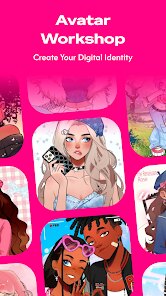
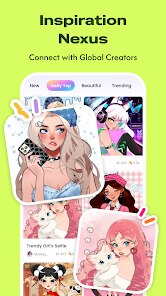
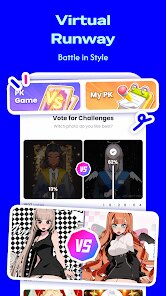
Neku is a character creation app that sits somewhere between a dress-up game and a social avatar builder. You mainly use it to design personalized anime-style characters, tweaking everything from hairstyles and eye shapes to outfits and poses. It's not exactly a game where you level up or fight, but more like a digital dollhouse for people who enjoy visual customization. I first found it on the Google Play Store, and it had a decent number of downloads, though nothing like the blockbuster hits. It's free to download and install, and after launching it, the first screen asks if you want to sign up or just browse. I skipped registration for now, and the first impression was a clean, pastel-colored interface with lots of buttons, but not too overwhelming. You can immediately see a few premade characters, which gives you a sense of what's possible.
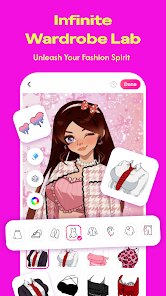
After tapping the "Create" button, you land on a screen with a blank base figure. The onboarding is mostly visual, with icons for each editable section: face, hair, clothes, accessories. I started with the face, and honestly, the slider-based adjustments for eye size, angle, and spacing felt smooth, but there were so many sliders that I briefly felt lost. The app doesn't force you through a tutorial, so you just figure it out by tapping around. A common workflow would be to pick a hairstyle first, then adjust its color, then move to the outfit category. One practical tip I noticed: you can save a preset look at any point, which is handy if you want to experiment without losing progress. There's also a randomize button, which I clicked out of curiosity and got a surprisingly cool result once. The whole process feels intuitive once you get past the initial overload of options, though sometimes the loading time between menus slows the flow.
After spending a couple of weeks with Neku, I think it's a solid pick if you enjoy character design without the complexity of professional tools like VRoid or Picrew. It's clearly aimed at casual creators and roleplayers who want quick, cute results. That said, if you're looking for deep customization like full body sliders or extensive layering, you might feel restricted because the options, while plentiful, are still within a set framework. What makes it different from, say, Gacha Club or similar apps is the art style, which is cleaner and more modern, but it lacks the mini-games or story elements that keep you engaged. I could see someone keeping it installed just to make profile pictures for social media, but I already uninstalled it because I ran out of new things to create. It's a neat tool, but it didn't hook me long-term.
features
- 🎨 The color palette system is surprisingly deep. You can adjust not just the main hue of hair or clothes, but also gradients and shading intensity. Compared to an app like Picrew where you're often stuck with fixed color sets, Neku gives more freedom to match exact shades, which helps when creating characters for specific themes.
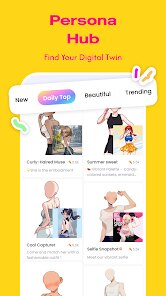
- 🧑🎤 The pose library includes over 50 dynamic stances and expressions. In most similar apps like Gacha Life, poses are limited and often static, but here you can mix a confident posture with a surprised face. This makes character storytelling easier without needing external editing software.
- 🖼️ The screenshot export feature includes background removal and transparent PNG support. While apps like Charat.me force you to screenshot manually and crop, Neku generates a clean file ready for stickers or profile pictures. That alone saves time if you're active on forums or social media.
pros
- 👍 The amount of free content is generous. Unlike VRoid where you often pay for premium hair or outfit packs, Neku lets you access most core items without spending a dime, which feels refreshing for a free app.
- 👍 The undo button is always visible and works retroactively across multiple steps. In Picrew, if you accidentally close a layer, there's no recovery. Here, you can undo even after saving, which reduces frustration during complex edits.
- 👍 The app loads quickly even on budget phones. I tested it on a 2020 mid-range device, and unlike some heavy avatar apps that lag, Neku stayed responsive even with twenty layers of accessories.
cons
- 👎 The selection of base body types is limited. While you can customize facial features extensively, the body shapes are essentially the same thin frame with no option for muscular or plus-size builds. Apps like Charat Big Bang offer that, and it's a noticeable gap here.
- 👎 There is no cloud backup. If you uninstall the app or switch devices, all your saved characters are gone unless you manually export each one. In comparison, Gacha Club ties data to accounts, making it easier to keep progress.
- 👎 The ad frequency is high when you're not connected to the internet. Offline ads interrupt the flow every few saves, and they often play video ads that take ten seconds to skip. It's tolerable on WiFi, but annoying during quick editing sessions.
Recommended Apps
![]()
16Personalities
16Personalities4
![]()
Zodiac Palm Reader: MagicWay
Reatility Media4.6
![]()
Moblo - 3D furniture modeling
MYTIforge4.1![]()
Magnifier Plus with Flashlight
Digitalchemy, LLC4.6![]()
QR Code Scanner
QR Code Scanner & Barcode Reader4.7![]()
FalFal: Astrology, Tarot, Love
FalFal Team4.8![]()
Christmas Photo Frames
PhotoFramesApps4.6![]()
AI Video Art Creator - Livensa
FERASET4.5![]()
Horoscope of Birth
Denimaks4.4![]()
Make Me Bald Prank
AppTornado2.5![]()
Kling AI: AI Image&Video Maker
Lohas Games Pte. Ltd.4.4![]()
Japan Timetable & Route Search
NAVITIME JAPAN CO., LTD.4.3![]()
Prank Call & Funny Video
TeH Software0![]()
Parallax 3D Live Wallpapers
TarrySoft4.3![]()
AI Chatbot - Nova
ScaleUp4.7















Disclaimer
1.AppInfoLibrary does not represent any developer, nor is it the developer of any App or game.
2.AppInfoLibrary provide custom reviews of Apps written by our own reviewers, and detailed information of these Apps, such as developer contacts, ratings and screenshots.
3.All trademarks, registered trademarks, product names and company names or logos appearing on the site are the property of their respective owners.
4. AppInfoLibrary abides by the federal Digital Millennium Copyright Act (DMCA) by responding to notices of alleged infringement that complies with the DMCA and other applicable laws.
5.If you are the owner or copyright representative and want to delete your information, please contact us info@appinfolibrary.com.
6.All the information on this website is strictly observed all the terms and conditions of Google Ads Advertising policies and Google Unwanted Software policy .














