

Cartoon Photo Editor

5M+
Installs
AZ Mobile Software
Developer
-
Video Players & Editors
Category
-
Rated for 3+
Content Rating
-
azmobilesoftware@gmail.com
Developer Email
-
https://sites.google.com/view/cutewallpapersstudio
Privacy Policy
Screenshots
editor reviews
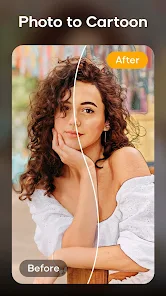
Cartoon Photo Editor is a mobile utility app that focuses on turning regular portraits and snapshots into stylized cartoon versions. It's the kind of tool you grab when you want to make a fun profile picture or surprise a friend with a goofy version of their face. I downloaded it from the Google Play Store because it was free and had a decent install count, so I figured why not give it a shot. Right after launching the app, the first thing that hit me was the sheer number of ads—pop-ups, banners, the works. It felt a bit overwhelming, but I pushed through because the core idea sounded promising. You don't need to register or sign up, which is nice, but the in-app purchases for removing ads or unlocking extra filters are front and center from the start.
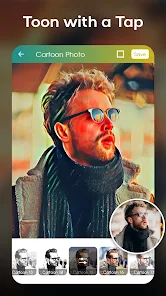
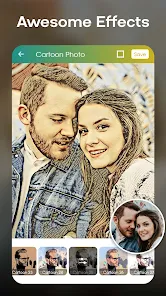
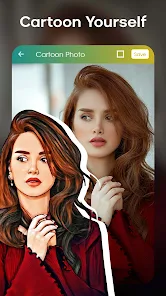
Once I got into the actual editor, the experience was a mixed bag. You start by either taking a photo or picking one from your gallery. The app then applies a cartoon filter, and you can tweak things like the intensity or swap between different cartoon styles. The interface is cluttered with buttons and ads crammed into every corner, which makes it a bit of a maze to find what you want. Onboarding is practically nonexistent—you're thrown right in. I found the cartoon conversion hit or miss; sometimes it nailed the exaggerated features, other times it just looked like a blurry mess. A small tip I picked up was to use a well-lit, front-facing photo for the best results. The app also has basic editing tools like cropping and brightness, but they feel tacked on rather than thoughtfully integrated.
After using Cartoon Photo Editor for a while, I think it works best for someone who wants a quick, silly transformation without caring too much about polish. It's not for anyone looking for a serious editing suite or high-quality output. Compared to apps like PicsArt or ToonMe, this one feels more basic and ad-heavy, but it gets the job done if you just want a cartoon sticker of your face. What makes it stand out is the sheer variety of cartoon styles—some are really creative. I kept it installed because it's fun for the occasional laugh, but I doubt it'll stay on my phone long-term since there are better options with fewer interruptions. If you can tolerate the ads, it's a decent time-waster.
features
- 🎨 The cartoon filter variety is the main draw here. Unlike ToonMe, which focuses on a polished, single-style conversion, Cartoon Photo Editor throws a dozen different looks at you—from smooth anime to rough sketch effects. You can even adjust the level of cartoonization, giving you some control over how silly or serious the result looks.
- 📸 Quick processing is a highlight. You snap a photo and within seconds the app spits out a cartoon version. No waiting around for complicated AI processing like you'd see in more advanced editors. It's perfect for a quick laugh or a spontaneous profile picture update.
- 🖼️ The basic editing suite, while not deep, includes crop, rotate, and brightness controls. This sets it apart from simpler cartoon apps like Cartoon Face, which lack any editing at all. It's handy for minor tweaks before applying the filter, though you won't want to rely on it for serious work.
pros
- 💪 The app is super lightweight and doesn't slow down your phone compared to heavier apps like PicsArt. It installs fast and opens quickly, even on older devices.
- 💪 It has a surprisingly wide range of cartoon styles—more than most competitors like Cartoon Face or Photo Lab. You get dozens of filters without paying a cent upfront, which is rare for this niche.
- 💪 The lack of a required login or account creation is a big plus. You can start editing immediately, unlike apps like ToonMe, which sometimes push you to sign up before using certain features.
cons
- 😬 The ad situation is brutal. You can't go more than a few taps without a pop-up or a banner covering half the screen. Apps like PicsArt handle ads much better by putting them in less intrusive places.
- 😬 The cartoon quality is inconsistent. On some photos the effect looks great, but on others it turns your face into a distorted mess. ToonMe is far more reliable when it comes to clean, predictable results.
- 😬 The interface feels cluttered and outdated. Buttons are crammed in, and it's easy to accidentally tap an ad or the wrong tool. Competitor apps have much cleaner, more intuitive layouts.
Recommended Apps
![]()
16Personalities
16Personalities4
![]()
Zodiac Palm Reader: MagicWay
Reatility Media4.6
![]()
Moblo - 3D furniture modeling
MYTIforge4.1![]()
Magnifier Plus with Flashlight
Digitalchemy, LLC4.6![]()
QR Code Scanner
QR Code Scanner & Barcode Reader4.7![]()
FalFal: Astrology, Tarot, Love
FalFal Team4.8![]()
Christmas Photo Frames
PhotoFramesApps4.6![]()
AI Video Art Creator - Livensa
FERASET4.5![]()
Horoscope of Birth
Denimaks4.4![]()
Make Me Bald Prank
AppTornado2.5![]()
Kling AI: AI Image&Video Maker
Lohas Games Pte. Ltd.4.4![]()
Japan Timetable & Route Search
NAVITIME JAPAN CO., LTD.4.3![]()
Prank Call & Funny Video
TeH Software0![]()
Parallax 3D Live Wallpapers
TarrySoft4.3![]()
AI Chatbot - Nova
ScaleUp4.7















Disclaimer
1.AppInfoLibrary does not represent any developer, nor is it the developer of any App or game.
2.AppInfoLibrary provide custom reviews of Apps written by our own reviewers, and detailed information of these Apps, such as developer contacts, ratings and screenshots.
3.All trademarks, registered trademarks, product names and company names or logos appearing on the site are the property of their respective owners.
4. AppInfoLibrary abides by the federal Digital Millennium Copyright Act (DMCA) by responding to notices of alleged infringement that complies with the DMCA and other applicable laws.
5.If you are the owner or copyright representative and want to delete your information, please contact us info@appinfolibrary.com.
6.All the information on this website is strictly observed all the terms and conditions of Google Ads Advertising policies and Google Unwanted Software policy .














