
Fake video call - Prank call

1M+
Installs
HiddenScreen.NET
Developer
-
Entertainment
Category
-
Rated for 12+
Content Rating
-
support@hiddenscreen.net
Developer Email
-
https://s3-us-west-2.amazonaws.com/faketim/privacypolicy.html
Privacy Policy
Screenshots
editor reviews
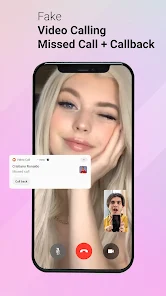
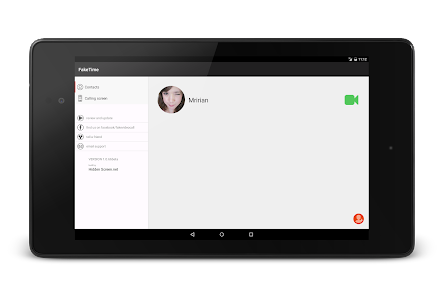
So you've stumbled upon Fake Video Call - Prank Call by HiddenScreen.NET, which is basically a prank simulation app that lives on Google Play. You download and install it, and the first impression is that it's designed to let you fake an incoming video call from a celebrity, a friend, or anyone you upload a photo of. It's free to download, and once you launch it, the interface hits you with a very direct, no-nonsense setup screen that immediately asks you to pick a contact or a preset celebrity. The install count seems moderate, and while it's free, there are some in-app purchases and ads that pop up after a few uses. Registration isn't required, which is a relief, because you can jump straight into the prank without any account creation hassle.
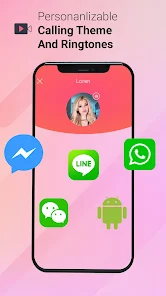
After you actually start using it, the hands-on experience is fairly straightforward but has its quirks. The onboarding is minimal, so you're mostly figuring it out as you go. You pick a contact, upload their photo if needed, and then you can schedule the fake call or trigger it manually. The main actions involve setting the call delay, choosing a ringtone, and then waiting for the fake call to appear. The interface is clean but a bit outdated, with some buttons feeling small on a modern phone. One smooth moment is how the incoming call screen mimics a real one almost perfectly, with the contact name and photo showing up. But a confusing moment is that the app sometimes glitches and the fake call ends abruptly. A practical tip is to test it a few times on your own phone first to get the timing right before pranking someone else.
After using it for a while, I'd say this app is perfect for teens or friends who love harmless pranks, but it's probably not for anyone looking for a polished or reliable prank tool. What makes it different from similar apps like "Fake Call from Girlfriend" is that it focuses more on video calls than just audio calls, and it includes a decent library of celebrity presets. However, some users might keep it installed for occasional laughs, while others might uninstall it because of the frequent ads and occasional glitches. Honestly, it's a fun gimmick for a few pranks, but the lack of updates and the somewhat clunky interface mean it's not something I'd keep long-term.
features
- 🤳 Fake Video Call Simulation: The core feature lets you simulate an incoming video call from any contact by uploading a photo or selecting a preset celebrity. Compared to similar apps like "Fake Call from Girlfriend" (which is just audio-based), this one offers a more realistic visual experience with a full-screen video call interface, making the prank feel more authentic.
- ⏰ Customizable Call Timing: You can set a delay for the fake call, from a few seconds to several minutes, allowing you to orchestrate the prank perfectly in social settings. Unlike "Prank Call Simulator," which has fixed timers, this gives you more control to sync the call with your environment, like during a group conversation or a classroom moment.
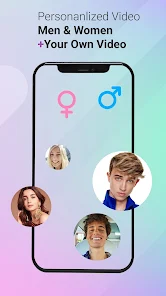
- 👥 Preset Celebrity Library: The app includes a built-in library of celebrity photos and names (like famous actors or influencers) that you can use instantly without uploading anything. This is an outstanding feature over others like "Fake Call Prank 2024," where you always need to manually add contacts, saving you time and effort when you just want a quick prank.
pros
- 🎭 Realistic Call Screen Mimicry: The fake incoming call screen looks almost identical to a real one, with the contact photo, name, and ringtone all synced properly. Apps like "Prank Call Free" often have a cartoonish or laggy interface, but here the visual quality is surprisingly decent for a free app.
- 🌐 No Registration Needed: You don't need to sign up or log in, unlike some competitors such as "Fake Call + Chat" that require a Google account. This makes it quicker to use and respects your privacy, which is a big plus for a one-time prank tool.
- 💾 Lightweight and Fast: The app installs quickly and doesn't eat up much storage space (under 10MB). In contrast, "Video Call Prank Pro" is heavier because it includes extra social features, so this feels more streamlined for just the prank purpose.
cons
- 📱 Frequent Ad Interruptions: After using the app two or three times, ads start popping up between setting up the prank and the actual call. Apps like "Fake Call Free" have a similar issue, but here the ad frequency feels higher, which can ruin the spontaneity of the prank.
- 🎥 Glitchy Video Call End: Sometimes the fake video call ends abruptly after a few seconds without warning, breaking the illusion. In comparison, "Fake Call from Girlfriend" has a more stable call duration, so you might feel let down when the prank cuts short unexpectedly.
- 📉 Outdated Interface Design: The buttons and menus look like they're from 2016, with small tap targets and old-school color schemes. Similar apps like "Prank Dialer" have modernized their UI, so this one feels dated and less intuitive to navigate on newer Android phones.
Recommended Apps
![]()
16Personalities
16Personalities4
![]()
Zodiac Palm Reader: MagicWay
Reatility Media4.6
![]()
Moblo - 3D furniture modeling
MYTIforge4.1![]()
Magnifier Plus with Flashlight
Digitalchemy, LLC4.6![]()
QR Code Scanner
QR Code Scanner & Barcode Reader4.7![]()
FalFal: Astrology, Tarot, Love
FalFal Team4.8![]()
Christmas Photo Frames
PhotoFramesApps4.6![]()
AI Video Art Creator - Livensa
FERASET4.5![]()
Horoscope of Birth
Denimaks4.4![]()
Make Me Bald Prank
AppTornado2.5![]()
Kling AI: AI Image&Video Maker
Lohas Games Pte. Ltd.4.4![]()
Japan Timetable & Route Search
NAVITIME JAPAN CO., LTD.4.3![]()
Prank Call & Funny Video
TeH Software0![]()
Parallax 3D Live Wallpapers
TarrySoft4.3![]()
AI Chatbot - Nova
ScaleUp4.7















Disclaimer
1.AppInfoLibrary does not represent any developer, nor is it the developer of any App or game.
2.AppInfoLibrary provide custom reviews of Apps written by our own reviewers, and detailed information of these Apps, such as developer contacts, ratings and screenshots.
3.All trademarks, registered trademarks, product names and company names or logos appearing on the site are the property of their respective owners.
4. AppInfoLibrary abides by the federal Digital Millennium Copyright Act (DMCA) by responding to notices of alleged infringement that complies with the DMCA and other applicable laws.
5.If you are the owner or copyright representative and want to delete your information, please contact us info@appinfolibrary.com.
6.All the information on this website is strictly observed all the terms and conditions of Google Ads Advertising policies and Google Unwanted Software policy .














