
SuperMe - Avatar Maker Creator

10M+
Installs
THE.DEMON
Developer
-
Productivity
Category
-
Rated for 3+
Content Rating
-
partner@maoyoo.net
Developer Email
-
https://www.supermii.cn/policy.html
Privacy Policy
Screenshots
editor reviews
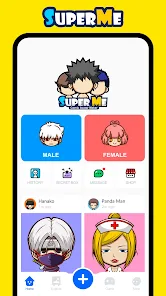
SuperMe – Avatar Maker Creator is exactly what it sounds like: an app for building custom cartoon avatars from your photos. It sits in that crowded genre of avatar creation tools you find all over Google Play and the App Store, alongside stuff like Zmoji or FaceQ. The main draw is being able to turn a regular selfie into a stylized digital version of yourself, which people use for profile pics, messaging stickers, or just for fun. I grabbed it because I was bored of my usual social media icons and wanted something personal without drawing anything myself. After hitting download and launching it, the first impression was pretty clean – a bright background with a big “tap to create” button, no clutter. There's a free download, but installation took a moment, and I noticed it's had over a million installs, so it's not some niche thing. No forced registration popped up, which was a relief, though I did spot some in-app purchase options for extra outfits or accessories right from the start. The initial vibe felt decent, like the developers focused on keeping the onboarding simple.
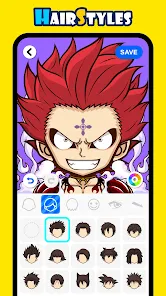
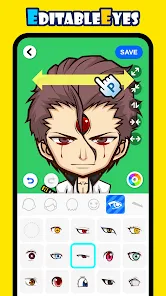
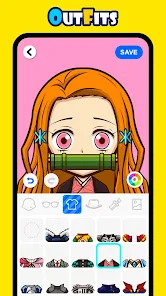
The actual hands-on experience starts with snapping or uploading a photo. The app scans your face and maps out features like eyes, nose, and jawline, then suggests a base avatar that resembles you. From there, you tweak everything – skin tone, hair style and color, facial hair, glasses, even eye shape. I found the interface fairly intuitive; sliding through options felt smooth on my phone, though the sheer amount of choices for eyes or hairstyles took a minute to browse. Common usage steps go like this: pick a photo, let it process, adjust what looks off, then save or share. One practical tip: if you have a clear front-facing shot with good lighting, the face detection works way better. I hit a confusing moment when I tried to change the background – there's a separate menu for that buried under “themes,” which I only found by tapping around. For daily use, it's a quick 5-minute project if you just want a fresh avatar, but if you get into customizing every detail, you might spend twenty minutes or more on one face. Small annoyances include occasional lag when loading new hairstyles, but nothing that made me crash the app.
After using SuperMe for a while, I think it lands well for people who enjoy playful customization and want a polished avatar without heavy effort. Teens or anyone active on messaging apps might keep it installed for generating stickers or profile pics regularly. But if you already use something like Bitmoji and are satisfied with those simpler cartoon versions, this feels more detailed but also more time-consuming. It's different from similar apps because the face mapping actually tries to match your real features closely – my avatar looked noticeably like me, not just a generic character. That said, I can see someone uninstalling it after making one avatar because the novelty wears off, especially since many customization options are locked behind in-app purchases. I personally kept it on my phone because I like swapping avatars every few months, but I wouldn't call it essential. Overall, it's a solid tool for its niche, but nothing groundbreaking.
features
- 🤖 Realistic Face Mapping: Where many apps like Zmoji or Bitmoji rely on generic templates you piece together, SuperMe scans your actual photo and generates a base avatar that closely mirrors your facial structure. It adjusts jaw width, eye distance, and lip shape automatically, which feels like a smarter starting point than picking from a list of pre-made heads.
- 🎨 Massive Customization Library: The sheer number of hairstyles, facial hair options, glasses frames, and outfits is noticeably deeper than something like FaceQ. You can tweak eyebrow thickness, nose bridge width, even iris size – things that feel niche but matter if you want a truly unique look.
- 📸 Integrated Sticker Pack: Unlike standalone avatars you export as images, SuperMe lets you generate a sticker pack directly for messaging apps like WhatsApp or Telegram. The stickers match the avatar's expressions (happy, sad, surprised) without extra work, which is something I haven't seen in Avatar Maker or similar tools without manual setup.
pros
- 👍 Fast Initial Setup: Compared to Zepp Face or MirrorLab, SuperMe gets you from photo to usable avatar in under two minutes. The auto-detection does 80% of the work, so you're not stuck sliders forever.
- 👍 High Visual Consistency: The final avatar looks cohesive – hair blends into the head shape naturally, and skin tones don't look plastic. That's a step up from apps like Cartoon Face where the style feels mismatched across features.
- 👍 No Mandatory Account: Many avatar apps like ToonMe force sign-ups or email verification. SuperMe let me save and export right away, which respects your time.
cons
- 👎 Heavy Paywall for Full Access: A good chunk of premium hairstyles, outfits, and backgrounds require individual purchases or a subscription. Bitmoji, in contrast, offers its full wardrobe for free. It feels limiting if you want variety without spending money.
- 👎 Occasional Face Detection Failures: If your photo has angled lighting or partial shadows, the app misplaces features (e.g., one eye higher than the other). MirrorLab handles tricky lighting better without manual correction.
- 👎 No Animation or 3D Rotation: Unlike Zmoji's animated stickers, SuperMe outputs only static 2D avatars. You can't rotate the head or see it from different angles, which makes it feel less flexible for dynamic use cases.
Recommended Apps
![]()
16Personalities
16Personalities4
![]()
Zodiac Palm Reader: MagicWay
Reatility Media4.6
![]()
Moblo - 3D furniture modeling
MYTIforge4.1![]()
Magnifier Plus with Flashlight
Digitalchemy, LLC4.6![]()
QR Code Scanner
QR Code Scanner & Barcode Reader4.7![]()
FalFal: Astrology, Tarot, Love
FalFal Team4.8![]()
Christmas Photo Frames
PhotoFramesApps4.6![]()
AI Video Art Creator - Livensa
FERASET4.5![]()
Horoscope of Birth
Denimaks4.4![]()
Make Me Bald Prank
AppTornado2.5![]()
Kling AI: AI Image&Video Maker
Lohas Games Pte. Ltd.4.4![]()
Japan Timetable & Route Search
NAVITIME JAPAN CO., LTD.4.3![]()
Prank Call & Funny Video
TeH Software0![]()
Parallax 3D Live Wallpapers
TarrySoft4.3![]()
AI Chatbot - Nova
ScaleUp4.7















Disclaimer
1.AppInfoLibrary does not represent any developer, nor is it the developer of any App or game.
2.AppInfoLibrary provide custom reviews of Apps written by our own reviewers, and detailed information of these Apps, such as developer contacts, ratings and screenshots.
3.All trademarks, registered trademarks, product names and company names or logos appearing on the site are the property of their respective owners.
4. AppInfoLibrary abides by the federal Digital Millennium Copyright Act (DMCA) by responding to notices of alleged infringement that complies with the DMCA and other applicable laws.
5.If you are the owner or copyright representative and want to delete your information, please contact us info@appinfolibrary.com.
6.All the information on this website is strictly observed all the terms and conditions of Google Ads Advertising policies and Google Unwanted Software policy .














