

Emoji background changer

10M+
Installs
Judi Studio
Developer
-
Video Players & Editors
Category
-
Rated for 3+
Content Rating
-
judi.contact2@gmail.com
Developer Email
-
https://sites.google.com/view/emojibackgroundchangerprivatep/home
Privacy Policy
Screenshots


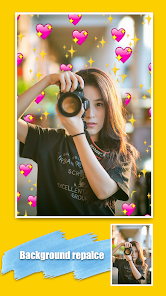

editor reviews
Emoji Background Changer, from Judi Studio, is exactly what its name suggests: a simple mobile utility that lets you swap out the backgrounds behind popular emoji images. It's not a messaging app or a full photo editor, but a focused tool for creating custom emoji stickers and profile pics. You might download it from Google Play or the App Store because you want something a bit more personal than the standard smiley faces in your keyboard. On first launch, the interface feels surprisingly clean for such a niche app; there's no clutter or confusing dashboard, just a straightforward grid of emoji to pick from, and the main action is clear from the get-go. The install count seems modest, and while it's free to download, you'll quickly notice that some of the nicer background packs or extra emoji sets are locked behind a small in-app purchase or a short ad view.
Using the app day-to-day is pretty straightforward. After tapping an emoji, you're taken to a simple editing screen where you can scroll through solid colors, gradients, or pre-made patterns to place behind it. The real hands-on experience happens when you pinch to resize the emoji or drag it around within the new background frame. Onboarding is minimal; you basically learn by doing, which works fine since there aren't many options to get lost in. A common usage flow would be picking a heart-eyes face, slapping a soft pastel gradient behind it, adjusting the size so it fills the square nicely, and tapping save. One small practical tip: the app works best when you export images at the square 1:1 ratio for social media stories. The whole process is smooth most of the time, though I did notice the app stuttered for a second when loading a large batch of newer emoji styles.
After using Emoji Background Changer for a few weeks, my personal take is that it nails the one thing it sets out to do, but that's also its limit. People who love customizing their iMessage stickers or making unique profile icons for Discord or WhatsApp will probably enjoy this and might keep it installed. On the other hand, if you already have a capable photo editing app like Canva or even PicsArt, you could just slap an emoji on a colored canvas yourself, so this app's reason to exist becomes thinner. What makes it different from general editors is how fast it is for this specific task; no layers, no export settings, just pick, adjust, and save. I could see someone uninstalling it after a week if the novelty of a few colorful backgrounds wears off, but for the occasional use, it's a neat little tool that takes up almost no space.
features
- 🎨 The core feature is the background palette itself. You get a wide range of solid colors, soft gradients, and thematic patterns like stars or confetti. Compared to something like Bitmoji, which locks you into its own branded backgrounds, here you have more control over the exact color combo behind each emoji.
- 📐 The precise emoji adjustment tools are a highlight. You can pinch to scale the emoji bigger or smaller and drag it to any corner of the frame. In contrast, iOS's built-in sticker feature doesn't let you reposition the emoji within a custom background; it just drops it wherever you place it.
- 📦 The app includes a decent library of newer emoji styles, including the animated ones. While Gboard offers emoji stickers too, it doesn't give you this level of background customization; you're stuck with their preset sticker packs.
pros
- ⚡ Speed is the biggest strength. The app loads and exports images in seconds, much faster than opening a full editor like Photoshop Express just to change a background color.
- 🖼️ The square export preset is perfect for social media profile pictures. Apps like Instagram's own editing tools don't give you this emoji-centered workflow at all.
- 🧩 The interface is very beginner-friendly. You don't need to learn any layer masks or blending modes, unlike in PicsArt where changing an emoji background feels more complex than it should be.
cons
- 📉 The app library feels limited compared to Bitmoji. You only get the standard Unicode emoji set, so you can't create a cartoon avatar with custom outfits; it's just faces and objects.
- 📺 Ads pop up between saves, which can get annoying during a quick editing session. Competing apps like Canva offer ad-free basic editing, though they have their own premium plans.
- 🔄 There's no batch editing feature. If you want to apply the same background to ten emojis, you have to do them one by one, unlike something like Snapseed's stamp tool for repetitive edits.
Recommended Apps
![]()
16Personalities
16Personalities4
![]()
Zodiac Palm Reader: MagicWay
Reatility Media4.6
![]()
Moblo - 3D furniture modeling
MYTIforge4.1![]()
Magnifier Plus with Flashlight
Digitalchemy, LLC4.6![]()
QR Code Scanner
QR Code Scanner & Barcode Reader4.7![]()
FalFal: Astrology, Tarot, Love
FalFal Team4.8![]()
Christmas Photo Frames
PhotoFramesApps4.6![]()
AI Video Art Creator - Livensa
FERASET4.5![]()
Horoscope of Birth
Denimaks4.4![]()
Make Me Bald Prank
AppTornado2.5![]()
Kling AI: AI Image&Video Maker
Lohas Games Pte. Ltd.4.4![]()
Japan Timetable & Route Search
NAVITIME JAPAN CO., LTD.4.3![]()
Prank Call & Funny Video
TeH Software0![]()
Parallax 3D Live Wallpapers
TarrySoft4.3![]()
AI Chatbot - Nova
ScaleUp4.7















Disclaimer
1.AppInfoLibrary does not represent any developer, nor is it the developer of any App or game.
2.AppInfoLibrary provide custom reviews of Apps written by our own reviewers, and detailed information of these Apps, such as developer contacts, ratings and screenshots.
3.All trademarks, registered trademarks, product names and company names or logos appearing on the site are the property of their respective owners.
4. AppInfoLibrary abides by the federal Digital Millennium Copyright Act (DMCA) by responding to notices of alleged infringement that complies with the DMCA and other applicable laws.
5.If you are the owner or copyright representative and want to delete your information, please contact us info@appinfolibrary.com.
6.All the information on this website is strictly observed all the terms and conditions of Google Ads Advertising policies and Google Unwanted Software policy .














