
Face Warp

10M+
Installs
Wombatica Software
Developer
-
Video Players & Editors
Category
-
Rated for 3+
Content Rating
-
apps@wombatica.app
Developer Email
-
https://wombatica.app/android-app-privacy-policy/
Privacy Policy
Screenshots
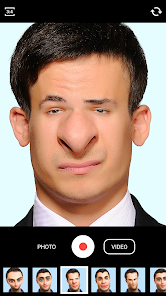
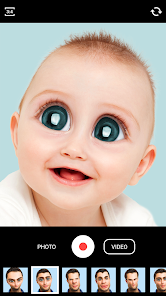
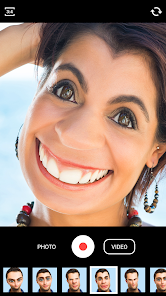
editor reviews
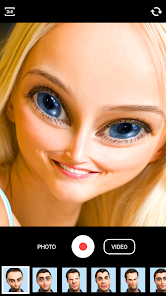
Face Warp is a playful photo-editing tool that focuses on twisting and morphing faces into silly shapes. It's one of those casual entertainment apps you might grab on a lazy afternoon, just to see how ridiculous you can make your selfies look. You mainly use it to stretch, squash, or distort someone's face by dragging the screen with your finger, which makes it perfect for a quick laugh or sending a funny image to friends. On Google Play and the App Store, it has racked up over 50 million downloads, and it's free to download, though you'll see some ads unless you pay for the ad-free version. The first time you launch the app, the interface feels super simple, almost too basic, like a toy more than a full editing suite.
Once you start using Face Warp, the experience is straightforward. You pick a photo from your gallery or take a new one, then you touch the face area to let the app detect it. After that, you can tap and drag any part of the face to warp it, like pushing a nose sideways or pulling a cheek out. There's no learning curve, which is nice, but the detection can be a bit hit or miss if the photo has bad lighting or weird angles. Onboarding is minimal, just a quick tip screen showing you how to pinch or slide, then you're off. A small practical tip I found is that using a high-contrast photo makes the warp smoother. During daily use, you'll probably just warp a few faces, save the result, and then share it on social media, which is exactly what most people do.
After using Face Warp for a while, I see it as a fun novelty app. People who enjoy sending goofy photos to family or creating meme-worthy images will likely keep it installed for quick laughs. But if you're looking for polished filters or serious editing tools, you'll probably uninstall it within a day. What makes it different from something like Snapchat's face lenses is that Face Warp gives you manual control, you decide exactly where and how to distort, instead of relying on pre-made effects. That said, Snapchat offers more variety and social integration. I'd keep Face Warp only if I regularly needed to make custom silly faces, otherwise, it's just a one-trick pony that gets old fast.
features
- Manual face warping with pinpoint accuracy, unlike Snapchat which only offers automated lenses. You drag exactly where you want to distort, giving you full creative control over the final look.
- Real-time preview as you warp, meaning you see the changes instantly without waiting for processing. This makes it feel responsive and playful, like drawing on a live canvas.
- Simple one-tap save and share to social media, which keeps the workflow fast. Most similar apps bury export options in menus, but Face Warp puts it front and center.
pros
- Free to download with no paywall for basic warping, unlike some apps that lock advanced morphing tools behind subscriptions.
- Extremely easy to use for all ages, no editing experience needed, just drag and drop. Competitors like YouCam Perfect require more navigation through menus.
- High download count shows it's trusted by millions, which adds a layer of reliability over lesser-known morphing apps from unknown developers.
cons
- Limited to just face warping, no background editing or text overlays, which makes it feel shallow compared to apps like PicsArt that offer full suites for free.
- Ads can interrupt frequently unless you pay, which annoys users during a quick warp session. Snapchat offers similar fun without any ad interruptions.
- Face detection fails often on group photos or low-light shots, forcing you to retake or pick new images, wasting time compared to more robust detection in FaceApp.
Recommended Apps
![]()
16Personalities
16Personalities4
![]()
Zodiac Palm Reader: MagicWay
Reatility Media4.6
![]()
Moblo - 3D furniture modeling
MYTIforge4.1![]()
Magnifier Plus with Flashlight
Digitalchemy, LLC4.6![]()
QR Code Scanner
QR Code Scanner & Barcode Reader4.7![]()
FalFal: Astrology, Tarot, Love
FalFal Team4.8![]()
Christmas Photo Frames
PhotoFramesApps4.6![]()
AI Video Art Creator - Livensa
FERASET4.5![]()
Horoscope of Birth
Denimaks4.4![]()
Make Me Bald Prank
AppTornado2.5![]()
Kling AI: AI Image&Video Maker
Lohas Games Pte. Ltd.4.4![]()
Japan Timetable & Route Search
NAVITIME JAPAN CO., LTD.4.3![]()
Prank Call & Funny Video
TeH Software0![]()
Parallax 3D Live Wallpapers
TarrySoft4.3![]()
AI Chatbot - Nova
ScaleUp4.7















Disclaimer
1.AppInfoLibrary does not represent any developer, nor is it the developer of any App or game.
2.AppInfoLibrary provide custom reviews of Apps written by our own reviewers, and detailed information of these Apps, such as developer contacts, ratings and screenshots.
3.All trademarks, registered trademarks, product names and company names or logos appearing on the site are the property of their respective owners.
4. AppInfoLibrary abides by the federal Digital Millennium Copyright Act (DMCA) by responding to notices of alleged infringement that complies with the DMCA and other applicable laws.
5.If you are the owner or copyright representative and want to delete your information, please contact us info@appinfolibrary.com.
6.All the information on this website is strictly observed all the terms and conditions of Google Ads Advertising policies and Google Unwanted Software policy .














