
Ghost Photo Prank

5M+
Installs
Nachosware Prank Games
Developer
-
Entertainment
Category
-
Rated for 12+
Content Rating
-
nachosware@gmail.com
Developer Email
-
http://freeandroidappsprank.blogspot.com.es/2013/04/privacy-policy-politica-de-privacidad.html
Privacy Policy
Screenshots
editor reviews
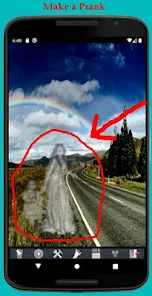
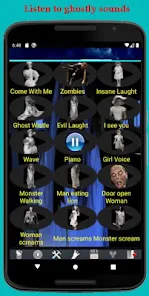
Ghost Photo Prank is a playful prank app from Nachosware Prank Games, a studio known for silly joke tools rather than anything serious. You download it from Google Play or the App Store, install it, and launch it expecting nothing more than a cheap scare to show your friends. The app has a modest install count in the low millions, and it's free to download — no registration needed at all. Once you open it, the first impression is that you're looking at a fairly simple photo viewer with a ghostly overlay effect. The whole idea is straightforward: use a real photo from your camera roll, add a half-transparent ghost image on top, and pretend it's a real supernatural snap. The interface is cluttered with loud ads right from the start, which immediately dampens the fun, but for a prank app, most users just shrug and get on with it.
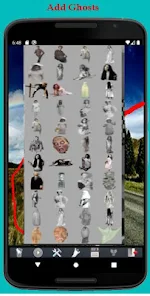
After you get past the ad pop-ups, the actual experience is surprisingly easy. You tap "Select Photo," choose any picture from your gallery, and then hit "Add Ghost." The ghost images themselves are pretty basic — think stock photo ghosts with greenish tints and blurry edges. The main action is dragging that ghost around to position it over someone's face or a dark corner in the image. You can resize it with pinch gestures, which is helpful but not super smooth. I found that the ghost often snapped to weird positions, and it took a few tries to get the placement right. Once you're happy, you tap "Save" and the app generates a new image with the ghost blended in. A small practical tip: use photos with low lighting or shadows, because the ghost effect looks laughably fake in bright daylight. The whole process takes maybe two minutes, which is perfect for a quick laugh at a party or on a group chat. There's no onboarding tutorial — you just fumble through the buttons, and honestly, that's fine for a prank app.
After using Ghost Photo Prank for a few days, I can say it's exactly as disposable as it looks. It's fun for pulling quick gags on friends who believe in ghosts, or for making fake paranormal posts on social media during Halloween. But if you're looking for polished editing tools or realistic ghost effects, this isn't it — apps like Ghost Lens or GhostCam offer way better blending and motion effects. What sets this one apart is pure simplicity: no accounts, no editing skills needed, just pick a ghost and go. That said, the constant ads and the limited ghost selection make me doubt anyone would keep it installed for more than a week. I can see it being a one-time download for a specific joke, then uninstalled right after. It's not bad — it just doesn't have enough to keep you coming back.
features
- 👻 Ghost overlay tool — The core feature is placing semi-transparent ghost images onto your own photos. You can drag, rotate, and resize the ghost with your fingers, though the snapping can be annoying. Compare this to Ghost Lens, which lets you animate ghosts and add sound effects; this app's static approach feels very basic in contrast.
- 👻 No sign-up required — You don't need to create an account or log in at all. Just open the app and start creating prank photos immediately. GhostCam forces you to register before using the camera effect, so this is a clear win for quick access.
- 👻 Quick save and share — After editing, you save the image directly to your camera roll with one tap. From there, you can send it to any messaging app. Ghost Lens buries the share button behind a menu, which slows down the prank moment.
- 👻 Preloaded ghost library — The app comes with about 10 different ghost images, ranging from classic sheet ghosts to creepy faces. The selection is tiny compared to GhostCam's 50+ options, but it's enough for a one-time joke.
pros
- 👍 Free with no hidden paywalls — Unlike Ghost Lens, which locks better ghost effects behind a $4.99 pro version, Ghost Photo Prank keeps all ghosts freely accessible from the start.
- 👍 Extremely fast workflow — You can finish a prank photo in under 30 seconds once you understand the interface. GhostCam requires you to wait through a loading screen for its camera preview, which kills the spontaneity.
- 👍 Lightweight and low storage — The app takes under 30MB, so it won't hog your phone. Ghost Lens is around 100MB due to its animation engine, making it a heavier install for something silly.
cons
- 👎 Aggressive ad frequency — Every time you save a photo, a full-screen video ad plays, and there's a banner ad at the bottom constantly. GhostCam has no ads at all after purchase, so the experience is much cleaner.
- 👎 Very limited ghost selection — With only 10 ghosts, you run out of variety after two pranks. Ghost Lens offers over 30 ghost types and even lets you upload custom images, which this app can't match.
- 👎 No undo button — If you accidentally move the ghost the wrong way, you have to restart the whole photo from scratch. GhostCam has a proper undo history, which makes editing less frustrating.
Recommended Apps
![]()
16Personalities
16Personalities4
![]()
Zodiac Palm Reader: MagicWay
Reatility Media4.6
![]()
Moblo - 3D furniture modeling
MYTIforge4.1![]()
Magnifier Plus with Flashlight
Digitalchemy, LLC4.6![]()
QR Code Scanner
QR Code Scanner & Barcode Reader4.7![]()
FalFal: Astrology, Tarot, Love
FalFal Team4.8![]()
Christmas Photo Frames
PhotoFramesApps4.6![]()
AI Video Art Creator - Livensa
FERASET4.5![]()
Horoscope of Birth
Denimaks4.4![]()
Make Me Bald Prank
AppTornado2.5![]()
Kling AI: AI Image&Video Maker
Lohas Games Pte. Ltd.4.4![]()
Japan Timetable & Route Search
NAVITIME JAPAN CO., LTD.4.3![]()
Prank Call & Funny Video
TeH Software0![]()
Parallax 3D Live Wallpapers
TarrySoft4.3![]()
AI Chatbot - Nova
ScaleUp4.7















Disclaimer
1.AppInfoLibrary does not represent any developer, nor is it the developer of any App or game.
2.AppInfoLibrary provide custom reviews of Apps written by our own reviewers, and detailed information of these Apps, such as developer contacts, ratings and screenshots.
3.All trademarks, registered trademarks, product names and company names or logos appearing on the site are the property of their respective owners.
4. AppInfoLibrary abides by the federal Digital Millennium Copyright Act (DMCA) by responding to notices of alleged infringement that complies with the DMCA and other applicable laws.
5.If you are the owner or copyright representative and want to delete your information, please contact us info@appinfolibrary.com.
6.All the information on this website is strictly observed all the terms and conditions of Google Ads Advertising policies and Google Unwanted Software policy .














