
FoxEyes - Change Eye Color

5M+
Installs
GameSmileStudio
Developer
-
Video Players & Editors
Category
-
Rated for 3+
Content Rating
-
gamesmilestudio@gmail.com
Developer Email
-
https://gamesmilesstudio.blogspot.com/2024/01/privacy-policy-privacy-policy-please.html
Privacy Policy
Screenshots
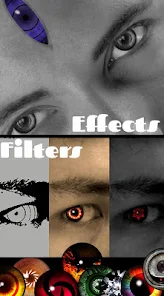
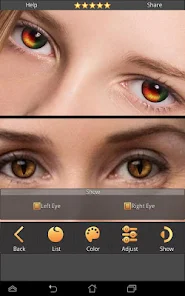
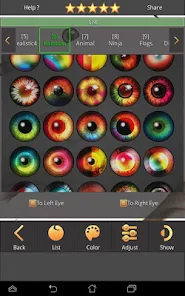
editor reviews
FoxEyes is a photo editing app that promises to change eye color in portraits, and it's exactly the kind of novelty tool you'd browse past on Google Play or the App Store out of pure curiosity. It's a niche utility app, not a full-blown editor like Photoshop Express, so you'd download it with a single goal in mind. The install count seems moderate, and it's free to grab with optional in-app purchases and ads. After launching it, the first impression is straightforward: a simple interface with a tutorial overlay that tells you to pick a photo from your gallery or snap one right there. I remember thinking, "Okay, let's see if this actually looks real," because most apps that claim to change eye color just slap a weird gradient over the iris.
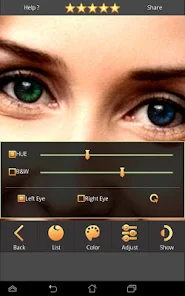
The actual hands-on experience is where FoxEyes shows its personality. Once you load a portrait, the app auto-detects the eyes with decent accuracy—though it sometimes misses if you're wearing glasses or squinting. The interface is clean: a selection of eye colors swiping along the bottom, from natural shades like blue and hazel to flashier tones like violet or gold. You tap a color, and it applies almost instantly, with sliders for intensity and blending to make it look less like a sticker. What threw me off at first was the need to manually adjust the eye region if the detection was off; you pinch to zoom and drag the mask into place. After a few tries, I got the hang of it—holding the phone steady and choosing a well-lit face photo worked best. Onboarding is quick, but I wish it warned you that extreme colors look fake on dimly lit shots.
After playing around for a while, I think FoxEyes is fun for a quick chuckle or an Instagram post, but it's not something you'd keep installed for serious editing. People who enjoy quirky photo tweaks or cosplay enthusiasts might love it, especially for testing fantasy eye colors without buying contacts. Compared to something like Adobe Lightroom, which requires layers and masking for the same effect, FoxEyes is much faster and simpler. But it falls short on precision: the auto-detection can slip on side profiles or images with shadows, and the eye texture sometimes looks painted on. I kept it for a week to surprise friends with weird eye colors in group photos, then uninstalled because it didn't do much else. If you want a quick vanity tool and don't mind the occasional wonky result, it's worth a try, but don't expect pro-grade output.
features
- 🔍 Auto eye detection works fast on front-facing portraits, though it stumbles on glasses or side angles—YouCam Perfect does similar auto-detection but handles accessories better.
- 🎨 A wide palette of natural and fantasy eye colors, from deep brown to neon pink, with intensity sliders for subtle or bold looks—PhotoDirector has more texture options but a steeper learning curve.
- ⚡ Real-time preview as you swipe through colors, no lag or buffering, making it easy to test multiple looks quickly—FaceApp's eye changer feels slower and applies changes less smoothly.
- 🖱️ Manual mask adjustment tools let you fix detection errors with pinch-to-zoom and drag, boosting accuracy for tricky photos—Adobe Photoshop Express lacks this specific feature for eye-only edits.
pros
- 🎯 FoxEyes excels at simplicity: you open it, pick a photo, and change eye colors in under 30 seconds, unlike youCam Perfect which buries similar options under menus and premium paywalls.
- 🎭 The fantasy color range is wide and vibrant, ideal for cosplay or quirky social posts, while FaceApp's eye tool focuses more on natural-looking swaps and requires a subscription for the fun shades.
- ⚡ It's lightweight on storage and battery, loading fast even on older phones, whereas Adobe Lightroom needs more memory and processing power for the same task.
cons
- 🐢 Auto detection often fails on side profiles, closed eyes, or heavy makeup, forcing manual tweaks each time, while YouCam Perfect's eye tracking is more reliable in tricky lighting.
- 💎 The eye texture sometimes looks flat or painted on, especially with metallic colors, whereas PhotoDirector adds realistic highlights and shadows after swapping shades.
- 📹 No batch editing or video support, so you must apply changes one photo at a time, limiting utility for series shots—FaceApp allows batch edits for face-level changes.
- 📱 After the free trial, most natural-looking colors require in-app purchases, which feels stingy compared to YouCam Perfect's free basic eye tools.
Recommended Apps
![]()
16Personalities
16Personalities4
![]()
Zodiac Palm Reader: MagicWay
Reatility Media4.6
![]()
Moblo - 3D furniture modeling
MYTIforge4.1![]()
Magnifier Plus with Flashlight
Digitalchemy, LLC4.6![]()
QR Code Scanner
QR Code Scanner & Barcode Reader4.7![]()
FalFal: Astrology, Tarot, Love
FalFal Team4.8![]()
Christmas Photo Frames
PhotoFramesApps4.6![]()
AI Video Art Creator - Livensa
FERASET4.5![]()
Horoscope of Birth
Denimaks4.4![]()
Make Me Bald Prank
AppTornado2.5![]()
Kling AI: AI Image&Video Maker
Lohas Games Pte. Ltd.4.4![]()
Japan Timetable & Route Search
NAVITIME JAPAN CO., LTD.4.3![]()
Prank Call & Funny Video
TeH Software0![]()
Parallax 3D Live Wallpapers
TarrySoft4.3![]()
AI Chatbot - Nova
ScaleUp4.7















Disclaimer
1.AppInfoLibrary does not represent any developer, nor is it the developer of any App or game.
2.AppInfoLibrary provide custom reviews of Apps written by our own reviewers, and detailed information of these Apps, such as developer contacts, ratings and screenshots.
3.All trademarks, registered trademarks, product names and company names or logos appearing on the site are the property of their respective owners.
4. AppInfoLibrary abides by the federal Digital Millennium Copyright Act (DMCA) by responding to notices of alleged infringement that complies with the DMCA and other applicable laws.
5.If you are the owner or copyright representative and want to delete your information, please contact us info@appinfolibrary.com.
6.All the information on this website is strictly observed all the terms and conditions of Google Ads Advertising policies and Google Unwanted Software policy .














