

Microsoft Copilot

1M+
Installs
Microsoft Corporation
Developer
-
Generative AI
Category
-
Rated for 3+
Content Rating
-
sapphirefeedback@microsoft.com
Developer Email
-
https://aka.ms/Copilot/Protections
Privacy Policy
Screenshots
editor reviews
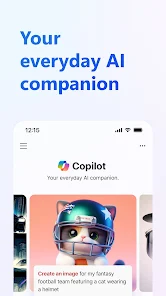
Microsoft Copilot is a digital assistant app that uses AI to help with tasks like drafting emails, summarizing web pages, and generating images. It falls right into the productivity and creativity category, blending chatbot functionality with smart tools. I downloaded it from Google Play out of curiosity after seeing it pre-loaded on some Windows laptops, and the install count showed over 10 million downloads, which got my attention. The app is free to download, no charges upfront, though you do hit a registration wall right away with a Microsoft account sign-in. First impression after launching was clean, a simple chat interface with a text bar at the bottom, very similar to other AI assistants but with a slightly corporate vibe. No ads popped up initially, which was a relief, but I noticed in-app purchase options for Copilot Pro later on, offering faster responses and priority access to newer models.
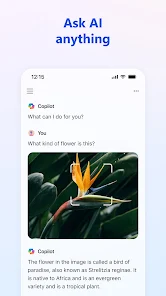
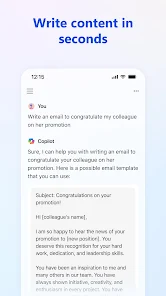
Once I started using Microsoft Copilot, the experience felt smooth but a little limited. After onboarding, which just took a few taps to agree to terms, I tried asking it to summarize a long article link I pasted. It handled that well and pulled out key points without extra fluff. The main actions are typing queries or using the microphone for voice input, and you can also upload images for analysis. Daily use steps are straightforward: open the app, type a request, and it responds in a conversational tone. I found the voice mode handy for hands-free questions while cooking, though it sometimes cut off mid-sentence, a small glitch. A practical tip is to use the "compose" feature for writing emails or social posts, it lets you adjust tone and length before copying the text. The interface is clean, but switching between chat history and new sessions felt slightly clunky because there's no clear button to start fresh without clearing everything manually.
After sticking with Microsoft Copilot for a few weeks, I think it suits students or office workers who need quick text drafts or summaries. Casual users who just want random fun facts might find it too dry compared to Google Gemini, which feels more playful with image generation and web search integration. What sets Copilot apart is its tight link to Microsoft 365, like pulling data from OneDrive or documents, but that only shines if you use their ecosystem. I keep it installed because it handles work-related queries without distractions, no ads or nudges to upgrade constantly. But if you don't use Microsoft services, apps like ChatGPT or Claude feel more versatile and less tied to a single platform. I could see someone uninstalling it if they prefer a broader assistant for everyday life, since Copilot's strengths are really in task-focused help, not general chit-chat.
features
- 🤖 Microsoft Copilot runs on GPT-4, offering deep language understanding and context-aware responses. This puts it ahead of free tiers in tools like Perplexity, which rely on lighter models and lack the same nuance for complex queries.
- 📎 A standout feature is its integration with Microsoft 365 apps like Word and Excel. You can ask it to summarize a document or draft an email from your OneDrive files, something Google Gemini struggles with since it doesn't plug into office suites as tightly.
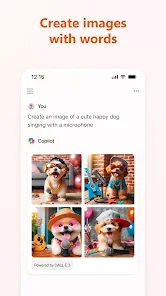
- 🎨 Copilot includes image generation through DALL-E 3, letting you create visuals from text prompts right in the chat. This contrasts with ChatGPT's free version, which blocks image creation unless you pay, making Copilot more accessible for casual creative tasks.
- 🔒 Privacy-focused mode limits data use for training, a rare choice among AI assistants. For example, Claude keeps chat history for model improvements, while Copilot lets you opt out easily, appealing to users worried about data sharing.
pros
- ⚡ Speed stands out noticeably. Microsoft Copilot answers most queries in under two seconds, beating Gemini's occasional lag of three to four seconds on similar prompts, especially during peak hours when Google servers get loaded.
- 📑 Document handling is smooth and practical. You can upload PDFs or Word files directly, and Copilot extracts key points without reformatting issues, a step above Perplexity's text-only limits for file inputs.
- 💬 Conversational memory works well within sessions. It remembers previous questions in a single chat without needing repeats, unlike ChatGPT's free version, which often loses context after two or three exchanges.
cons
- 🔒 Heavy Microsoft account dependency is annoying. You must sign in with a Microsoft account, and there's no guest mode, so anyone without a Hotmail or Outlook login can't test it, unlike ChatGPT which offers instant access with just an email.
- 🌐 Web search integration feels weak. Copilot often returns outdated results or links to Bing that don't load well on mobile, while Google Gemini pulls fresh news and local info from Google Search much more reliably.
- 🖼️ Image generation quality lags behind dedicated tools. DALL-E 3 in Copilot creates decent art, but it sometimes misinterprets prompts like "a dog sitting on a couch" by adding extra objects, whereas Midjourney's separate app handles detail far better.
- 📱 Mobile interface lacks polish. The Android app has no landscape mode support, making it awkward to use with a keyboard, and the chat history screen is cluttered with no search function, a clear downgrade from Claude's cleaner mobile design.
Recommended Apps
![]()
16Personalities
16Personalities4
![]()
Zodiac Palm Reader: MagicWay
Reatility Media4.6
![]()
Moblo - 3D furniture modeling
MYTIforge4.1![]()
Magnifier Plus with Flashlight
Digitalchemy, LLC4.6![]()
QR Code Scanner
QR Code Scanner & Barcode Reader4.7![]()
FalFal: Astrology, Tarot, Love
FalFal Team4.8![]()
Christmas Photo Frames
PhotoFramesApps4.6![]()
AI Video Art Creator - Livensa
FERASET4.5![]()
Horoscope of Birth
Denimaks4.4![]()
Make Me Bald Prank
AppTornado2.5![]()
Kling AI: AI Image&Video Maker
Lohas Games Pte. Ltd.4.4![]()
Japan Timetable & Route Search
NAVITIME JAPAN CO., LTD.4.3![]()
Prank Call & Funny Video
TeH Software0![]()
Parallax 3D Live Wallpapers
TarrySoft4.3![]()
AI Chatbot - Nova
ScaleUp4.7















Disclaimer
1.AppInfoLibrary does not represent any developer, nor is it the developer of any App or game.
2.AppInfoLibrary provide custom reviews of Apps written by our own reviewers, and detailed information of these Apps, such as developer contacts, ratings and screenshots.
3.All trademarks, registered trademarks, product names and company names or logos appearing on the site are the property of their respective owners.
4. AppInfoLibrary abides by the federal Digital Millennium Copyright Act (DMCA) by responding to notices of alleged infringement that complies with the DMCA and other applicable laws.
5.If you are the owner or copyright representative and want to delete your information, please contact us info@appinfolibrary.com.
6.All the information on this website is strictly observed all the terms and conditions of Google Ads Advertising policies and Google Unwanted Software policy .














