
Cool CallScreen-Birthday Theme

10M+
Installs
Hendrickson
Developer
-
Productivity
Category
-
Rated for 18+
Content Rating
-
kaberaseryferis@gmail.com
Developer Email
-
https://docs.google.com/document/d/1D6i-4d5sEvOGPG2_56TqWwdieedwlSKuEtRjgppAWy0/edit?usp=sharing
Privacy Policy
Screenshots
editor reviews
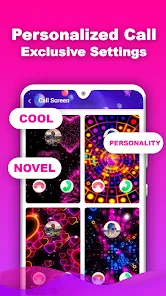
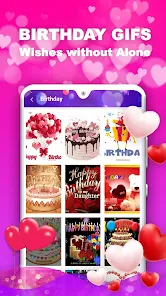
Cool CallScreen-Birthday Theme is basically exactly what it sounds like: a personalization app that replaces your phone's boring default incoming call screen with festive, birthday-themed visuals. Found it on the Google Play Store, where it sits in the customization category alongside countless other dialer skin apps. You'd grab this if you wanted to surprise someone on their special day or just feel like your own phone is throwing a little party every time a call comes in. After installing and launching it for the first time, the interface hits you fast - simple splash screens, no frills, just a bunch of thumbnail previews of different birthday call backgrounds. What caught me off guard was how straightforward it actually is. No endless permissions begging or sketchy data requests, which honestly made me breathe easier compared to other apps in this space.
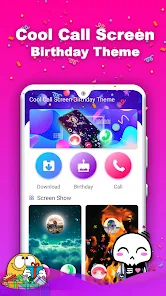
Once inside, the app doesn't mess around with tutorials or onboarding steps. You land right on the main gallery where all the birthday themes are laid out like a mini catalog. Each thumbnail shows a different animated or static background - balloons, confetti, cake slices, glittery text saying Happy Birthday, that sort of thing. Tapping one previews the full effect, and if you like it, you just hit the apply button. The app then asks to set itself as the default caller screen handler, which is one of those necessary Android permissions. After that, every incoming call shows your chosen theme rather than the system UI. There's a tiny settings cog where you might fiddle with sound options or toggle random theme shuffling. A small tip: preview the theme before applying because some animations play smoother than others depending on your phone's chipset. I noticed mid-range devices handled the simpler static backgrounds better, while the flashy animated ones stuttered a little during the actual call screen transition.
After living with it for a few days, my honest take is this app nails a super narrow niche but doesn't try to be more than it is. If you're someone who loves hosting birthday surprises or just enjoys cheerful, colorful things popping up on your phone screen, you'll probably find it endearing. But if you're not specifically planning a birthday celebration, the single-use nature makes it feel like something you'd install and forget about. Unlike Zedge or other wallpaper apps that offer seasonal variety year-round, Cool CallScreen commits fully to one occasion. That's both its charm and its limitation. I can see keeping it installed for the week leading up to a friend's birthday party, then uninstalling once the date passes. It does what it says - no more, no less. For a free download with no aggressive subscription upsells, that's honestly refreshing in the Play Store clutter.
features
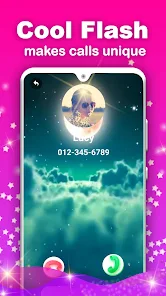
- 🎂 Instant birthday ambiance - Unlike traditional dialer apps like Truecaller, where the call screen is purely informational, this app turns each incoming call into a little celebration. The second a call arrives, your screen bursts with animated confetti, bouncing cake icons, or shimmering balloon graphics, complete with a cheerful backdrop. It doesn't just show you who's calling - it sets a genuine festive mood that's hard to ignore.
- 🎂 One-tap application process - You don't need to dig through layers of settings menus or permission jungles. Choose a theme, tap apply, confirm as default dialer, and you're done. This straightforward setup contrasts sharply with apps like Drupe or Contacts+, which bury customization features behind subscriptions and account sign-ups. Here, the focus stays purely on the visual outcome, not the hoops to get there.
- 🎂 Non-intrusive ad placement - Given the free nature of the app, I was bracing for pop-up after pop-up every time I previewed a theme. Surprisingly, ads show up sparingly - mostly a small banner at the bottom of the main page that doesn't interfere with picking or applying themes. Compared to similar tools like CallApp or Caller ID, which force full-screen video ads between previews, this feels genuinely respectful of your time.
pros
- 💪 Completely free with no subscription - Most call screen customization apps, like Color Phone or Emoji Call App, lock premium themes behind a recurring payment or at least a one-time unlock fee. Cool CallScreen-Birthday Theme gives you access to every birthday theme without asking for a dime, and there's no hidden trial that expires after three days.
- 💪 Works offline without internet - Once you've downloaded and applied a theme, the app doesn't need Wi-Fi or mobile data to display the animated call screen. That's a solid advantage over Zedge or Waplog, which rely on constant server connections to stream content. For someone in a spotty coverage area, this offline reliability matters.
- 💪 Small storage footprint - At under 15 MB, it barely registers on your phone's storage chart. Compare that to HiYa or Showcaller, which balloon past 50 MB with bloated contact management features you may never use. This app sticks to its single purpose without hauling unnecessary baggage.
cons
- 💔 Extremely limited theme variety beyond birthdays - Unlike Zedge or WALLI, which offer thousands of categories covering holidays, moods, seasons, and abstract art, Cool CallScreen stocks only birthday motifs. Once the celebration week ends, there's little reason to scroll through the same confetti and cake designs again. You'll likely crave variety after the second day.
- 💔 No integration with contact groups - Apps like Truecaller let you assign different call screens to specific contacts or groups, so your mom sees a birthday theme while your boss gets a neutral one. Here, the theme applies universally to every single caller. That limitation feels clunky if you only want the surprise effect for certain people.
- 💔 Occasional animation lag on budget devices - While the static backgrounds work flawlessly, the animated themes sometimes stutter or drop frames during the initial ring vibration on cheaper Android phones. Competitors like Call Screen Live manage smoother performance across a wider hardware range, likely due to better optimization.
Recommended Apps
![]()
16Personalities
16Personalities4
![]()
Zodiac Palm Reader: MagicWay
Reatility Media4.6
![]()
Moblo - 3D furniture modeling
MYTIforge4.1![]()
Magnifier Plus with Flashlight
Digitalchemy, LLC4.6![]()
QR Code Scanner
QR Code Scanner & Barcode Reader4.7![]()
FalFal: Astrology, Tarot, Love
FalFal Team4.8![]()
Christmas Photo Frames
PhotoFramesApps4.6![]()
AI Video Art Creator - Livensa
FERASET4.5![]()
Horoscope of Birth
Denimaks4.4![]()
Make Me Bald Prank
AppTornado2.5![]()
Kling AI: AI Image&Video Maker
Lohas Games Pte. Ltd.4.4![]()
Japan Timetable & Route Search
NAVITIME JAPAN CO., LTD.4.3![]()
Prank Call & Funny Video
TeH Software0![]()
Parallax 3D Live Wallpapers
TarrySoft4.3![]()
AI Chatbot - Nova
ScaleUp4.7















Disclaimer
1.AppInfoLibrary does not represent any developer, nor is it the developer of any App or game.
2.AppInfoLibrary provide custom reviews of Apps written by our own reviewers, and detailed information of these Apps, such as developer contacts, ratings and screenshots.
3.All trademarks, registered trademarks, product names and company names or logos appearing on the site are the property of their respective owners.
4. AppInfoLibrary abides by the federal Digital Millennium Copyright Act (DMCA) by responding to notices of alleged infringement that complies with the DMCA and other applicable laws.
5.If you are the owner or copyright representative and want to delete your information, please contact us info@appinfolibrary.com.
6.All the information on this website is strictly observed all the terms and conditions of Google Ads Advertising policies and Google Unwanted Software policy .














