

Face Me - AI Art Photo Editor

5M+
Installs
Fillog Studio
Developer
-
Video Players & Editors
Category
-
Rated for 3+
Content Rating
-
fillogfeedback@outlook.com
Developer Email
-
https://sites.google.com/view/vegoo-privacy-policy
Privacy Policy
Screenshots
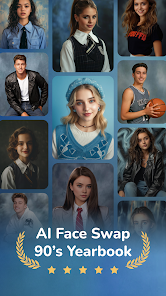


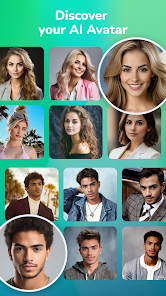
editor reviews
Face Me - AI Art Photo Editor is one of those image manipulation apps that have been flooding the market lately, riding the wave of generative AI. Basically, you upload a photo of your face, and the app plasters it onto all sorts of pre-made templates, turning you into a cartoon character, a Renaissance painting subject, or a zombie. It falls squarely into the novelty photo editor category, the kind of thing you'd download for a laugh with friends. I spotted it on the Google Play Store during one of those late-night browsing sessions, and the install count looked healthy enough, so I figured I'd give it a shot. It's free to download, which is always a plus when you're just curious. After launching it, my first impression was that the interface is pretty flashy, lots of vibrant colors and big buttons screaming at you to try this or that style. It definitely feels more like a toy than a serious editing tool.
Once you get past the splashy welcome screen, actually using the app is straightforward. You snap a selfie or pick one from your gallery, and then you're hit with a grid of dozens of art styles. The onboarding is almost nonexistent; you just pick a filter and wait. The wait is the big thing here. Some of the AI processing takes a good ten to fifteen seconds, which feels like an eternity when you're just messing around. I tried a "Fairy Tale Princess" style first, and the result was honestly hilarious, my face looked convincingly like it belonged on a Disney poster. The main actions are basically browsing categories like "Fantasy," "Horror," or "Classic Art," selecting a template, and hitting generate. A practical tip that I learned quickly is to use a well-lit, forward-facing photo; anything with shadows or weird angles makes the AI glitch and gives you a three-eyed monstrosity. The app does have some built-in tutorials, but they're more like ads for premium packs than helpful guides.
After playing around with it for a bit, I have mixed feelings. Face Me is perfect for a quick giggle with your friends or for generating a quirky profile picture that stands out. People who love those "what would I look like as a robot" trends will get a kick out of it. But if you're serious about photo editing or want granular control over the final image, this is absolutely not for you. Compared to something like FaceApp, which offers more subtle aging or gender-swapping filters, Face Me leans entirely into the wild, over-the-top artistic transformations. What makes it different is the sheer volume of templates, but the trade-off is a lot of ads unless you pay up. I kept it installed for a week because the results are genuinely funny, but I can see myself uninstalling it once the novelty wears off, it's not an app you'll use daily unless you're obsessed with changing your avatar every hour.
features
- 🎭 The standout feature is the sheer variety of art styles. You get over a hundred templates covering everything from "Stone Age Carving" to "Cyberpunk 2077," which is way more than what you see in basic apps like PicsArt's AI tools. Other apps might give you ten filters; Face Me gives you a full art gallery.
- 🎭 The face detection technology works surprisingly well for a free app. It maps your facial features accurately even if you're wearing glasses or have a beard, which is something that cheaper alternatives screw up all the time. I've had apps that gave me a mustache that wasn't there, but this one nailed it.
- 🎭 The auto-crop and background removal are seamless. You don't need to manually cut out your face, the app does it for you in one tap. In apps like YouCam Perfect, you often have to fiddle with manual cropping for decent results, but here it's fully automatic and usually correct.
- 🎭 The ability to save videos of the transformation process is a nice bonus. It creates a short time-lapse of your face being drawn, which is a really fun thing to post on social media stories. Most competing apps just give you a static image with no cool shareable effect.
pros
- 👍 Regular updates with fresh content. The developers actually add new templates every few weeks, unlike apps like Meitu that feel abandoned after a few months. This keeps the app from getting stale, there's always a new style to try.
- 👍 High-resolution exports. Even with the free version, the final images are crisp and not pixelated. In contrast, free tools like Remini's art filters often leave you with a blurry mess unless you pay.
- 👍 The interface is lightweight and doesn't hog your battery or storage. Some photo editors, like Adobe Photoshop Express, are total resource hogs, but Face Me processes everything on the cloud, so your phone stays cool and fast.
- 👍 A solid free trial of premium styles. You don't have to fork over cash immediately to see what the paid filters look like, you get one or two uses for free. That's way more generous than apps like Facetune, which locks everything behind a paywall from the start.
cons
- 👎 The free version is cluttered with ads. You get a full-screen video ad after every single generation, which completely kills the fun. Other apps, like Snapchat's AI features, have integrated ads that are less intrusive, but here it's relentless.
- 👎 The results are very inconsistent with non-frontal photos. If you try to use a photo taken from a side angle, the AI completely breaks down and looks deformed. Apps like ToonApp handle profile shots much better without glitching.
- 👎 There is no manual editing. If the AI messes up your ear or puts a weird shadow on your nose, you're stuck with it. You can't go in and fix things like you can in a real editor like Photoshop Mix, which is frustrating if the output is almost perfect.
- 👎 The app pushes in-app purchases aggressively. You can barely tap on a new style without a pop-up asking you to subscribe for $9.99 a week. Apps like Dream by Wombo let you use most features without constantly nagging you to upgrade.
Recommended Apps
![]()
16Personalities
16Personalities4
![]()
Zodiac Palm Reader: MagicWay
Reatility Media4.6
![]()
Moblo - 3D furniture modeling
MYTIforge4.1![]()
Magnifier Plus with Flashlight
Digitalchemy, LLC4.6![]()
QR Code Scanner
QR Code Scanner & Barcode Reader4.7![]()
FalFal: Astrology, Tarot, Love
FalFal Team4.8![]()
Christmas Photo Frames
PhotoFramesApps4.6![]()
AI Video Art Creator - Livensa
FERASET4.5![]()
Horoscope of Birth
Denimaks4.4![]()
Make Me Bald Prank
AppTornado2.5![]()
Kling AI: AI Image&Video Maker
Lohas Games Pte. Ltd.4.4![]()
Japan Timetable & Route Search
NAVITIME JAPAN CO., LTD.4.3![]()
Prank Call & Funny Video
TeH Software0![]()
Parallax 3D Live Wallpapers
TarrySoft4.3![]()
AI Chatbot - Nova
ScaleUp4.7















Disclaimer
1.AppInfoLibrary does not represent any developer, nor is it the developer of any App or game.
2.AppInfoLibrary provide custom reviews of Apps written by our own reviewers, and detailed information of these Apps, such as developer contacts, ratings and screenshots.
3.All trademarks, registered trademarks, product names and company names or logos appearing on the site are the property of their respective owners.
4. AppInfoLibrary abides by the federal Digital Millennium Copyright Act (DMCA) by responding to notices of alleged infringement that complies with the DMCA and other applicable laws.
5.If you are the owner or copyright representative and want to delete your information, please contact us info@appinfolibrary.com.
6.All the information on this website is strictly observed all the terms and conditions of Google Ads Advertising policies and Google Unwanted Software policy .














