

Voi - AI Avatar Portrait Maker

1M+
Installs
Codeway Dijital
Developer
-
Generative AI
Category
-
Rated for 3+
Content Rating
-
voi@codeway.co
Developer Email
-
https://static-assets.selfbooth.app/privacy
Privacy Policy
Screenshots

editor reviews
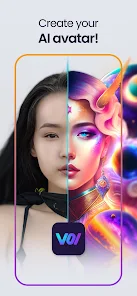
Voi is an AI-powered avatar creation app developed by Codeway Dijital that lets you generate realistic and artistic portraits from your own photos. You just upload a few selfies, and the app uses machine learning to transform them into stylized avatars, ranging from fantasy characters to professional headshots. I downloaded it from Google Play after seeing it recommended for creating unique profile pictures, and the install was quick and completely free. The first impression after launching was solid: a clean, modern interface with a short tutorial that made it clear what to do next. There was no forced registration upfront, which I appreciated, though you can sign in later to save your creations. In-app purchases popped up after the initial free credits ran out, but you can still preview results without paying immediately.
Once I started using Voi, the experience felt pretty hands-on. You select a few face photos from your gallery, and the app analyzes them for a minute or so before offering different style packs, like "Cinematic" or "Fantasy." The processing speed was decent on my mid-range phone, and the results were visually striking, especially the headshot variations that cleaned up lighting and skin texture. The interface is intuitive, with big buttons and clear labels, so I never got lost in menus. One small tip: make sure your photos have good lighting and no sunglasses, because the app struggles with side profiles or heavy shadows. I tried a few free generations, and the outputs were consistently high-quality, though the number of free credits felt a bit limited for experimenting.
After using Voi for a few days, I can see why someone would keep it installed for occasional use. It's great for people who need a polished profile picture fast, like for LinkedIn or dating apps, without having to learn photo editing software. That said, the app doesn't offer much beyond avatar creation, so if you're after general photo editing or deeper customization, it might feel too narrow. Compared to apps like FaceApp or Remini, Voi focuses more on stylized, artistic outputs rather than simple retouching, which sets it apart. But the limited free credits and reliance on in-app purchases mean you either pay or move on. I ended up uninstalling it after a week because I didn't need multiple avatars, but for someone who regularly changes their profile image, Voi is a solid, hassle-free tool.
features
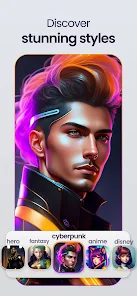
- 🌠 One standout feature is the "Style Packs" system, which gives you pre-made themes like Cyberpunk or Renaissance. Unlike Lensa AI, which offers similar avatars but often requires more manual tweaking, Voi applies these styles automatically after analyzing your face, saving you time. The results are more coherent too, with consistent lighting across all outputs.
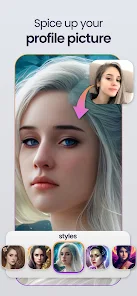
- 🌠 Another highlight is the "Headshot" mode, which creates professional-looking profile pictures perfect for work or social media. It handles skin smoothing and background removal well, rivaling apps like Remini but without needing to wait ages for processing. The output resolution is solid for online use.
- 🌠 The "Fantasy" style pack is particularly impressive, generating avatars with mythical elements like elf ears or glowing eyes. It feels more creative than similar options in FaceApp, where fantasy filters are often cartoony. Voi keeps things realistic, which makes the avatars usable for gamers or roleplayers.
pros
- 👍 Speed is a big win for Voi. Processing a batch of avatar styles took under two minutes on my phone, which is noticeably faster than Lensa AI, which can take five minutes or more for similar tasks. This makes it ideal for impatient users.
- 👍 The interface is extremely beginner-friendly, with no confusing sliders or layers. Compared to Stable Diffusion-based apps, which often feel like tech tools, Voi feels like a consumer product you can open and use instantly.
- 👍 Pricing is fair for what you get. While free credits are limited, the paid packs are cheaper than Apps like FaceApp Pro, and you don't need a subscription to preview styles before buying.
cons
- 👎 Free credits run out far too quickly. You get maybe 5-10 generations before hitting the paywall, which feels stingy compared to apps like Remini, which offer more daily free uses for basic edits.
- 👎 The app struggles with non-frontal faces or group photos. If you upload a photo with a slight angle or another person in frame, the generation often fails or produces distorted results, whereas Lensa AI handles profiles better.
- 👎 There's no photo editing or retouching tools beyond avatar creation. If you want to fix red eyes or adjust contrast, you'll need a separate app, making Voi feel limited for general photo work.
Recommended Apps
![]()
16Personalities
16Personalities4
![]()
Zodiac Palm Reader: MagicWay
Reatility Media4.6
![]()
Moblo - 3D furniture modeling
MYTIforge4.1![]()
Magnifier Plus with Flashlight
Digitalchemy, LLC4.6![]()
QR Code Scanner
QR Code Scanner & Barcode Reader4.7![]()
FalFal: Astrology, Tarot, Love
FalFal Team4.8![]()
Christmas Photo Frames
PhotoFramesApps4.6![]()
AI Video Art Creator - Livensa
FERASET4.5![]()
Horoscope of Birth
Denimaks4.4![]()
Make Me Bald Prank
AppTornado2.5![]()
Kling AI: AI Image&Video Maker
Lohas Games Pte. Ltd.4.4![]()
Japan Timetable & Route Search
NAVITIME JAPAN CO., LTD.4.3![]()
Prank Call & Funny Video
TeH Software0![]()
Parallax 3D Live Wallpapers
TarrySoft4.3![]()
AI Chatbot - Nova
ScaleUp4.7















Disclaimer
1.AppInfoLibrary does not represent any developer, nor is it the developer of any App or game.
2.AppInfoLibrary provide custom reviews of Apps written by our own reviewers, and detailed information of these Apps, such as developer contacts, ratings and screenshots.
3.All trademarks, registered trademarks, product names and company names or logos appearing on the site are the property of their respective owners.
4. AppInfoLibrary abides by the federal Digital Millennium Copyright Act (DMCA) by responding to notices of alleged infringement that complies with the DMCA and other applicable laws.
5.If you are the owner or copyright representative and want to delete your information, please contact us info@appinfolibrary.com.
6.All the information on this website is strictly observed all the terms and conditions of Google Ads Advertising policies and Google Unwanted Software policy .














