

Avatar Maker: Anime

1M+
Installs
Avatars Makers Factory
Developer
-
Social
Category
-
Rated for 12+
Content Rating
-
dimitrovbk83@gmail.com
Developer Email
-
https://kvins.github.io/avatarMakers/GPrivacyPolicy.html
Privacy Policy
Screenshots
editor reviews
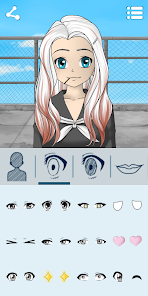
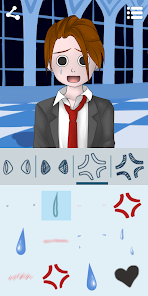
I stumbled upon Avatar Maker: Anime a few weeks back when I was looking for a way to jazz up my social media profile without using a real photo. It is, true to its name, an app from Avatars Makers Factory that focuses on crafting anime-style avatars. From the Google Play listing and App Store page, it looks like it has enough downloads to show it's not a total ghost town, and it launches with a free download option. Once you open it, the first thing you notice is this explosion of bright, cartoony art. You're hit with a huge assortment of options right away—hair colors that don't exist in nature, oversized eyes, and fantasy outfits. The initial impression is pretty overwhelming, honestly, because there is no gentle hand-holding. It's just “here are hundreds of pieces, go wild.”
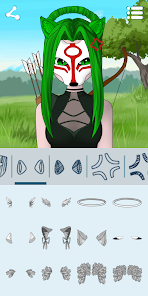
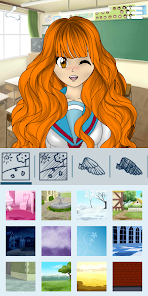
Using the app is a mix of straightforward and slightly chaotic. The main screen is basically a giant editing studio where you swipe through categories like hairstyles, eyes, mouths, and clothes. Each category has dozens of choices. You tap on a wig, and it plops onto your character's head. You swipe to another wig, and it replaces the old one. No long loading, no lag, just instant previews. The onboarding is basically nonexistent—you just start tapping. The tricky part is that the navigation for submenus isn't always intuitive. For example, finding the right “accessories” tab took me a minute, and some items are buried under weird labels. But once you figure out the layout, it becomes addictive. You can tweak details like eye shape, skin tone, and even add little stickers or backgrounds. A small tip: save your drafts often, because the app sometimes restarts if you switch apps too much. The whole flow feels like digital dollhouse dressing up, which is fun once you get the hang of it.
After a few sessions, I think this app is a solid pick for anyone who loves customizing characters but doesn't want to learn complex drawing tools. The sheer volume of assets means you can make something unique every time. However, it's not for someone who wants a polished, guided experience—the interface feels a bit clunky compared to something like ZEPETO, which is smoother but less detailed. What sets Avatar Maker: Anime apart is the raw creative freedom; you can mix things like a samurai helmet with a school uniform and a cyberpunk eye patch without the app stopping you. I'll probably keep it installed for quick avatar projects, but I can see people uninstalling if they get frustrated by the occasional lag or the lack of a save system that backs up to the cloud. It's a good niche tool, not a daily driver for everyone.
features
- 🛠️ The editing customization is incredibly deep. You can tweak almost every facial feature individually—eye shape, iris size, eyebrow angle, mouth width. This goes far beyond what something like ZEPETO offers, where most presets are locked to full face templates. The sheer granularity lets you make a truly one-of-a-kind character instead of just mixing a few pre-made heads.
- 🎨 The asset library is massive and surprisingly diverse. There are styles ranging from classic school uniforms and fantasy armor to sci-fi outfits and traditional clothing. You are not stuck in one aesthetic. This beats apps like FaceQ, which have fewer themes and often feel repetitive after a few tries.
- 📥 The ability to save high-resolution images of your avatar without watermarks is a standout feature. Many similar apps, such as Avatar Maker: Manga Girls, lock clear exports behind a paywall or a subscription. Here, you can export your creation and use it on other platforms like Discord or WhatsApp without any annoying overlays.
- 💾 The app uses a local draft save system, which is handy for experimenting. You can create multiple versions and go back to them later without losing your progress, unlike some apps that only save one active project. It encourages trying wild combinations without the fear of messing up your main look.
pros
- 🎲 The crazy variety of assets is the biggest win. You can combine a futuristic visor with a medieval chestplate and a rabbit tail, something you can't do in the more rigid ZEPETO or the simpler Bitmoji. That freedom to mash up completely different themes feels genuinely creative.
- 🖼️ The export quality is much higher than many free alternatives. Unlike apps like Mii Maker or some web-based tools that give you a tiny, pixelated image, Avatar Maker: Anime outputs a clean, large image ready for use as a profile picture.
- 🛠️ The granular facial editing is better than in games like Gacha Club or others focused on full body animation. Here, the face is the star, and you can fine-tune even subtle expressions, making the character feel more alive and less like a preset doll.
cons
- 🖥️ The user interface feels dated and clunky. Navigating between categories like “headwear” and “necklace” isn't smooth. Apps like ZEPETO have a much cleaner, more modern layout. Finding specific items can be a chore because the icons are small and some categories overlap confusingly.
- 📱 The app seems to lack cloud saving. If you clear the app data or switch phones, your drafts are gone. This is a big drawback compared to services like Ready Player Me or ZEPETO, which link your avatar to an account and keep it safe across devices.
- 🚀 Performance can be inconsistent. On my phone, the app would occasionally pause for a second when loading a new category of outfits. This isn't a deal-breaker, but it does interrupt the flow, especially compared to the snappy response of simpler apps like FaceQ where every tap is instant.
- 🔍 The search and organization are poor. There is no way to search for a specific item or tag. You just have to scroll through hundreds of options. Games like Gacha Club have a better categorization system with folders, making it easier to find what you need.
Recommended Apps
![]()
16Personalities
16Personalities4
![]()
Zodiac Palm Reader: MagicWay
Reatility Media4.6
![]()
Moblo - 3D furniture modeling
MYTIforge4.1![]()
Magnifier Plus with Flashlight
Digitalchemy, LLC4.6![]()
QR Code Scanner
QR Code Scanner & Barcode Reader4.7![]()
FalFal: Astrology, Tarot, Love
FalFal Team4.8![]()
Christmas Photo Frames
PhotoFramesApps4.6![]()
AI Video Art Creator - Livensa
FERASET4.5![]()
Horoscope of Birth
Denimaks4.4![]()
Make Me Bald Prank
AppTornado2.5![]()
Kling AI: AI Image&Video Maker
Lohas Games Pte. Ltd.4.4![]()
Japan Timetable & Route Search
NAVITIME JAPAN CO., LTD.4.3![]()
Prank Call & Funny Video
TeH Software0![]()
Parallax 3D Live Wallpapers
TarrySoft4.3![]()
AI Chatbot - Nova
ScaleUp4.7















Disclaimer
1.AppInfoLibrary does not represent any developer, nor is it the developer of any App or game.
2.AppInfoLibrary provide custom reviews of Apps written by our own reviewers, and detailed information of these Apps, such as developer contacts, ratings and screenshots.
3.All trademarks, registered trademarks, product names and company names or logos appearing on the site are the property of their respective owners.
4. AppInfoLibrary abides by the federal Digital Millennium Copyright Act (DMCA) by responding to notices of alleged infringement that complies with the DMCA and other applicable laws.
5.If you are the owner or copyright representative and want to delete your information, please contact us info@appinfolibrary.com.
6.All the information on this website is strictly observed all the terms and conditions of Google Ads Advertising policies and Google Unwanted Software policy .














