

Smile Photo Editor

5M+
Installs
Hairstyle Photo Apps
Developer
-
Video Players & Editors
Category
-
Rated for 12+
Content Rating
-
best.photo.app@gmail.com
Developer Email
-
http://bestphotoapps.ru/privacy-policy.html
Privacy Policy
Screenshots



editor reviews
Smile Photo Editor, from Hairstyle Photo Apps, is a lightweight photo retouching tool that focuses specifically on enhancing smiles in portraits. It's a niche utility app rather than a full-featured image editor, so it's really only for people who want to fix or improve smiles in their selfies and group photos. You download it for free from the Google Play Store, where it shows a moderate number of installs, and the first launch greets you with a simple, clean interface that's immediately clear about what it does. There are no overwhelming menus or confusing options, which makes the first impression surprisingly refreshing for a free app.
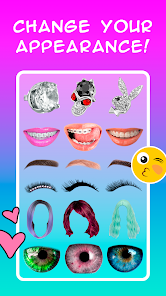
Once you tap to import a photo, the app walks you through a few core actions: adjusting lip shape, whitening teeth, and sometimes adding a slight redness to lips. The onboarding is fast, using visual cues rather than text-heavy tutorials, so you pick it up by just tapping around. A normal user would load a selfie, zoom into the mouth area, and then use sliders to tweak the intensity of each effect. The interface is smooth for basic edits, but I noticed some lag when applying changes to higher-resolution images. A practical tip is to start with subtle adjustments, because pushing the sliders too far can create a plastic look. The most common usage steps involve cropping the focus area, applying the smile enhancement, and then exporting the edited image back to your gallery.
After using Smile Photo Editor for a while, I think it nails its narrow purpose but falls short on versatility. People who frequently post portraits on social media and dislike how their smile looks in candid shots will find this app genuinely useful, and they might keep it installed just for occasional fixes. However, anyone wanting a general photo editor for overall touch-ups would be better served by something like Adobe Lightroom or Snapseed, which also offer teeth whitening and basic retouching but with far more control elsewhere. What sets Smile Photo Editor apart is how straightforward it is, but the app's ads can be intrusive during export, and I could see some users uninstalling it after a few uses because of that annoyance. It's a solid specialist tool, but you'll likely reach for it only when the other apps feel like overkill.
features
- 😊 Teeth Whitening: The app uses a targeted whitening tool that brightens teeth without washing out the rest of the face, which is a common issue in general photo editors. For comparison, YouCam Perfect also offers teeth whitening, but it tends to desaturate surrounding pixels, while Smile Photo Editor keeps the skin tone natural.
- 😊 Lip Shape Adjustment: You can reshape the lips subtly by lifting the corners or adjusting the curve of the smile line. This is more precise than the lip enhancement found in FaceApp, which applies broader changes that can look unnatural.
- 😊 Smile Boost: This feature amplifies the overall expression by enhancing the natural creases around the mouth. Unlike BeautyPlus, which uses a generic "beauty" slider that over-smoothes everything, Smile Photo Editor targets only the smile area.
pros
- 🌟 Simplicity: The app does one thing and does it well, so you won't get lost in a sea of tools. This makes it more beginner-friendly than Snapseed, where finding the retouching tools takes some learning.
- 🌟 No Account Needed: You can edit photos immediately without signing up, which is a big plus compared to Facetune, which pushes you to create an account before you even start editing.
- 🌟 Fast Exports: Saving and sharing cleaned-up images is quick, with minimal compression artifacts. Tools like PicsArt often degrade image quality during export due to compression settings.
cons
- ⚠️ Limited Editing Scope: You cannot adjust exposure, contrast, or colors, so if the original photo is dimly lit, the smile edits won't look great. Most free photo editors like Adobe Lightroom offer basic lighting adjustments alongside retouching.
- ⚠️ Aggressive Ads: A video ad plays almost every time you export a photo, which disrupts the flow. Competitive apps like Remini show fewer ads during the editing process.
- ⚠️ Low-Resolution Output: While the app works on high-res images, the exported file sometimes loses detail in shadows and highlights, unlike YouCam Perfect which maintains better clarity.
Recommended Apps
![]()
16Personalities
16Personalities4
![]()
Zodiac Palm Reader: MagicWay
Reatility Media4.6
![]()
Moblo - 3D furniture modeling
MYTIforge4.1![]()
Magnifier Plus with Flashlight
Digitalchemy, LLC4.6![]()
QR Code Scanner
QR Code Scanner & Barcode Reader4.7![]()
FalFal: Astrology, Tarot, Love
FalFal Team4.8![]()
Christmas Photo Frames
PhotoFramesApps4.6![]()
AI Video Art Creator - Livensa
FERASET4.5![]()
Horoscope of Birth
Denimaks4.4![]()
Make Me Bald Prank
AppTornado2.5![]()
Kling AI: AI Image&Video Maker
Lohas Games Pte. Ltd.4.4![]()
Japan Timetable & Route Search
NAVITIME JAPAN CO., LTD.4.3![]()
Prank Call & Funny Video
TeH Software0![]()
Parallax 3D Live Wallpapers
TarrySoft4.3![]()
AI Chatbot - Nova
ScaleUp4.7















Disclaimer
1.AppInfoLibrary does not represent any developer, nor is it the developer of any App or game.
2.AppInfoLibrary provide custom reviews of Apps written by our own reviewers, and detailed information of these Apps, such as developer contacts, ratings and screenshots.
3.All trademarks, registered trademarks, product names and company names or logos appearing on the site are the property of their respective owners.
4. AppInfoLibrary abides by the federal Digital Millennium Copyright Act (DMCA) by responding to notices of alleged infringement that complies with the DMCA and other applicable laws.
5.If you are the owner or copyright representative and want to delete your information, please contact us info@appinfolibrary.com.
6.All the information on this website is strictly observed all the terms and conditions of Google Ads Advertising policies and Google Unwanted Software policy .














