
Dawn AI - Avatar Generator

5M+
Installs
Splice Video Editor
Developer
-
Generative AI
Category
-
Rated for 3+
Content Rating
-
support-android-dawn.ai@bendingspoons.com
Developer Email
-
https://bendingspoons.com/privacy.html?app=4975764015383620545
Privacy Policy
Screenshots
editor reviews
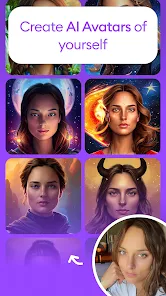
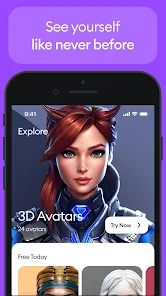
I first came across Dawn AI - Avatar Generator while looking for something fun to do with my selfies. It's basically an AI-driven portrait app that turns your photos into stylized avatars, ranging from realistic to fantasy looks. On Google Play and the App Store, it's free to download, and after installing it, I noticed it had a respectable number of downloads. The launch screen was clean, with a simple registration via email or social media, which felt quick. My first impression was that it's not cluttered with ads right away, though I did see options for in-app purchases later. Honestly, I just wanted to see what it could do with my face, so I jumped in without overthinking.
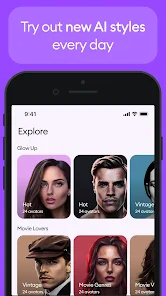
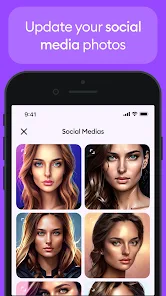
After signing up, the hands-on experience is mostly about uploading a photo and picking a style. The interface is straightforward: you choose from categories like “anime,” “cyberpunk,” or “fantasy,” and the app processes your image in a few seconds. The onboarding hints you to use a clear front-facing shot for best results, which I learned after a blurry attempt. For daily use, I'd take a new selfie, select a style, and wait for the AI to generate four variations. The results were sometimes hit or miss—some looked spot-on, while others made me look like a cartoon from another planet. A small tip: cropping your face tightly helps avoid weird distortions. The navigation is smooth overall, but I did get confused once when a preview froze and I had to restart. Still, for a quick laugh or a new profile picture, it's satisfying.
After using it for a few weeks, I think Dawn AI is a mixed bag. It's great for people who love experimenting with their appearance without real commitment, like teens or social media enthusiasts. But if you're after hyper-realistic results, you might feel let down compared to something like FaceApp, which feels more polished. What sets Dawn AI apart is its artistic range—it offers styles that are more out-there and imaginative. I kept it installed because it's fun for occasional use, but I can see someone uninstalling it if the free options feel limited or if the paid styles seem too pricey. It's a decent tool for creativity, but not a must-have.
features
- 🎨 Dawn AI shines with its style variety, offering over 30 unique looks from “steampunk” to “galactic,” which beats Lensa AI's narrower focus on professional portraits. The standout feature is its real-time preview: you can tweak parameters like skin tone or background before generating, making it more interactive than typical avatar apps.
- 🎨 Another edge is its batch generation—upload once and get multiple style options in one go, saving time compared to Reface, which requires separate uploads for each filter. The AI handles diverse ethnicities well, avoiding the weird whitewashing I saw in early versions of similar tools.
- 🎨 The app also includes a “morph” function that blends your face with fantasy elements like elf ears or robotic parts, something Toongineer doesn't offer. This adds a playful layer, letting you create avatars that feel personalized rather than cookie-cutter.
pros
- 💪 Dawn AI is stronger than Dreamscope in processing speed—it takes under 10 seconds per generation, while Dreamscope often lags. The free tier gives three style packs without watermarks, which is more generous than Prequel's limited free options.
- 💪 It also excels at maintaining facial features, unlike many cheap avatar apps that turn everyone into generic anime characters. The app's daily style suggestions keep it fresh, encouraging me to try new looks without extra effort.
cons
- 😐 Dawn AI struggles with consistency—sometimes it alters facial proportions oddly, unlike FaceApp which keeps a more natural base. The free version runs out of credits fast (only 5 generations daily), pushing you toward pricy subscriptions that cost more than Lensa's annual plan.
- 😐 It also lacks social sharing integration; you have to save images manually, while similar apps let you post directly to Instagram or TikTok. The occasional ad pop-up disrupts the flow, though it's less aggressive than some free tools.
- 😐 Finally, the app's privacy policy feels vague about how your uploaded photos are used, which makes me hesitant compared to BeFunk's clearer data-handling practices.
Recommended Apps
![]()
16Personalities
16Personalities4
![]()
Zodiac Palm Reader: MagicWay
Reatility Media4.6
![]()
Moblo - 3D furniture modeling
MYTIforge4.1![]()
Magnifier Plus with Flashlight
Digitalchemy, LLC4.6![]()
QR Code Scanner
QR Code Scanner & Barcode Reader4.7![]()
FalFal: Astrology, Tarot, Love
FalFal Team4.8![]()
Christmas Photo Frames
PhotoFramesApps4.6![]()
AI Video Art Creator - Livensa
FERASET4.5![]()
Horoscope of Birth
Denimaks4.4![]()
Make Me Bald Prank
AppTornado2.5![]()
Kling AI: AI Image&Video Maker
Lohas Games Pte. Ltd.4.4![]()
Japan Timetable & Route Search
NAVITIME JAPAN CO., LTD.4.3![]()
Prank Call & Funny Video
TeH Software0![]()
Parallax 3D Live Wallpapers
TarrySoft4.3![]()
AI Chatbot - Nova
ScaleUp4.7















Disclaimer
1.AppInfoLibrary does not represent any developer, nor is it the developer of any App or game.
2.AppInfoLibrary provide custom reviews of Apps written by our own reviewers, and detailed information of these Apps, such as developer contacts, ratings and screenshots.
3.All trademarks, registered trademarks, product names and company names or logos appearing on the site are the property of their respective owners.
4. AppInfoLibrary abides by the federal Digital Millennium Copyright Act (DMCA) by responding to notices of alleged infringement that complies with the DMCA and other applicable laws.
5.If you are the owner or copyright representative and want to delete your information, please contact us info@appinfolibrary.com.
6.All the information on this website is strictly observed all the terms and conditions of Google Ads Advertising policies and Google Unwanted Software policy .














