
Time Warp Scan Cam&Face Filter

5M+
Installs
HDY Apps
Developer
-
Video Players & Editors
Category
-
Rated for 3+
Content Rating
-
apps@homedy.com
Developer Email
-
https://sites.google.com/view/privacytosfortimewarpscan/
Privacy Policy
Screenshots



editor reviews
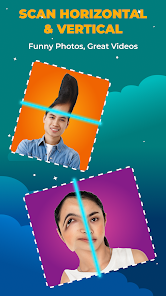
Time Warp Scan Cam&Face Filter is a camera app built around a specific viral effect—the "time warp scan" look where a line sweeps across the screen to create warped or skewed images. It's the kind of app you stumble upon when you see someone on social media with that trippy, melting face effect and think, "I want to try that." After downloading it from the Google Play store where it shows a modest number of installs and is free to download, the first thing that hits you is how straightforward the main screen is. No lengthy registration, no forced account creation. You just grant camera permissions and the effect is ready to go. That simplicity makes a good first impression because you don't have to fight through menus just to see what the hype is about. There are optional in-app purchases if you want extra filters or effects, but the core time warp scan function works without paying a cent, and ads appear occasionally but not aggressively during actual use.
When you actually start using the app, the experience is mostly smooth but has some quirks. The interface places the main scan filter front and center, so you tap the shutter button and a horizontal line slowly moves down your face, freezing the part above the line while the part below continues to move. This creates that cartoonish, stretched look instantly. Moving through the app feels intuitive for the first few minutes—you press record, the line moves, and you get a short video clip. However, I noticed the app can get confused if your face moves too quickly or if lighting changes suddenly, sometimes resulting in a glitchy output where parts of your face get cut off or misaligned. A small tip I picked up is to hold still and let the line move at a steady pace for the cleanest effect. The app also includes a few face filters like dog ears and glasses, but these feel like afterthoughts compared to the time warp scan feature which is clearly the star of the show.
After using Time Warp Scan Cam&Face Filter for a few days, I'd say it's a fun novelty rather than a daily driver camera app. People who love making goofy content for TikTok or Instagram Reels will probably get a kick out of it, especially if they want that specific scan effect without editing in another app. But if you're looking for a general camera app with a full set of editing tools, this isn't it. Compared to something like Snapchat or TikTok which offer the same effect built into their platforms, this standalone app feels limited because you can't add music, text, or stickers easily within the app—you have to export the clip and edit elsewhere. I could see someone keeping it installed if they frequently make these scan videos, but I can also imagine uninstalling it after a week because the effect gets repetitive and other apps do the same thing with more extras. For a free experiment, it delivers what it promises, but nothing more.
features
- 🎭 The time warp scan effect creates a unique moving line that freezes one part of your face while the other part moves, producing that viral stretched look. Similar apps like Snapchat have this effect too, but Time Warp Scan Cam makes it the main focus instead of burying it in a filter menu, so you can access it faster.
- 🎭 The app allows you to record video clips directly with the scan effect applied in real time, meaning you don't need to edit or add the effect later. In contrast, some camera apps require you to take a photo first and then apply the effect, which feels slower and less natural for video content.
- 🎭 No account registration is required to use the core feature. You can open the app, grant camera permission, and start recording immediately. Other apps like Instagram or TikTok push you to log in or sign up before using their camera, which adds friction if you just want to experiment quickly.
pros
- 👍 Free to download and use the main scan effect without any subscription—similar apps like FaceApp often lock their best filters behind a paywall, but this one keeps the signature feature open to everyone.
- 👍 The interface is minimalist with almost no clutter. When you open the app, you see the camera feed and one button. Apps like B612 or YouCam Perfect overload you with stickers and options, which can be overwhelming if you just want a single effect.
- 👍 The scan effect updates smoothly on most mid-range phones tested, maintaining decent frame rates. Some competing apps with similar effects lag or stutter on older devices, but this one ran well on a three-year-old Android phone.
cons
- 👎 Limited editing options—you can only record the scan video and save it. There's no crop, trim, filter overlay, or text tool. Apps like CapCut or InShot let you do much more with the clip after recording, but here you need to export and switch apps for any edits.
- 👎 The app crashes occasionally when you switch between the time warp scan mode and the other face filters. This happened several times during my testing, which can be frustrating if you've just captured a good clip.
- 👎 Ads show up after recording or when returning to the main screen. While not constant, they interrupt the flow more than in other free camera apps like Snow which manage to keep ads less intrusive.
- 👎 No way to speed up or slow down the scan line. The line moves at a fixed pace, so you can't create a slower, more dramatic effect or a faster, choppier one. More flexible apps let you adjust the scan speed for different creative looks.
Recommended Apps
![]()
16Personalities
16Personalities4
![]()
Zodiac Palm Reader: MagicWay
Reatility Media4.6
![]()
Moblo - 3D furniture modeling
MYTIforge4.1![]()
Magnifier Plus with Flashlight
Digitalchemy, LLC4.6![]()
QR Code Scanner
QR Code Scanner & Barcode Reader4.7![]()
FalFal: Astrology, Tarot, Love
FalFal Team4.8![]()
Christmas Photo Frames
PhotoFramesApps4.6![]()
AI Video Art Creator - Livensa
FERASET4.5![]()
Horoscope of Birth
Denimaks4.4![]()
Make Me Bald Prank
AppTornado2.5![]()
Kling AI: AI Image&Video Maker
Lohas Games Pte. Ltd.4.4![]()
Japan Timetable & Route Search
NAVITIME JAPAN CO., LTD.4.3![]()
Prank Call & Funny Video
TeH Software0![]()
Parallax 3D Live Wallpapers
TarrySoft4.3![]()
AI Chatbot - Nova
ScaleUp4.7















Disclaimer
1.AppInfoLibrary does not represent any developer, nor is it the developer of any App or game.
2.AppInfoLibrary provide custom reviews of Apps written by our own reviewers, and detailed information of these Apps, such as developer contacts, ratings and screenshots.
3.All trademarks, registered trademarks, product names and company names or logos appearing on the site are the property of their respective owners.
4. AppInfoLibrary abides by the federal Digital Millennium Copyright Act (DMCA) by responding to notices of alleged infringement that complies with the DMCA and other applicable laws.
5.If you are the owner or copyright representative and want to delete your information, please contact us info@appinfolibrary.com.
6.All the information on this website is strictly observed all the terms and conditions of Google Ads Advertising policies and Google Unwanted Software policy .














