
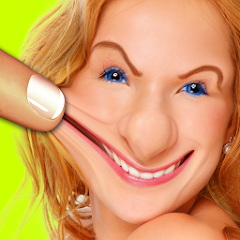
Warp My Face: Fun Photo Editor

5M+
Installs
Kaufcom Games Apps Widgets
Developer
-
Video Players & Editors
Category
-
Rated for 12+
Content Rating
-
info@kauf.com
Developer Email
-
http://www.kauf.com/cgi-bin/privacy_policy.pl
Privacy Policy
Screenshots
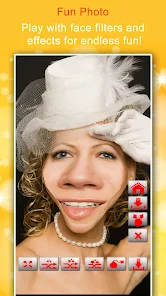
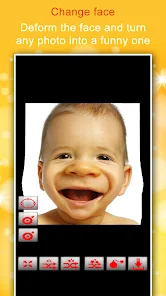
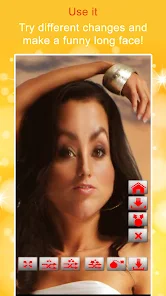
editor reviews
So I stumbled onto Warp My Face: Fun Photo Editor the other day while looking for something silly to kill time on a boring commute. It's basically a photo editing app focused entirely on distorting faces and adding goofy effects—belongs to that niche of entertainment apps meant for quick laughs. A lot of people use it for messing around with selfies or turning group photos into something ridiculous. The app sits at around 10 million installs on the Google Play Store, and yeah, it's free to download and install. Right after launching it, you're hit with a very colorful, almost cartoonish interface. It doesn't scream “polished” but feels approachable. First impression? It's like they knew you weren't looking for anything serious. There's no forced registration when you open it up. You can jump straight into editing from your gallery or camera. Some optional ads pop in here and there, but nothing that blocks you entirely unless you want to remove them through a small in-app purchase.
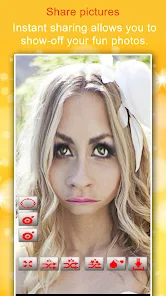
Actually using Warp My Face is where it gets interesting. The interface has three main tabs at the bottom: one for selecting photos, one for quick effects, and one for more detailed warping tools. Onboarding is basically non-existent—you just start swiping through options. The hands-on experience feels a little like playing with digital clay. You pinch, push, stretch, or twist parts of the face using sliders and touch gestures. The app does a decent job at recognizing facial landmarks automatically, but sometimes you have to manually adjust the effect area if the person is looking sideways. Common usage steps usually go like this: pick a photo, tap “warp,” choose an effect like “big nose” or “puckered lips,” then adjust the intensity. A small tip for newcomers: don't overdo the effect right away because the preview can lag a bit if you crank everything to maximum. After applying, you can add some text or stickers tied to holidays. The whole process takes maybe two minutes until you're sharing the image.
After using it for a while, I got mixed feelings. The app is genuinely fun for quick laughs with friends or for prank-style social media posts. If you're someone who enjoys apps like FaceApp or Snapchat filters but wants deeper control over individual features, this might feel refreshing. Yet, it doesn't offer any real photo editing outside of warping—no filters, no background replacement, nothing like that. Compared to something like YouCam Perfect, which does both retouching and fun effects, Warp My Face feels much more one-dimensional. People who want polished selfies will uninstall it after a day. But for those who just want to make a buddy's forehead double in size for a group chat, it stays installed in my phone. The app is different because it focuses fully on distortion rather than beauty enhancements. Honestly? I keep it around for those rare moments when a boring picture needs a stupid twist.
features
- 🔄 Warp My Face lets you distort photos by pushing, pulling, or stretching specific areas with touch gestures, unlike Candy Camera which focuses mostly on beauty filters and smoothing. Warp My Face gives you more freedom to warp noses, eyes, or cheeks independently rather than applying a preset look.
- 💥 Warp My Face offers instant silly effects like “tornado face” or “alien head” that warp photos in one tap. FaceApp lacks these quick absurd options. You get fast access to making someone's entire face look like a melted candle without tweaking sliders forever.
- 🖼️ Warp My Face includes holiday-themed stickers and text overlays you can drop right after warping. Snapchat only has lenses for real-time use but no such post-effect decorations to add to saved photos. It's a small touch but makes sharing ready-to-post memes much easier.
- ⚙️ Warp My Face lets you adjust effect intensity for each facial feature separately using sliders. PicsArt does support some warp features, but Warp My Face keeps everything simpler and more focused by avoiding hundreds of unrelated editing tools. You don't get overwhelmed with layers or complex masks.
pros
- 🛠️ The app has a tool that automatically detects facial keypoints, so warping feels responsive and accurate even on group shots. In YouCam Perfect you need to tap specific face points manually before applying effects, which takes more effort.
- 🎨 Warp My Face has a very quick undo feature for each step without ruining your whole progress. Candy Camera lacks such granular control, forcing you to restart entirely if a warp goes too far.
- ⚡ The app loads effects almost instantly even on older devices. Snapchat lenses often stutter on phones with less RAM, but Warp My Face stays stable because it works on saved photos not live camera feed.
- 💾 You can save images in full resolution without watermarks unless you skip optional ads. FaceApp forces a watermark on the free version unless you pay, which feels more limiting.
cons
- ⏳ There is a lot of waiting for ads after saving or switching effects. And those ads sometimes open the app store automatically. I don't get that kind of intrusiveness in PicsArt's free mode, where ads are banners mostly.
- 🔄 The app can be unresponsive sometimes when you try to zoom into a specific facial feature. It glitches and shifts the entire photo instead. Candy Camera handles zoom and edit selection much more smoothly.
- 🎯 The warp precision is hit or miss on small faces in group photos. FaceApp detects facial features more reliably even on tiny thumbnail-like faces, so Warp My Face might require you to crop the face first.
- 🎭 Some sticker packs are hidden behind a paywall, which feels like a tease after you apply a warp. Snapchat offers way more free lenses and stickers without making you pay for each holiday theme.
Recommended Apps
![]()
16Personalities
16Personalities4
![]()
Zodiac Palm Reader: MagicWay
Reatility Media4.6
![]()
Moblo - 3D furniture modeling
MYTIforge4.1![]()
Magnifier Plus with Flashlight
Digitalchemy, LLC4.6![]()
QR Code Scanner
QR Code Scanner & Barcode Reader4.7![]()
FalFal: Astrology, Tarot, Love
FalFal Team4.8![]()
Christmas Photo Frames
PhotoFramesApps4.6![]()
AI Video Art Creator - Livensa
FERASET4.5![]()
Horoscope of Birth
Denimaks4.4![]()
Make Me Bald Prank
AppTornado2.5![]()
Kling AI: AI Image&Video Maker
Lohas Games Pte. Ltd.4.4![]()
Japan Timetable & Route Search
NAVITIME JAPAN CO., LTD.4.3![]()
Prank Call & Funny Video
TeH Software0![]()
Parallax 3D Live Wallpapers
TarrySoft4.3![]()
AI Chatbot - Nova
ScaleUp4.7















Disclaimer
1.AppInfoLibrary does not represent any developer, nor is it the developer of any App or game.
2.AppInfoLibrary provide custom reviews of Apps written by our own reviewers, and detailed information of these Apps, such as developer contacts, ratings and screenshots.
3.All trademarks, registered trademarks, product names and company names or logos appearing on the site are the property of their respective owners.
4. AppInfoLibrary abides by the federal Digital Millennium Copyright Act (DMCA) by responding to notices of alleged infringement that complies with the DMCA and other applicable laws.
5.If you are the owner or copyright representative and want to delete your information, please contact us info@appinfolibrary.com.
6.All the information on this website is strictly observed all the terms and conditions of Google Ads Advertising policies and Google Unwanted Software policy .














