
Doodle Art: Magic Drawing App

5M+
Installs
Peaksel Games
Developer
-
Art & Design
Category
-
Rated for 3+
Content Rating
-
support@peaksel.email
Developer Email
-
https://www.peaksel.com/privacy-policy-for-free-apps/
Privacy Policy
Screenshots
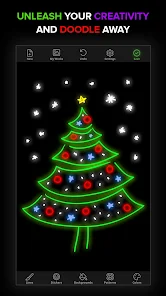
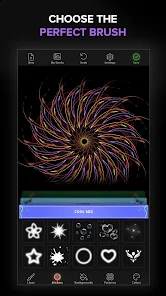
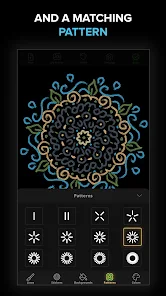
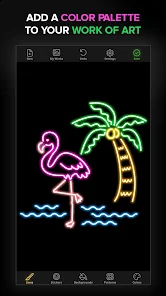
editor reviews
I first came across Doodle Art: Magic Drawing App while browsing the Google Play Store for something relaxing to kill time. It's essentially a coloring book app, but instead of realistic scenes, it focuses entirely on whimsical, hand-drawn style patterns. You download it for free and can instantly start coloring a bunch of sample pages. The very first impression after launching the app is a bit of a shock — the interface feels quite cluttered, with pop-ups pushing premium packs right in your face. There's no forced registration or heavy tutorial, which is nice, but you do notice the ads quite quickly. Still, the actual coloring part runs smooth and the touch controls respond well, so you don't feel like deleting it immediately.
Once you get past the initial barrage of offers, the hands-on experience is actually pretty decent. The app gives you a black-and-white doodle; you simply tap on the area you want to color, and it fills in. You don't have to stay inside the lines like with traditional coloring books. There is a small selection of palettes to choose from, but the free ones are limited — you get maybe 12 colors per picture unless you watch an ad to unlock more. Navigating between pages is straightforward: swipe left or right to browse your library, tap to start. The zoom feature works well for intricate spots, though rotating isn't intuitive. Onboarding wise, it's so simple that even someone who isn't great with phones can start coloring in seconds. One thing that feels nice is the satisfying pop sound when you finish filling a section.
After using Doodle Art for a few days, I think it's fine for casual relaxation, especially if you enjoy doodle-style art over more realistic adult coloring pages. If you're pixel-perfect type or want layered shading, this isn't for you. What makes it different from apps like Colorify or Happy Color is the hand-drawn aesthetic — these designs look like someone scribbled them on a napkin, which has a certain charm. However, the constant nudges to buy the premium version or watch ads for extra colors get old fast. I could see someone keeping it installed if they commute a lot and need a quick boredom killer. But I also understand why many would uninstall after a week — the locked content pile gets frustrating unless you pay. For a free app though, it delivers what it promises: mindless, low-pressure doodling.
features
- 🎨 The core mechanic is the tap-to-fill coloring system. You literally just tap any closed area of the doodle and it instantly fills with the selected color. This is the same basic idea as apps like Colorfy or Happy Color. What stands out here is that the lines are thicker and the spaces are bigger, so even tiny tiles on a phone screen are easy to hit accurately without needing zoom or a stylus. It makes the whole process feel less fussy.
- 📚 The library is organized into themed packs — animals, mandalas, patterns, etc. You start with one or two free pictures per pack, and unlock the rest either by watching ads or paying. In a similar way, Happy Color offers hundreds of free pictures with no unlock grind. Doodle Art's approach feels more restrictive. However, the doodle artwork style is unique and isn't as common in other apps. The lines are sketchy and imperfect, which gives each piece a handmade feel.
- 🖌️ The color palette is limited in the free version but is still usable for basic coloring. You get a set of pastels, brights, and darks. If you want gradient or glitter effects, you have to unlock them. What's outstanding is that the app remembers your recently used colors, so if you're repeatedly using the same shade across a picture, it stays at the top of your palette. This small detail actually saves a lot of scrolling.
pros
- 👍 The interface is extremely beginner-friendly. You don't need to manually swipe to stay inside lines like in some apps. Colorfy requires you to tap exactly inside each section, whereas Doodle Art has a forgiving tolerance. This makes it great for kids or anyone who just wants to zone out without stress.
- 👍 Offline functionality is a real strength. Once you've downloaded a picture pack, you can color without any internet connection. In contrast, many apps like Pixel Art or Sandbox Coloring force you to stay online. This is a big win if you color on the subway or during a flight.
- 👍 The auto-save feature is seamless. You can leave mid-picture, close the app, and come back a week later to continue right where you left off. No manual saving, no progress loss. Happy Color sometimes loses progress if you switch apps too quickly. Doodle Art handles this reliably.
cons
- 👎 The ad frequency is quite high. After finishing every three or four sections, a full-screen video ad plays. Sometimes it even pops up when you're just browsing the menu. Compared to Colorfy, which places ads more sparingly, this feels intrusive and disrupts the relaxation flow.
- 👎 The premium content wall is frustrating. You get maybe 10 free pictures total, and the rest are locked behind either watching multiple ads per image or buying the full version. Apps like Happy Color give you hundreds of completely free images without this gatekeeping. It makes Doodle Art feel more like a demo than a full app.
- 👎 The palette variety is thin even after unlocking some colors. You can't mix custom shades. If you want a specific teal or dusty rose, you're out of luck. In contrast, apps like Pigment let you create your own hex colors. Doodle Art feels restricted in this area for anyone who cares about color accuracy.
Recommended Apps
![]()
16Personalities
16Personalities4
![]()
Zodiac Palm Reader: MagicWay
Reatility Media4.6
![]()
Moblo - 3D furniture modeling
MYTIforge4.1![]()
Magnifier Plus with Flashlight
Digitalchemy, LLC4.6![]()
QR Code Scanner
QR Code Scanner & Barcode Reader4.7![]()
FalFal: Astrology, Tarot, Love
FalFal Team4.8![]()
Christmas Photo Frames
PhotoFramesApps4.6![]()
AI Video Art Creator - Livensa
FERASET4.5![]()
Horoscope of Birth
Denimaks4.4![]()
Make Me Bald Prank
AppTornado2.5![]()
Kling AI: AI Image&Video Maker
Lohas Games Pte. Ltd.4.4![]()
Japan Timetable & Route Search
NAVITIME JAPAN CO., LTD.4.3![]()
Prank Call & Funny Video
TeH Software0![]()
Parallax 3D Live Wallpapers
TarrySoft4.3![]()
AI Chatbot - Nova
ScaleUp4.7















Disclaimer
1.AppInfoLibrary does not represent any developer, nor is it the developer of any App or game.
2.AppInfoLibrary provide custom reviews of Apps written by our own reviewers, and detailed information of these Apps, such as developer contacts, ratings and screenshots.
3.All trademarks, registered trademarks, product names and company names or logos appearing on the site are the property of their respective owners.
4. AppInfoLibrary abides by the federal Digital Millennium Copyright Act (DMCA) by responding to notices of alleged infringement that complies with the DMCA and other applicable laws.
5.If you are the owner or copyright representative and want to delete your information, please contact us info@appinfolibrary.com.
6.All the information on this website is strictly observed all the terms and conditions of Google Ads Advertising policies and Google Unwanted Software policy .














