
Draw Glow Comics

5M+
Installs
ColorJoy
Developer
-
Art & Design
Category
-
Rated for 3+
Content Rating
-
colorjoy.feedback@outlook.com
Developer Email
-
http://coloring.hk/colorjoy_privacy.html
Privacy Policy
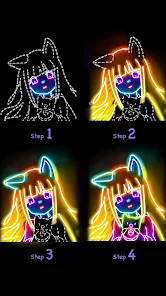
Screenshots
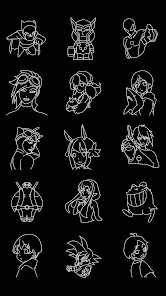
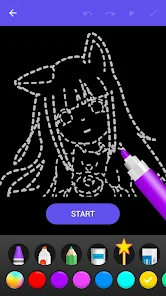
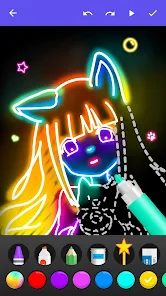
editor reviews
Draw Glow Comics by ColorJoy is a creative app that turns your smartphone into a glow-in-the-dark art studio. It's not your typical drawing app; instead of standard brushes and colors, you work with neon-like glowing effects on a dark canvas, which gives every piece a fun, slightly surreal vibe. A lot of people download it from Google Play or the App Store just to mess around with something different from the usual coloring or sketch apps. The first time you open it, the dark interface with bright, pulsating color options makes an immediate impression, and you can start doodling without any complex tutorials or sign-up hurdles. It's free to download, and while there are some in-app purchases and occasional ads for extra content, you don't feel pressured to pay right away.
Actually using the app is pretty straightforward and surprisingly addictive. After launching it, you're greeted by a mostly black screen with a selection of glowing colors at the bottom. The main action is just touching the screen and dragging your finger, and what comes out is this bright, slightly grainy glow that fades or stays depending on the setting you choose. The onboarding is minimal, so you might tap around a bit to figure out the tools, but that lack of hand-holding feels okay here since it's more about experimenting. In daily use, you might find yourself layering different colors on top of each other, then hitting the undo button when the effect looks messy. One tip that I picked up: if you want a smoother glow line, adjust the brush size and lower the transparency a bit before you start your stroke. The app handles fine on most phones, though it can lag a little if you're drawing something very detailed.
After spending some time with it, I can see why some people love this. It's perfect for bored teens, artists looking for a new style to try, or anyone who just wants to zone out and make trippy designs. On the other hand, if you expect precision tools, layers, or export options for professional work, you'd be disappointed. Compared to apps like Ibis Paint or even Procreate Pocket, Draw Glow Comics is extremely limited. What makes it stand out is that singular focus on glowing art. You won't find another app that nails that specific "drawing with light in a dark room" feeling as naturally. I kept it installed for those moments when I just want to make something cool without much thought. Others might uninstall it after a week once the novelty wears off, but for what it is, it delivers a unique, casual glow-drawing experience.
features
- 🎨 The standout feature is definitely the glow effect engine. While apps like Sketchbook or Procreate have standard brushes, Draw Glow Comics lets you paint with realistic, neon-like light on a completely black background. You can layer glowing colors to create the feeling of a blacklight poster or a cyberpunk scene, which is something you can't replicate easily in more traditional drawing tools without heavy manual adjustments.
- 🖌️ Another neat thing is the "ghost" drawing mode. This lets you draw a line that fades out over time, like a light trail. It's not a feature you find in most art apps, and it makes simple doodles look dynamic and animated. Compared to the static lines in something like Adobe Fresco, this gives your work a living, moving feel.
- ✨ The interface itself is a highlight. Almost every other drawing app uses a white or light gray background for its menus, but here everything stays dark to match your canvas. This makes the colors pop and keeps you focused on your art, unlike in Color by Number apps where bright menus can be distracting.
pros
- 🌟 One big strength is how fast you can start creating. Many apps like Ibis Paint or Medibang Paint require you to set up a canvas, choose brushes, and adjust layers first. Draw Glow Comics skips all that and lets you draw the second you open it. It's built for quick, satisfying sessions.
- 💡 Also, the color selection is curated specifically for glow effects. You don't get 200 shades of brown you'll never use. Instead, you get bright neon greens, electric blues, hot pinks, and pure whites that all look fantastic on the dark canvas. That curation saves time and helps beginners avoid bad color combinations.
- ⚡ Performance is surprisingly good for what it does. Some similar novelty drawing apps get slow or glitchy with longer strokes, but this one handles continuous glowing lines pretty smoothly on mid-range phones.
cons
- 🔋 A clear weakness is the lack of export options. You can save your art as an image, but other apps like Clip Studio Paint let you export in multiple formats or at higher resolutions. Here, the image quality is decent but not sharp enough for printing or professional use.
- 🖼️ The canvas size is also fixed. You can't change the dimensions or orientation. So if you want to draw a wide landscape or a tall portrait, you're stuck with the same square-ish crop. That's a big limitation compared to even the free version of Autodesk Sketchbook.
- 🛑 There's no layer system at all. In apps like Procreate, layers let you separate your characters from the background and edit them independently. Here, everything is on one flat layer, so if you mess up a line, you have to undo or erase, often ruining other parts of your drawing.
- 📢 The ads can be annoying. While the app is free, a banner ad at the bottom sometimes covers part of the color palette, and occasionally a full-screen video pops up right when you're about to finish a detailed line. That breaks the flow and isn't something you see in premium drawing tools.
Recommended Apps
![]()
16Personalities
16Personalities4
![]()
Zodiac Palm Reader: MagicWay
Reatility Media4.6
![]()
Moblo - 3D furniture modeling
MYTIforge4.1![]()
Magnifier Plus with Flashlight
Digitalchemy, LLC4.6![]()
QR Code Scanner
QR Code Scanner & Barcode Reader4.7![]()
FalFal: Astrology, Tarot, Love
FalFal Team4.8![]()
Christmas Photo Frames
PhotoFramesApps4.6![]()
AI Video Art Creator - Livensa
FERASET4.5![]()
Horoscope of Birth
Denimaks4.4![]()
Make Me Bald Prank
AppTornado2.5![]()
Kling AI: AI Image&Video Maker
Lohas Games Pte. Ltd.4.4![]()
Japan Timetable & Route Search
NAVITIME JAPAN CO., LTD.4.3![]()
Prank Call & Funny Video
TeH Software0![]()
Parallax 3D Live Wallpapers
TarrySoft4.3![]()
AI Chatbot - Nova
ScaleUp4.7















Disclaimer
1.AppInfoLibrary does not represent any developer, nor is it the developer of any App or game.
2.AppInfoLibrary provide custom reviews of Apps written by our own reviewers, and detailed information of these Apps, such as developer contacts, ratings and screenshots.
3.All trademarks, registered trademarks, product names and company names or logos appearing on the site are the property of their respective owners.
4. AppInfoLibrary abides by the federal Digital Millennium Copyright Act (DMCA) by responding to notices of alleged infringement that complies with the DMCA and other applicable laws.
5.If you are the owner or copyright representative and want to delete your information, please contact us info@appinfolibrary.com.
6.All the information on this website is strictly observed all the terms and conditions of Google Ads Advertising policies and Google Unwanted Software policy .














