
Diamond Zipper Lock Screen

10M+
Installs
Prometheus Interactive LLC
Developer
-
Productivity
Category
-
Rated for 3+
Content Rating
-
diamond.zipper.lock.screen@gmail.com
Developer Email
-
https://thaliadev.wixsite.com/thaliaapps/privacy-policy
Privacy Policy
Screenshots

editor reviews
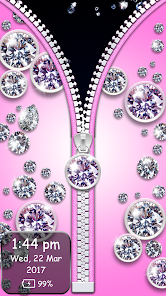
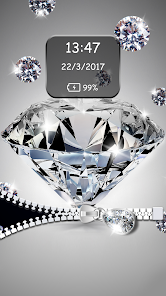
Diamond Zipper Lock Screen is a personalization app that replaces your phone's standard lock screen with a unique, zipper-themed interface. It's available for free on the Google Play Store and has been downloaded over a million times, though I'm not sure about the exact current count. You download and install it like any other app, and after launching, it asks for some standard permissions to function as your lock screen. The first impression is pretty striking — instead of a boring swipe or pattern, you get a metallic zipper that you actually drag up or down to unlock your phone. It feels flashy and different, like showing off a little accessory on your phone rather than just a utility.
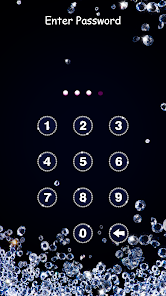
Once you start using it, the hands-on experience is mostly smooth. After granting accessibility permissions, the app takes over your lock screen, and you see the zipper right in the center. To unlock, you just drag the zipper tab up, and it makes a satisfying sound like a real jacket zipper. You can also pull it down to open specific shortcuts, like the camera or flashlight, which is handy. The interface is pretty straightforward — you can change the zipper style, pick different colors, and even adjust the sensitivity. I did have a few moments where the zipper felt a little laggy on my older phone, but it worked fine after I tweaked the settings. There's also a built-in wallpaper changer with lots of flashy backgrounds, but some of them feel a bit over-the-top for daily use.
After using it for a while, I'd say Diamond Zipper Lock Screen is fun but not for everyone. If you're someone who likes customizing your phone with unique, eye-catching lock screens, this app will probably stay on your phone for a few weeks at least. But if you prefer a clean, minimal look or a fast, no-nonsense unlock experience, you might find the zipper gimmick annoying over time. Compared to apps like Good Lock or Kustom Lock Screen, this one feels more like a novelty — it's not as deep in customization, but it's way easier to set up and use right away. I ended up keeping it for a while because it's genuinely fun to show your friends, but eventually I switched back to something simpler when I got tired of the extra second it takes to drag the zipper.
features
- 🪡 The main gimmick is the zipper itself — you unlock by dragging a metal zipper tab up or down, which feels satisfying and responsive. Compared to the standard swipe on stock Android, the tactile feedback of the zipper sound adds a playful touch, though it lacks the gesture complexity of something like Microsoft's Next Lock Screen.
- 🎨 You can customize the zipper style, colors, and background wallpapers through a simple menu. This is way easier than Kustom Lock Screen's steep learning curve, but the options are less comprehensive — no custom widgets or live data feeds, so it's more about looks than function.
- 🚀 Shortcuts built into the lock screen let you drag the zipper to specific positions to open apps like the camera or flashlight. It's handy, but not as seamless as the swipe shortcuts on CoverLock, which feel more natural for quick access.
pros
- 👍 Setting up the app is a breeze — you just install it, grant permissions, and you're done. No complex tutorials or configurations like you'd find in Good Lock, which requires messing around with multiple modules. This simplicity makes it great for casual users who want a quick change.
- 👍 The zipper animation is genuinely fun and smooth on most phones. It stands out from the boring patterns or PINs on stock lock screens, and the sound effect adds a layer of satisfaction that apps like Nova Lock Screen don't offer.
- 👍 Battery and performance impact is very light. I didn't notice any significant drain, unlike some heavy lock screen apps like AcDisplay that constantly update with notifications. It just sits quietly until you wake the phone.
cons
- 👎 The zipper gimmick gets old fast. After a week, I found myself annoyed by having to drag the zipper every time I unlocked the phone, especially when I was in a rush. Stock Android's swipe or fingerprint sensor is much faster and less obtrusive.
- 👎 The customization options are pretty limited compared to heavyweights like Microsoft Launcher's lock screen or SnapLock. You can only change colors and zipper styles, but there's no way to add custom widgets, weather info, or notification previews — things that make lock screens more useful.
- 👎 Accessibility permissions can be a privacy concern. The app needs these to function, which is common for lock screen apps, but I felt less comfortable than with built-in options or apps from bigger developers like Google or Microsoft.
Recommended Apps
![]()
16Personalities
16Personalities4
![]()
Zodiac Palm Reader: MagicWay
Reatility Media4.6
![]()
Moblo - 3D furniture modeling
MYTIforge4.1![]()
Magnifier Plus with Flashlight
Digitalchemy, LLC4.6![]()
QR Code Scanner
QR Code Scanner & Barcode Reader4.7![]()
FalFal: Astrology, Tarot, Love
FalFal Team4.8![]()
Christmas Photo Frames
PhotoFramesApps4.6![]()
AI Video Art Creator - Livensa
FERASET4.5![]()
Horoscope of Birth
Denimaks4.4![]()
Make Me Bald Prank
AppTornado2.5![]()
Kling AI: AI Image&Video Maker
Lohas Games Pte. Ltd.4.4![]()
Japan Timetable & Route Search
NAVITIME JAPAN CO., LTD.4.3![]()
Prank Call & Funny Video
TeH Software0![]()
Parallax 3D Live Wallpapers
TarrySoft4.3![]()
AI Chatbot - Nova
ScaleUp4.7















Disclaimer
1.AppInfoLibrary does not represent any developer, nor is it the developer of any App or game.
2.AppInfoLibrary provide custom reviews of Apps written by our own reviewers, and detailed information of these Apps, such as developer contacts, ratings and screenshots.
3.All trademarks, registered trademarks, product names and company names or logos appearing on the site are the property of their respective owners.
4. AppInfoLibrary abides by the federal Digital Millennium Copyright Act (DMCA) by responding to notices of alleged infringement that complies with the DMCA and other applicable laws.
5.If you are the owner or copyright representative and want to delete your information, please contact us info@appinfolibrary.com.
6.All the information on this website is strictly observed all the terms and conditions of Google Ads Advertising policies and Google Unwanted Software policy .














