
Video Live Wallpaper Maker

10M+
Installs
ZipoApps
Developer
-
Productivity
Category
-
Rated for 3+
Content Rating
-
support.videowallpaper@zipoapps.com
Developer Email
-
https://zipoapps.com/videowallpaper/privacy
Privacy Policy
Screenshots
editor reviews
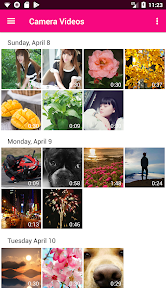
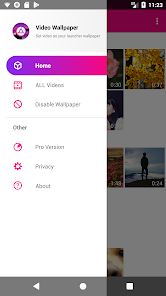
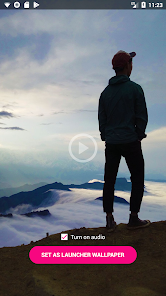
Video Live Wallpaper Maker, made by ZipoApps, is a personalization tool that turns any video clip from your phone into a moving background on your home or lock screen. It's basically one of those utility apps you grab when you're bored with static wallpapers and want your screen to feel more alive. I downloaded it from Google Play after seeing it had over 50 million installs and offered free use with optional in-app purchases. First impression after launching was pretty clean — no clutter, just a simple grid of sample wallpapers and a big button to pick your own video. You don't have to make an account, which I really appreciated because nothing kills my mood faster than being forced to sign up before even testing something.
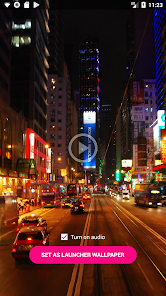
Once you start using it, the flow is straightforward. You tap "Pick Video", grab a clip from your gallery, and the app immediately shows a preview of how it'll look as your background. You can trim the video down, adjust brightness, or even set it to loop seamlessly, which is a nice touch because most people don't want a jarring restart every few seconds. Setting it as wallpaper takes two steps — one tap for the home screen, another for the lock screen. The interface is smooth most of the time, though I did notice a tiny lag when previewing longer videos on my older phone. One tip: use clips that are less than 15 seconds for best performance. A small thing I liked: they label videos as "optimized" for battery, which gives some peace of mind because animated wallpapers can drain your battery pretty fast.
After using it for a couple weeks, I'd say this app works best if you want a quick, fuss-free way to make your screen feel fresh without spending time learning complicated tools. People into personalization and short video loops will probably keep it installed. However, if you want dynamic wallpapers that respond to your music or change based on time of day, this app won't help — it's purely manual and static in its logic. Compared to something like Wallpaper Engine (on desktop) or even KLWP on Android, this one is way more limited but also way simpler. That's its main trade-off. I can see someone uninstalling it after a week because the novelty wears off, but if you're just looking for an occasional change, it's worth keeping around.
features
- 🌄 Unlike Muzei, which mostly gives you static art or remote images, Video Live Wallpaper Maker lets you turn any video from your phone into a wallpaper, making it feel much more personal. Muzei automatically rotates famous paintings, which is cool if you want inspiration, but this app is better if you want your own memories or clips on display.
- 🎬 You can trim and loop videos directly inside the app, so you don't need a separate video editor. This is a big deal because apps like Video to Wallpaper often push you to edit outside or charge for basic trimming. Here, you cut the exact moment you want and it loops flawlessly without effort.
- ⚡ The app shows a battery-friendly indicator for certain videos, which is something you rarely see in wallpaper tools. Most similar apps just let you set a video and drain your power without warning. This small label honestly helps you decide which clip to use based on how long you need your phone to last.
pros
- 🆓 It's completely free to install and use without any account required. A lot of similar apps like Kustom live wallpapers ask you to sign in or pay upfront just to try basic features. This one lets you test everything immediately, which lowers the barrier for casual users.
- 📱 The interface is dead simple compared to something like KLWP, which can feel overwhelming with its advanced editor and dozens of settings. If you just want a moving background without learning a new skill, this app gives you exactly that in two taps.
- ⚙️ The built-in trimmer and loop function are smooth and responsive, beating apps that force you to prepare videos externally. That convenience alone saves a lot of time and makes the app feel polished for everyday use.
cons
- 🔇 The app has no option to attach sound to wallpapers, which limits your creativity compared to apps like Video Live Wallpaper that allow audio playback. If you want a full multimedia experience, you lose that here completely.
- 📉 Performance on older phones is noticeably worse, with lag during preview and occasional stutters when applying longer clips. Competitors like Wallcraft handle compression better and feel smoother on low-end devices.
- 🔁 There's no automation or scheduling feature. Unlike Muzei, which can change your wallpaper daily or based on time, this app stays completely manual. You have to go back and change it yourself every time you want something different.
- 📺 The free version shows ads, and while they're not too intrusive, they pop up after every wallpaper change. Some other apps offer an ad-free experience from the start without requiring a purchase, which feels a bit nicer.
Recommended Apps
![]()
16Personalities
16Personalities4
![]()
Zodiac Palm Reader: MagicWay
Reatility Media4.6
![]()
Moblo - 3D furniture modeling
MYTIforge4.1![]()
Magnifier Plus with Flashlight
Digitalchemy, LLC4.6![]()
QR Code Scanner
QR Code Scanner & Barcode Reader4.7![]()
FalFal: Astrology, Tarot, Love
FalFal Team4.8![]()
Christmas Photo Frames
PhotoFramesApps4.6![]()
AI Video Art Creator - Livensa
FERASET4.5![]()
Horoscope of Birth
Denimaks4.4![]()
Make Me Bald Prank
AppTornado2.5![]()
Kling AI: AI Image&Video Maker
Lohas Games Pte. Ltd.4.4![]()
Japan Timetable & Route Search
NAVITIME JAPAN CO., LTD.4.3![]()
Prank Call & Funny Video
TeH Software0![]()
Parallax 3D Live Wallpapers
TarrySoft4.3![]()
AI Chatbot - Nova
ScaleUp4.7















Disclaimer
1.AppInfoLibrary does not represent any developer, nor is it the developer of any App or game.
2.AppInfoLibrary provide custom reviews of Apps written by our own reviewers, and detailed information of these Apps, such as developer contacts, ratings and screenshots.
3.All trademarks, registered trademarks, product names and company names or logos appearing on the site are the property of their respective owners.
4. AppInfoLibrary abides by the federal Digital Millennium Copyright Act (DMCA) by responding to notices of alleged infringement that complies with the DMCA and other applicable laws.
5.If you are the owner or copyright representative and want to delete your information, please contact us info@appinfolibrary.com.
6.All the information on this website is strictly observed all the terms and conditions of Google Ads Advertising policies and Google Unwanted Software policy .














