
Galaxy Starry Keyboard Backgro

1M+
Installs
Fun Keyboard Theme for Android
Developer
-
Productivity
Category
-
Rated for 3+
Content Rating
-
baojieminn@gmail.com
Developer Email
-
http://www.kikatech.com/privacy_en_kika_keyboard_theme.html
Privacy Policy
Screenshots


editor reviews
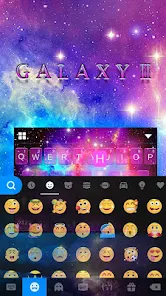
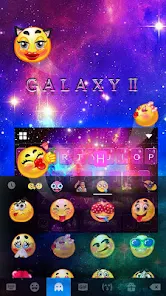
Galaxy Starry Keyboard Background is a theme app for Android that lets you swap out the look of your default keyboard with space-themed visuals. It's basically a cosmetic tool, not a keyboard itself, so you need to have a compatible keyboard app already installed, like GO Keyboard or a similar one. I found it on Google Play with over a million downloads, and it's free to install, though it does show ads and offers in-app purchases for extra themes. When I first launched it, the interface felt a bit cluttered with too many buttons and ads popping up right away, which was a little overwhelming. But the starry sky previews looked pretty cool, so I stuck with it to see what it could do.
After getting past the initial setup, the actual experience was hit or miss. You pick a theme from a grid of galaxy images, hit apply, and it redirects you to the keyboard app's settings to activate it. This step tripped me up at first because the app didn't explain that clearly. The themes themselves look decent—lots of nebulas, stars, and deep blues—but they only change the background wallpaper of the keyboard, not the keys or font style. So if you're expecting a full redesign, you'll be let down. In daily use, typing felt the same as before since the layout and responsiveness didn't change. A practical tip is to preview a theme before downloading it, because some images look grainy on higher resolution screens. The app also bombards you with full-screen ads after every few selections, which gets annoying fast, especially when you're just browsing casually.
After using it for a while, I think this app is for people who really want a quick and easy way to put a space vibe on their keyboard without diving into complex customization. It's not for anyone who wants control over every detail, like key colors or sound effects. Compared to apps like SwiftKey Themes or Gboard themes, Galaxy Starry is much more limited—those let you adjust everything from key borders to background blur. What sets it apart is its specific focus on galactic imagery, which is pretty niche. I kept it installed for a week just for the novelty, but eventually I uninstalled it because the ads drove me crazy and I wanted more flexibility. Someone who's really into astronomy-inspired aesthetics might hang onto it longer, but for most users, it's just a temporary decoration.
features
- 🌟 Galactic wallpaper selection: The app gives you hundreds of high-resolution space images, from swirling nebulas to close-up planets. What's impressive is you can preview each one before downloading, so you avoid wasting storage on themes you don't like. Compared to popular apps like GO Keyboard's built-in themes, which offer generic categories like “nature” or “abstract,” this app has a much tighter focus on cosmic visuals, making it stand out if you're obsessed with outer space.
- 🌟 No learning curve for basic use: You just tap a theme, hit apply, and the keyboard background changes instantly if you have a compatible keyboard installed. The process is dead simple, unlike apps like SwiftKey Themes where you have to navigate through multiple menus to change a single element. This makes it great for people who just want a quick refresh without tweaking a bunch of settings.
- 🌟 Frequent updates with new content: The developers regularly add fresh galaxy images, so the collection doesn't get stale. With other theme apps, you might see the same 50 options forever. Here, there's always something new to try, which keeps the app interesting over time.
- 🌟 Lightweight storage footprint: Each theme download is small, often under 1 MB, so you can stockpile a dozen without filling up your phone. That's a nice perk compared to apps like Zedge, which can have massive downloads for wallpapers that barely look different.
pros
- 🎯 Deep focus on cosmic themes: Unlike SwiftKey Themes or Gboard, which offer a broad mix of styles, this app sticks to space imagery. It's perfect for astronomy fans who want a consistent look across their keyboard.
- 🎯 Simple application process: You don't need to dig through complex settings like in AIO Keyboard Theme Manager. Just tap and apply, which is great for people who aren't techy.
- 🎯 No account or login required: You can start customizing immediately without signing up, unlike some apps that force registration for basic features. This lowers the barrier to entry.
cons
- ⚡ Heavy reliance on third-party keyboards: It won't work with Gboard or Samsung Keyboard unless you download a separate keyboard app like GO Keyboard first. That extra step kills the convenience for many users.
- ⚡ Excessive ads disrupt usage: Full-screen pop-ups appear after every few theme previews, which is way more intrusive than similar apps like Keyboard Theme Studio, which only shows banner ads.
- ⚡ No customization beyond background: You can't change key text colors, button shapes, or font styles. Apps like SwiftKey Themes let you tweak everything, so this app feels limited in comparison.
- ⚡ Preview images aren't always accurate: Some galaxy pictures look sharp in the app but turn blurry on the keyboard, especially on phones with higher pixel densities.
Recommended Apps
![]()
16Personalities
16Personalities4
![]()
Zodiac Palm Reader: MagicWay
Reatility Media4.6
![]()
Moblo - 3D furniture modeling
MYTIforge4.1![]()
Magnifier Plus with Flashlight
Digitalchemy, LLC4.6![]()
QR Code Scanner
QR Code Scanner & Barcode Reader4.7![]()
FalFal: Astrology, Tarot, Love
FalFal Team4.8![]()
Christmas Photo Frames
PhotoFramesApps4.6![]()
AI Video Art Creator - Livensa
FERASET4.5![]()
Horoscope of Birth
Denimaks4.4![]()
Make Me Bald Prank
AppTornado2.5![]()
Kling AI: AI Image&Video Maker
Lohas Games Pte. Ltd.4.4![]()
Japan Timetable & Route Search
NAVITIME JAPAN CO., LTD.4.3![]()
Prank Call & Funny Video
TeH Software0![]()
Parallax 3D Live Wallpapers
TarrySoft4.3![]()
AI Chatbot - Nova
ScaleUp4.7















Disclaimer
1.AppInfoLibrary does not represent any developer, nor is it the developer of any App or game.
2.AppInfoLibrary provide custom reviews of Apps written by our own reviewers, and detailed information of these Apps, such as developer contacts, ratings and screenshots.
3.All trademarks, registered trademarks, product names and company names or logos appearing on the site are the property of their respective owners.
4. AppInfoLibrary abides by the federal Digital Millennium Copyright Act (DMCA) by responding to notices of alleged infringement that complies with the DMCA and other applicable laws.
5.If you are the owner or copyright representative and want to delete your information, please contact us info@appinfolibrary.com.
6.All the information on this website is strictly observed all the terms and conditions of Google Ads Advertising policies and Google Unwanted Software policy .














