
HD Wallpapers (Backgrounds)

10M+
Installs
Android Station
Developer
-
Productivity
Category
-
Rated for 3+
Content Rating
-
support@androidstation.info
Developer Email
-
http://backgroundhd.androidstation.info/PrivacyPolicy.html
Privacy Policy
Screenshots
editor reviews
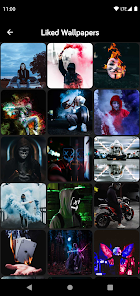
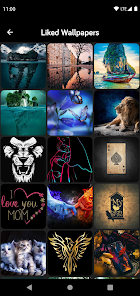
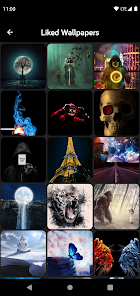
HD Wallpapers (Backgrounds) is a straightforward image collection app from developer Android Station, sitting squarely in the customization and personalization category. People mainly use it to find high-resolution pictures and set them as backgrounds on their phones or tablets. The app has been downloaded over ten million times on Google Play and is completely free to install, though it does show ads and offers some in-app purchases to remove them. The first impression after launching is a bit overwhelming at first because the screen fills up with hundreds of tiny thumbnails immediately, but it also feels promising if you're someone who gets bored of the same lock screen every week. There's no mandatory registration, so you can jump straight into browsing within seconds after opening it.
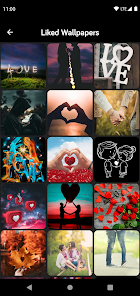
Once you start using it, the experience is pretty straightforward, but not always smooth. The interface is simple: a grid of images, a search bar at the top, and categories like "Abstract," "Nature," or "Dark" lined up below. Tapping a thumbnail shows a full preview, and from there, you can save the image to your device or apply it directly as a wallpaper. The first time I tried setting a picture, it prompted me to choose between "Home Screen," "Lock Screen," or both, which was a nice little touch. However, the app runs a full-screen ad almost every time you go back to the grid or switch categories, which breaks the flow pretty badly. One practical tip: if you find a category you like, download a batch at once instead of going back and forth, because each return trip triggers another ad. The search function works okay for broad terms, but sometimes returns random results that don't quite match what you typed.
After using it for a few days, I think this app is perfect for someone who just wants quick, decent wallpapers without any social features or complicated editing tools. It's not for people who care about curated collections or want to avoid interruptions, because the ads really are constant. Compared to something like Zedge, which offers ringtones and live wallpapers alongside static images, HD Wallpapers feels more focused but also more limited. The big draw here is the sheer number of images and how fast you can flip through them, but that's also what makes it feel disposable. I ended up keeping it installed because it's easy to open when I want a quick change, but I can see someone deleting it after a week if the ads drive them crazy.
features
- 📱 Content volume: HD Wallpapers offers a massive library with thousands of categories and hundreds of thousands of images, which easily beats apps like Walli or Vellum that rely on smaller, curated artist collections. You'll never run out of options here, even if the quality is more hit-or-miss.
- 📱 Direct apply feature: You can set an image as wallpaper directly from the app without needing to save it first. That sounds small, but apps like Pexels or Unsplash require you to download and then manually set it through your gallery, which adds an extra step. This app handles it in one tap.
- 📱 Battery-friendly options: The app includes a dedicated "AMOLED" category with true black backgrounds that save battery on phones with OLED screens. Most general wallpaper apps don't go that extra mile, so this is a smart inclusion for power users.
- 📱 Live preview before applying: When you select an image, the app shows you how it will look on both the home and lock screens with simulated icons and clocks. Other apps just show the raw image, leaving you to guess how it'll fit after the set.
pros
- ✅ Free and no registration: Unlike Backdrops or Walli, which lock certain categories behind a login or a paywall, HD Wallpapers lets you browse and download everything right away. You don't have to create an account, hand over your email, or sign in with Google.
- ✅ Massive real-time update: The image library updates frequently, so you rarely see the same top picks for long. Zedge often feels stale after a month, but this one keeps rotating content, which helps if you change wallpapers weekly.
- ✅ Low storage footprint: The app itself is tiny (under 10 MB) compared to something like Kustom Live Wallpaper, which takes up over 50 MB just for the engine. It's great if you're running low on space but still want customization options.
cons
- ❌ Aggressive ad interruptions: Every few taps trigger a full-screen video or pop-up, and it happens more frequently than in apps like Zedge or Resplash. It genuinely makes browsing feel like a chore after five minutes.
- ❌ No live wallpaper support: While apps like Kustom or even Zedge offer animated backgrounds, this one only handles static images. If you want something that moves, you'll have to look elsewhere entirely.
- ❌ Inconsistent image quality: Many wallpapers look crisp on the thumbnail but appear pixelated or stretched once applied. Apps like Vellum or Walli manually check every upload for resolution, but this one clearly doesn't, so you waste time saving duds.
- ❌ Limited editing tools: You cannot crop, adjust brightness, or blur the image before setting it. Even a basic app like PicsArt offers more control, so if you need fine-tuning, you'll have to edit externally first.
Recommended Apps
![]()
16Personalities
16Personalities4
![]()
Zodiac Palm Reader: MagicWay
Reatility Media4.6
![]()
Moblo - 3D furniture modeling
MYTIforge4.1![]()
Magnifier Plus with Flashlight
Digitalchemy, LLC4.6![]()
QR Code Scanner
QR Code Scanner & Barcode Reader4.7![]()
FalFal: Astrology, Tarot, Love
FalFal Team4.8![]()
Christmas Photo Frames
PhotoFramesApps4.6![]()
AI Video Art Creator - Livensa
FERASET4.5![]()
Horoscope of Birth
Denimaks4.4![]()
Make Me Bald Prank
AppTornado2.5![]()
Kling AI: AI Image&Video Maker
Lohas Games Pte. Ltd.4.4![]()
Japan Timetable & Route Search
NAVITIME JAPAN CO., LTD.4.3![]()
Prank Call & Funny Video
TeH Software0![]()
Parallax 3D Live Wallpapers
TarrySoft4.3![]()
AI Chatbot - Nova
ScaleUp4.7















Disclaimer
1.AppInfoLibrary does not represent any developer, nor is it the developer of any App or game.
2.AppInfoLibrary provide custom reviews of Apps written by our own reviewers, and detailed information of these Apps, such as developer contacts, ratings and screenshots.
3.All trademarks, registered trademarks, product names and company names or logos appearing on the site are the property of their respective owners.
4. AppInfoLibrary abides by the federal Digital Millennium Copyright Act (DMCA) by responding to notices of alleged infringement that complies with the DMCA and other applicable laws.
5.If you are the owner or copyright representative and want to delete your information, please contact us info@appinfolibrary.com.
6.All the information on this website is strictly observed all the terms and conditions of Google Ads Advertising policies and Google Unwanted Software policy .














