
Notepad, Notes, Easy Notebook

10M+
Installs
Simple Design Ltd.
Developer
-
Productivity
Category
-
Everyone
Content Rating
-
support@simpledesign.ltd
Developer Email
-
https://simpledesign.ltd/privacypolicy.html?pkg=notes.notepad.checklist.calendar.todolist.notebook
Privacy Policy
Screenshots
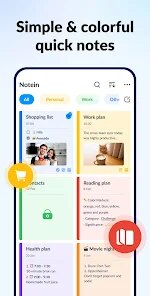
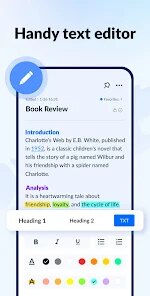
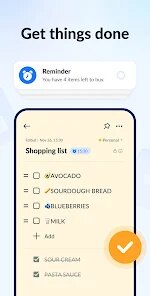
editor reviews
I've been using Notepad, Notes, Easy Notebook by Simple Design Ltd. for a while now, and it's basically a straightforward note-taking app you'd grab from Google Play or the App Store. It's meant for jotting down quick thoughts, making to-do lists, or keeping random bits of info handy. The first thing I noticed after downloading and launching it was how bare-bones everything felt—no flashy tutorial or account setup, just a blank page ready to go. There are in-app purchases for extra features like cloud backup and customization, but the core experience is free with minimal ads. The install count seems decent, and for a free app, it doesn't push you to pay right away.
Using it daily is pretty simple. The interface is clean, with a white background and basic formatting tools like bold, italic, and bullet points hidden in a toolbar at the top. I opened it to jot down a grocery list, and the process was smooth—tap the plus button, type away, and hit save. One thing that tripped me up initially was finding the folder option to organize notes; it's tucked away in a side menu that isn't super obvious. After a few tries, I got used to swiping left on a note to delete it or pin it to the top. A small tip: if you're typing something urgent, the app auto-saves as you go, so I never lost a random thought even when I closed it accidentally. It's not flashy, but it gets the job done without lag.
After using it for a couple of weeks, I'd say it's great for people who just want a simple, no-fuss notepad—like students scribbling lecture notes or someone tracking daily tasks without extra bells and whistles. But if you're into heavy organization or need features like audio recording or seamless syncing across devices, you might find it lacking compared to apps like Notion or Google Keep. What sets it apart is its offline focus; I can type away without worrying about an internet connection, and it never nags me about sharing notes. I'll probably keep it installed for quick jots, but for complex projects, I'd switch to something more robust. It feels like a digital sticky note—handy but limited.
features
- 📝 Quick Capture Mode: The app opens directly to a typing screen without any splash or delay, perfect for grabbing ideas fast. When I compare it with Google Keep, which takes a second to load and sync online, this one feels more immediate. Its standout feature is the auto-save, so I never worry about losing a half-typed thought.
- 📝 Folder Organization: You can group notes into custom folders, like “Work” or “Personal,” with a simple drag-and-drop system. Evernote offers similar folders, but this app keeps it cleaner without tagging options. The outstanding part is how you can set a folder as default, so new notes go there automatically.
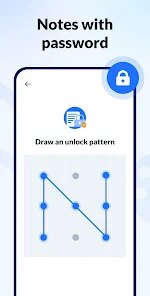
- 📝 Password Protection: Locking individual notes or whole folders with a PIN is a huge plus for privacy. Compared to Apple Notes, which requires device-level security, this lets you hide specific sensitive notes without locking your whole phone. The standout is that unlocking retains all formatting, so it's seamless.
pros
- 👍 Offline Reliability: Unlike Google Keep, which feels broken without internet, this app works perfectly offline. I can type and organize anywhere, and it saves locally without waiting for a connection.
- 👍 No Clutter: Simplicity is its best trait. Where Notion overwhelms me with databases and templates, this app has zero distractions—just pure text entry. It's refreshing for quick notes.
- 👍 Low Battery Usage: The app is lightweight and barely drains my phone's battery, unlike heavy note apps that hog resources. I've left it open for hours without any system slowdown.
cons
- 👎 No Sync Across Devices: Unlike Evernote, which syncs seamlessly, this app lacks cloud sync unless you buy the in-app upgrade. I can't access my notes on my laptop, which is a dealbreaker for some people.
- 👎 Limited Formatting: Basic bold or italic works, but you can't insert tables, images, or checkboxes directly. Google Keep handles lists better with tick boxes, and I miss that for daily tasks.
- 👎 Clunky Search: The search function only scans note titles, not the full content, which makes finding notes harder. Apple Notes searches inside text much better, and this feels like a step back.
- 👎 No Folder Sorting: You can create folders, but you can't sort them alphabetically or by date inside a folder. It gets messy quickly with many notes, unlike Notion's flexible views.
Recommended Apps
![]()
16Personalities
16Personalities4
![]()
Zodiac Palm Reader: MagicWay
Reatility Media4.6
![]()
Moblo - 3D furniture modeling
MYTIforge4.1![]()
Magnifier Plus with Flashlight
Digitalchemy, LLC4.6![]()
QR Code Scanner
QR Code Scanner & Barcode Reader4.7![]()
FalFal: Astrology, Tarot, Love
FalFal Team4.8![]()
Christmas Photo Frames
PhotoFramesApps4.6![]()
AI Video Art Creator - Livensa
FERASET4.5![]()
Horoscope of Birth
Denimaks4.4![]()
Make Me Bald Prank
AppTornado2.5![]()
Kling AI: AI Image&Video Maker
Lohas Games Pte. Ltd.4.4![]()
Japan Timetable & Route Search
NAVITIME JAPAN CO., LTD.4.3![]()
Prank Call & Funny Video
TeH Software0![]()
Parallax 3D Live Wallpapers
TarrySoft4.3![]()
AI Chatbot - Nova
ScaleUp4.7















Disclaimer
1.AppInfoLibrary does not represent any developer, nor is it the developer of any App or game.
2.AppInfoLibrary provide custom reviews of Apps written by our own reviewers, and detailed information of these Apps, such as developer contacts, ratings and screenshots.
3.All trademarks, registered trademarks, product names and company names or logos appearing on the site are the property of their respective owners.
4. AppInfoLibrary abides by the federal Digital Millennium Copyright Act (DMCA) by responding to notices of alleged infringement that complies with the DMCA and other applicable laws.
5.If you are the owner or copyright representative and want to delete your information, please contact us info@appinfolibrary.com.
6.All the information on this website is strictly observed all the terms and conditions of Google Ads Advertising policies and Google Unwanted Software policy .














