
Water Reminder - Remind Drink

10M+
Installs
recorder & smart apps
Developer
-
Health & Fitness
Category
-
Everyone
Content Rating
-
olympic.game.studio@gmail.com
Developer Email
-
https://sites.google.com/view/wrreminddrinkwater
Privacy Policy
Screenshots
editor reviews
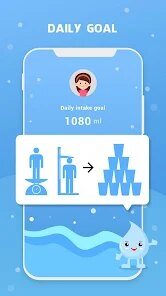
Water Reminder - Remind Drink is exactly what it sounds like: a hydration tracker that sits in your notification bar and nags you (politely) to sip water throughout the day. It is one of those utility apps that people usually download when they realize they have been running on coffee and energy drinks for weeks straight, or when their doctor casually mentions they need to drink more water. After downloading it from Google Play (it has a decent number of installs, freely available with optional in-app purchases and ads), launching it gives you a pretty clean first impression. The interface uses soft blue tones and a simple drop-shaped icon, nothing fancy. You set your daily goal by entering your weight and activity level, which feels straightforward and not overly clinical. The app asks for notification permissions right away, which makes sense for the whole "remind" part. The in-app purchases can unlock additional themes and remove ads, though honestly the default setup works fine without paying anything.
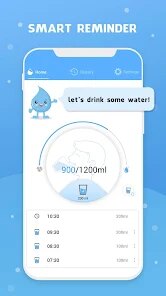
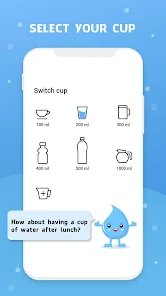
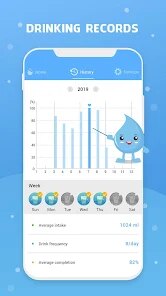
After the initial setup, the actual daily usage is fairly hands-off. You open the app, and the main screen shows a water glass filling up as you log drinks. To log, you tap a button, pick a predefined amount (like 250 ml or 500 ml), or type a custom one. The app also remembers common amounts you use, which is pretty convenient after a few days. One trick I found useful was setting reminders every 90 minutes instead of the default 30 minutes, because otherwise the notifications become overwhelming during a busy workday. The interface is smooth enough, though the animations can feel a bit sluggish on older phones. The app also tracks your weekly patterns, so you can see which days you are consistently low. There is a small daily streak feature that gives you a tiny motivational boost, which is pretty standard for these types of apps. No social features, no challenges, no leaderboards. It is purely a personal tool.
After using this for about a month, I can say it works well for someone who needs a simple, no-fuss reminder system and does not want to overthink their hydration. If you already drink enough water naturally, this app will probably just add clutter to your notifications. Compared to something like WaterMinder or Plant Nanny, this one feels much more minimal. WaterMinder has a more polished look and better health data integration, while Plant Naming adds a game layer (growing a plant when you drink). This one sits somewhere in between: not as pretty as WaterMinder, not as playful as Plant Nanny, but definitely more straightforward. I ended up keeping it installed because the reminder works and I like seeing my weekly graphs, but I completely understand why someone might delete it after a week if they find the constant notifications annoying. It does what it says, no more, no less.
features
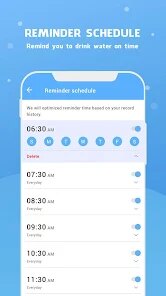
- 💧 Smart auto-reminders based on your daily activity: Instead of just pinging you every hour regardless, this app adjusts notification frequency based on your logged intake and activity level. If you are more active on a given day, it prompts you more often. Not a huge difference from WaterMinder's adaptive system, but it works well enough for everyday use.
- 📊 Visual water glass tracking with progress bars: The main interface is a simple glass filling up, which makes it easy to see your progress at a glance. Compared to My Water's more number-heavy display, this is much more intuitive. You can also tap the glass to log intake directly, which saves a few taps.
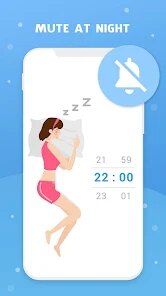
- 🔔 Customizable intervals and quiet hours: You can set different reminder frequencies for work hours and rest hours, as well as define specific time windows when notifications should be silent. This is pretty standard, but some apps like WaterMinder require a premium subscription for similar granularity. This one keeps it free with basic features.
- 🧊 Drink history with weekly summary view: The app logs every sip you take and displays a weekly bar chart. It is nothing groundbreaking, but the summary view is clean and easy to read. Plant Nanny hides similar data behind a gamification layer, which can be distracting if you just want raw data.
pros
- ✨ Completely free with no hidden paywalls for core functionality: Many similar apps, like WaterMinder or Aqualert, lock basic features behind a subscription or one-time purchase. This one lets you use all the essential features without paying a cent. Ads exist, but they are banner-based and not intrusive.
- 🚫 No account creation required: You can start using the app instantly without signing up. This is a big plus compared to some newer apps that force you to register with an email or social account just to set a water goal. The app respects your privacy from the start.
- 🎯 Simple, distraction-free design: There are no gamified elements, no plant growth mechanics, no social sharing. If you just want a straightforward reminder without extra clutter, this app delivers that better than Plant Nanny or WaterMinder, which both add layers of complexity.
cons
- 🔇 Notification fatigue: If you set reminders too frequently, the app becomes annoying quickly. Unlike WaterMinder, which offers a "smart delay" feature to avoid spamming you, this app just pings you at the set interval regardless. You have to manually adjust the frequency to avoid frustration.
- 📱 Limited customization options: You cannot change the water glass color, font, or layout in the free version. WaterMinder and even some free competitors like My Water offer more visual personalization. The app also lacks a dark mode natively, which feels outdated.
- 📉 No integration with health platforms: Unlike WaterMinder, which syncs with Apple Health and Google Fit, this app does not connect to any health data ecosystem. If you track your water intake as part of a broader health routine, you will have to enter everything manually, which can get tedious.
Recommended Apps
![]()
16Personalities
16Personalities4
![]()
Zodiac Palm Reader: MagicWay
Reatility Media4.6
![]()
Moblo - 3D furniture modeling
MYTIforge4.1![]()
Magnifier Plus with Flashlight
Digitalchemy, LLC4.6![]()
QR Code Scanner
QR Code Scanner & Barcode Reader4.7![]()
FalFal: Astrology, Tarot, Love
FalFal Team4.8![]()
Christmas Photo Frames
PhotoFramesApps4.6![]()
AI Video Art Creator - Livensa
FERASET4.5![]()
Horoscope of Birth
Denimaks4.4![]()
Make Me Bald Prank
AppTornado2.5![]()
Kling AI: AI Image&Video Maker
Lohas Games Pte. Ltd.4.4![]()
Japan Timetable & Route Search
NAVITIME JAPAN CO., LTD.4.3![]()
Prank Call & Funny Video
TeH Software0![]()
Parallax 3D Live Wallpapers
TarrySoft4.3![]()
AI Chatbot - Nova
ScaleUp4.7















Disclaimer
1.AppInfoLibrary does not represent any developer, nor is it the developer of any App or game.
2.AppInfoLibrary provide custom reviews of Apps written by our own reviewers, and detailed information of these Apps, such as developer contacts, ratings and screenshots.
3.All trademarks, registered trademarks, product names and company names or logos appearing on the site are the property of their respective owners.
4. AppInfoLibrary abides by the federal Digital Millennium Copyright Act (DMCA) by responding to notices of alleged infringement that complies with the DMCA and other applicable laws.
5.If you are the owner or copyright representative and want to delete your information, please contact us info@appinfolibrary.com.
6.All the information on this website is strictly observed all the terms and conditions of Google Ads Advertising policies and Google Unwanted Software policy .














