
Prank Call

1M+
Installs
MyPhoneRobot
Developer
-
Entertainment
Category
-
Rated for 12+
Content Rating
-
info@myphonerobot.com
Developer Email
-
https://myphonerobot.com/prank/prank-call-privacy.html
Privacy Policy
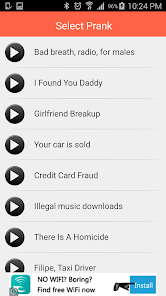
Screenshots
editor reviews
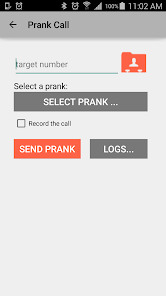
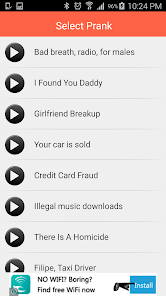
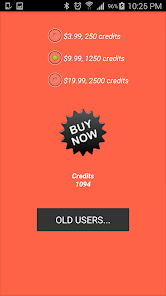
So, you download an app called Prank Call from the Google Play Store - it's basically a tool that lets you fake incoming phone calls to get out of awkward situations. It's a utility app meant for those moments when you're stuck in a boring conversation, a long meeting, or a date that's just not clicking. The idea is simple: you set up a fake caller with a name and a ringtone, and when you tap a button, boom, your phone lights up like someone's actually calling you. With over a million installs and it being free to download, the first impression after launching it is a bit dated but functional. The interface looks like something from a few years back, but it gets the job done without needing you to sign up or log in right away. There are a few in-app purchases if you want extra features like pre-recorded voices, but the basic fake call trick works from the get-go.
After using it for a bit, the hands-on experience is actually pretty smooth once you figure out the flow. The main screen offers options like "Fake Call Now" or "Schedule Call," so you're never more than a tap away from an exit strategy. I tried the instant call first: you choose a name from your contact list or type a random one, pick a ringtone, and hit the button. The phone starts ringing, the screen shows the caller ID, and you can even set it to vibrate for extra realism. One thing that caught me off guard was the delay - there's a split-second lag between tapping and the ring starting, which might tip off someone who's really paying attention. But if you're just using it to slip away from a chatty coworker, it's more than enough. The scheduled calls are neat too - set a timer for 2 minutes, and the fake call comes in like clockwork. I did notice the app has a few ads popping up after each use, which can be annoying, but they're not intrusive enough to ruin the trick.
After a few weeks of keeping it installed, I'd say Prank Call is a fun gimmick for casual users who need a quick escape now and then. If you're someone who hates confrontation or gets stuck in long conversations often, this app is a lifesaver. But honestly, it's not something you'll use daily unless you're in constant awkward social spots. Compared to similar apps like Fake Call or Fake Caller, this one feels simpler and more straightforward, though it lacks the polish of prank call apps that include actual pre-recorded conversations. What stands out is its reliability - the fake call feature works every time without crashing, which is more than I can say for some competitors. The timer feature is also a nice touch, letting you plan your exit without fumbling with the phone. That said, the dated design and occasional ads might make you uninstall it after the novelty wears off. I'd keep it around for emergencies, but it's not a permanent fixture on my home screen.
features
- 🎭 Fake Call with Custom Names: You can set the caller's name to anything you want - a friend, a boss, or even "Mom" - and the app displays their name and photo on the lock screen. Compared to Fake Caller, which often limits you to pre-set names, this gives you more control over the scenario, making the trick feel more believable when you're stuck in a meeting or a date.
- ⏰ Scheduled Calls for Precision: The app lets you schedule a fake call to ring after a set time, like 2 minutes or 5 minutes. This is way more useful than competitor Prank Dial, which only offers instant calls, because you can plan your exit without looking at your phone - just set it and forget it until the ringtone goes off, perfect for lectures or dinner parties.
- 📞 Realistic Call Screen and Vibration: The fake call triggers the actual phone interface, complete with the caller ID slide-to-answer screen and vibration patterns that match your phone's settings. Unlike Fake Call Free, which sometimes shows a generic screen that looks fake, this app mimics the real thing closely enough that even a tech-savvy friend might not notice it's a prank.
pros
- ✅ No Registration Required: Unlike Fake Caller Pro which forces you to create an account for full features, Prank Call lets you use the core fake call function right after download. No email, no password - just tap and go, which feels refreshing when you need a quick escape without the hassle.
- ✅ Works Offline: For situations where you have no Wi-Fi or cellular data - like a boring hiking trip or a subway commute - this app still functions because it doesn't rely on internet for the fake call simulation. Phone Pranker crashes without a connection, but Prank Call stays solid.
- ✅ Simple Interface for Quick Use: The layout sticks to basics with big buttons for "Fake Call Now" and "Schedule Call," so you don't waste time navigating menus. FakeCall has a cluttered design that takes extra taps, where this one gets you out of a jam in seconds.
cons
- ❌ Outdated Visual Design: The interface looks like it's stuck in 2015 with blocky icons and old-school fonts, which feels cheap compared to Fake Caller's modern, sleek appearance. This might turn off users who want a polished app even for a prank tool, though it still works fine functionally.
- ❌ Ads After Every Use: You get a full-screen ad after each fake call, which is annoying when you're trying to quickly hang up and move on. Phone Pranker has fewer ads, making Prank Call feel less smooth for frequent users who need multiple escapes in a day.
- ❌ No Pre-Recorded Voices: Unlike FakeCall that offers pre-recorded conversations with fake voices to sell the trick, Prank Call only gives you a ringing sound. So if someone picks up your phone, they'll see a call but no one will talk, which might expose the prank in more elaborate scenarios.
- ❌ Lag on Instant Calls: When you tap "Fake Call Now," there's a slight 1-2 second delay before the ring starts, which can seem unnatural if you're in a quiet room. Fake Caller responds instantly, making it less likely to arouse suspicion in tight spots like a library or a meeting.
Recommended Apps
![]()
16Personalities
16Personalities4
![]()
Zodiac Palm Reader: MagicWay
Reatility Media4.6
![]()
Moblo - 3D furniture modeling
MYTIforge4.1![]()
Magnifier Plus with Flashlight
Digitalchemy, LLC4.6![]()
QR Code Scanner
QR Code Scanner & Barcode Reader4.7![]()
FalFal: Astrology, Tarot, Love
FalFal Team4.8![]()
Christmas Photo Frames
PhotoFramesApps4.6![]()
AI Video Art Creator - Livensa
FERASET4.5![]()
Horoscope of Birth
Denimaks4.4![]()
Make Me Bald Prank
AppTornado2.5![]()
Kling AI: AI Image&Video Maker
Lohas Games Pte. Ltd.4.4![]()
Japan Timetable & Route Search
NAVITIME JAPAN CO., LTD.4.3![]()
Prank Call & Funny Video
TeH Software0![]()
Parallax 3D Live Wallpapers
TarrySoft4.3![]()
AI Chatbot - Nova
ScaleUp4.7















Disclaimer
1.AppInfoLibrary does not represent any developer, nor is it the developer of any App or game.
2.AppInfoLibrary provide custom reviews of Apps written by our own reviewers, and detailed information of these Apps, such as developer contacts, ratings and screenshots.
3.All trademarks, registered trademarks, product names and company names or logos appearing on the site are the property of their respective owners.
4. AppInfoLibrary abides by the federal Digital Millennium Copyright Act (DMCA) by responding to notices of alleged infringement that complies with the DMCA and other applicable laws.
5.If you are the owner or copyright representative and want to delete your information, please contact us info@appinfolibrary.com.
6.All the information on this website is strictly observed all the terms and conditions of Google Ads Advertising policies and Google Unwanted Software policy .














