
Artimind: AI Art Generator

10M+
Installs
Apero Vision Lab
Developer
-
Generative AI
Category
-
Rated for 12+
Content Rating
-
trustedapp.help@gmail.com
Developer Email
-
https://sites.google.com/view/ai-art-generator-policy/home
Privacy Policy
Screenshots


editor reviews
Artimind is an AI art generator that lets you turn text prompts and photos into stylized images, illustrations, and concept art. It belongs to the growing category of mobile-first creative tools using generative AI. You can mainly use it to create unique digital artwork for social media, wallpapers, or just for fun, without needing any drawing skills. I downloaded it from Google Play because I was curious about how well a free AI art app could perform on my phone. After launching it, the first impression was surprisingly clean and inviting. The install count seems decent, though not in the millions, and it is free to download with in-app purchases for extra features. Registration wasn't forced upfront, which I appreciated. There are occasional ads, but they did not ruin the experience. The home screen shows recent creations and a clear prompt input bar, so you can start making something right away. That immediate accessibility felt like a smart choice for casual users.
Once I started using it, the workflow felt straightforward. You type a description and pick a style from a decent list like anime, oil painting, or 3D render. The app processes the image in about ten to fifteen seconds, which is reasonable for free generation. I noticed the results were often hit or miss. Sometimes the app captured exactly what I imagined, but other times the object or face looked distorted. The interface is well organized, with tabs for different modes like text-to-image, image-to-image, and style transfer. I found the style transfer feature surprisingly useful for giving my own photos an artistic look. During onboarding, there is a quick tooltip guide that explains the basics, but it does not hold your hand too much. A small tip I discovered is to use very specific prompts with art style keywords to get better results. The history tab stores your creations, so you can revisit or tweak them later. Overall, the app feels smooth for short sessions, though it can get a bit choppy if you load too many high-resolution images.
After spending a few weeks with it, I think Artimind is best for people who want quick, fun AI art without a steep learning curve. It is not the best choice if you need high-fidelity, professional-level images, because the detail and consistency lag behind tools like Midjourney or Leonardo AI. What sets it apart is how mobile-friendly and beginner-friendly it is. You do not need a powerful PC or a subscription upfront. That said, I could see someone keeping it installed for casual inspiration or social media posts, but serious creators might uninstall it after hitting the quality ceiling. Compared to Dream by Wombo or Starryai, Artimind offers a bit more style variety and control, but it still cannot match the polish of paid desktop tools. It feels like a solid entry-level option that knows its limits.
features
- 🎨 Versatile style library: Artimind offers over 30 art styles, from watercolor to cyberpunk. In comparison, Dream by Wombo has fewer built-in style options and relies more on preset filters. This variety gives you more creative freedom without needing to pay for premium packs.
- 💡 Intuitive text-to-image workflow: You type a prompt, pick a style, and the image appears in seconds. Starryai requires you to set several parameters like aspect ratio and guidance scale before generating, which can feel overwhelming for beginners. Artimind keeps it simple with just the essentials.
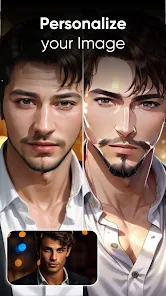
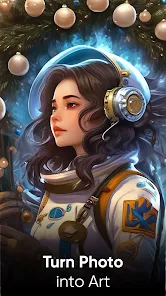
- 📸 Image-to-image and style transfer: You can upload your own photo and apply an artistic style, like turning a selfie into a Van Gogh painting. This feature works better than in Dream by Wombo, where the style transfer often looks unnatural or blurs the original subject too much.
pros
- 👍 Free daily credits let you generate multiple images without paying. Dream by Wombo also offers free credits, but Artimind's daily limit feels more generous for casual experiments.
- 👍 No watermarks on free images. Many free AI art apps, like Starryai, stamp a visible watermark unless you buy a subscription. Artimind keeps your creations clean, which is a big plus for sharing on social media.
- 👍 Offline style previews let you see how each style alters your prompt before generating. This saves credits and time, something I have not seen in similar mobile apps like Dream by Wombo.
cons
- 👎 Image resolution is capped at 1024x1024 for free users. Apps like Leonardo AI offer higher resolutions even in their free tiers, so Artimind feels restrictive for printing or detailed work.
- 👎 Occasional distorted faces and anatomy issues. Midjourney handles human figures much more consistently, while Artimind sometimes produces artifacts or misshapen body parts that require multiple retries.
- 👎 Slow generation queue during peak hours. I have waited over a minute for an image to render, whereas Dream by Wombo stays snappier even with heavy server load.
Recommended Apps
![]()
16Personalities
16Personalities4
![]()
Zodiac Palm Reader: MagicWay
Reatility Media4.6
![]()
Moblo - 3D furniture modeling
MYTIforge4.1![]()
Magnifier Plus with Flashlight
Digitalchemy, LLC4.6![]()
QR Code Scanner
QR Code Scanner & Barcode Reader4.7![]()
FalFal: Astrology, Tarot, Love
FalFal Team4.8![]()
Christmas Photo Frames
PhotoFramesApps4.6![]()
AI Video Art Creator - Livensa
FERASET4.5![]()
Horoscope of Birth
Denimaks4.4![]()
Make Me Bald Prank
AppTornado2.5![]()
Kling AI: AI Image&Video Maker
Lohas Games Pte. Ltd.4.4![]()
Japan Timetable & Route Search
NAVITIME JAPAN CO., LTD.4.3![]()
Prank Call & Funny Video
TeH Software0![]()
Parallax 3D Live Wallpapers
TarrySoft4.3![]()
AI Chatbot - Nova
ScaleUp4.7















Disclaimer
1.AppInfoLibrary does not represent any developer, nor is it the developer of any App or game.
2.AppInfoLibrary provide custom reviews of Apps written by our own reviewers, and detailed information of these Apps, such as developer contacts, ratings and screenshots.
3.All trademarks, registered trademarks, product names and company names or logos appearing on the site are the property of their respective owners.
4. AppInfoLibrary abides by the federal Digital Millennium Copyright Act (DMCA) by responding to notices of alleged infringement that complies with the DMCA and other applicable laws.
5.If you are the owner or copyright representative and want to delete your information, please contact us info@appinfolibrary.com.
6.All the information on this website is strictly observed all the terms and conditions of Google Ads Advertising policies and Google Unwanted Software policy .














