
Transparent Live Wallpaper

5M+
Installs
Mobi Softech
Developer
-
Productivity
Category
-
Rated for 3+
Content Rating
-
mobisoftech567@gmail.com
Developer Email
-
http://onex-28c2.kxcdn.com/moreapps/MobiSoftech-Privacy-Policy.html
Privacy Policy
Screenshots
editor reviews
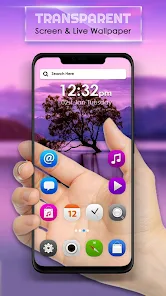
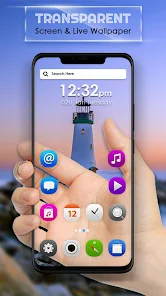
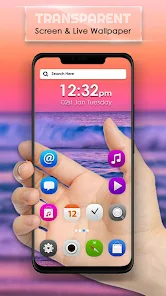
I remember stumbling upon Transparent Live Wallpaper by Mobi Softech on Google Play when I was just messing around looking for something to freshen up my phone screen. It's basically exactly what the name suggests – a live wallpaper app that focuses on making your home screen look like a clear, see-through window rather than just a static image. The whole deal is about transparency effects, so your icons and widgets kind of float over whatever is behind them. I downloaded it because it was free at the time, and the install count seemed decent, but honestly, the first impression after launch was a bit basic. The interface screams utilitarian, not fancy, and you can tell right away that this isn't one of those polished apps with smooth animations or flashy tutorials. You just jump straight into picking a background or adjusting how much transparency you want. There is some in-app stuff for extra wallpapers, but you can get by without spending anything.
Once I actually started playing around with it, things clicked pretty fast. You choose your wallpaper source – either from your gallery, a preset the app offers, or just a solid color – and then tweak the transparency slider until you get that fade effect. The main screen shows you a live preview so you can see how your icons look over the background. A small practical tip I picked up is to use a darker wallpaper underneath because otherwise text gets lost. Navigating the app is straightforward, but the interface feels a bit clunky in places. Sometimes the preview lags a bit, and switching between options isn't as snappy as I'd like. The onboarding is basically nonexistent, which is fine if you're used to tinkering, but a first-timer might feel lost. Daily use involves opening the app, picking a background, setting the transparency from like 10% to 90%, and applying it. That's it. It gets the job done, but there is no real smoothness in the process.
After having it on my phone for a while, my gut feeling is that this app is really for people who want a specific look without a lot of fuss. If you are someone who enjoys minimalist setups or wants your wallpaper to feel less like a solid block and more like a veil, this does that job. But if you're looking for dynamic interactive wallpapers or tons of customization like what you get with apps such as Wallpaper Engine or Muzei, this is way too plain. What makes it different is its simplicity – it does one thing with no bloat. I can see someone keeping it installed if they just want that transparent effect and don't care about extra features. But personally, I uninstalled it after a week because the lack of smoothness in previews bugged me, and the selection of presets felt too limited. It's not a bad app, just a very basic one that serves a very narrow taste.
features
- 🌿 The core idea is refreshingly simple: you pick any background from your gallery or their limited presets, slide a transparency bar from zero to almost see-through, and hit apply. It does not try to be a full Wallpaper Engine or Snowfall alternative. For example, where apps like Backdrops rely on curated art collections, this one just gives you that floating glass look without the fluff.
- 🌿 It uses your device's own resources for backgrounds, which means no forced download of themed packs. While Muzei Auto Wallpaper brings in famous art daily, this app simply borrows your own photos. You set a picture of your dog or a solid gray gradient, and with the transparency slider, your home screen icons suddenly look like they are hovering mid-air.
- 🌿 The battery consumption is reasonable compared to typical live wallpaper apps. I did not notice extra drain, unlike what often happens with Vellum or Forest Live Wallpaper that keep refreshing animated scenes. This one just overlays a transparent layer, so your phone stays cool while still looking kind of stylish.
- 🌿 It allows you to combine effects with third-party launchers like Nova Launcher or Niagara, letting you create a screen that feels almost invisible in parts. That's the main draw for minimalists – a hidden, airy desktop that other wallpaper apps rarely emphasize.
pros
- 👍 It stays lightweight and loads fast without hogging memory. I can keep it running in the background while using Google Maps or Chrome, something that Wallpaper Engine sometimes struggles with.
- 👍 The transparency control is granular, not just three preset blurs. You can go from a subtle tint to nearly invisible, which gives you more precision than what you get in the default Pixel wallpapers or OnePlus Shelf setups.
- 👍 It works offline right from the start. No mandatory login, no account creation, unlike KLWP Live Wallpaper that expects some learning curve and configuration.
cons
- 👎 The interface feels dated and clunky. When I use Muzei or even the basic Samsung Gallery live wallpaper option, the UI is smooth. Here, tapping options sometimes has a half-second delay, which makes it feel unfinished.
- 👎 The in-app wallpaper store is nearly empty. While Backdrops offers hundreds of exclusive artist-made backgrounds, this one gives you maybe 5 preloaded transparent patterns, and the rest you must supply yourself.
- 👎 No advanced layer control. I can not blend multiple images or adjust blur separately from opacity. Apps like PicsArt Wallpaper or even the older Tapet give much better per-layer handling for custom backgrounds.
- 👎 Occasional crashes after applying the wallpaper on Android 13 and 14. I had to force stop and reapply a few times, which is not something I ever face with the default Google Wallpapers app or Vellum.
Recommended Apps
![]()
16Personalities
16Personalities4
![]()
Zodiac Palm Reader: MagicWay
Reatility Media4.6
![]()
Moblo - 3D furniture modeling
MYTIforge4.1![]()
Magnifier Plus with Flashlight
Digitalchemy, LLC4.6![]()
QR Code Scanner
QR Code Scanner & Barcode Reader4.7![]()
FalFal: Astrology, Tarot, Love
FalFal Team4.8![]()
Christmas Photo Frames
PhotoFramesApps4.6![]()
AI Video Art Creator - Livensa
FERASET4.5![]()
Horoscope of Birth
Denimaks4.4![]()
Make Me Bald Prank
AppTornado2.5![]()
Kling AI: AI Image&Video Maker
Lohas Games Pte. Ltd.4.4![]()
Japan Timetable & Route Search
NAVITIME JAPAN CO., LTD.4.3![]()
Prank Call & Funny Video
TeH Software0![]()
Parallax 3D Live Wallpapers
TarrySoft4.3![]()
AI Chatbot - Nova
ScaleUp4.7















Disclaimer
1.AppInfoLibrary does not represent any developer, nor is it the developer of any App or game.
2.AppInfoLibrary provide custom reviews of Apps written by our own reviewers, and detailed information of these Apps, such as developer contacts, ratings and screenshots.
3.All trademarks, registered trademarks, product names and company names or logos appearing on the site are the property of their respective owners.
4. AppInfoLibrary abides by the federal Digital Millennium Copyright Act (DMCA) by responding to notices of alleged infringement that complies with the DMCA and other applicable laws.
5.If you are the owner or copyright representative and want to delete your information, please contact us info@appinfolibrary.com.
6.All the information on this website is strictly observed all the terms and conditions of Google Ads Advertising policies and Google Unwanted Software policy .














