

Step Counter - Pedometer

10M+
Installs
Hitchhike Tech
Developer
-
Health & Fitness
Category
-
Rated for 3+
Content Rating
-
support@inston.ltd
Developer Email
-
https://inston.ltd/privacypolicy.html?pkg=stepcounter.pedometer.stepstracker
Privacy Policy
Screenshots
editor reviews
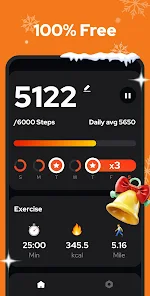
Step Counter - Pedometer by Hitchhike Tech is exactly what it sounds like: a straightforward pedometer app for Android. You download and install it from the Google Play Store, launch it, and the main screen is basically your step tally for the day. The big number right in the center makes it clear what the app cares about. It's free to install, with in-app purchases to remove ads and unlock a few extras. The first impression walking out the door is that it works without asking for much. You don't even need to sign up for an account, which avoids the annoyance of creating yet another login just to count steps. The app quietly sits in the background, tracking movement throughout the day.
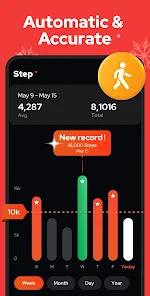
The actual hands-on experience after installing Step Counter is surprisingly light. Open the app, and you see your step count, distance, calories burned, and active time. There is a simple graph showing your activity over the week, which helps you notice lazy days or active streaks. Onboarding is minimal: the app asks for fitness tracking permission on newer Android versions, and that is pretty much it. A normal user would just carry their phone in their pocket or bag, and the step count updates automatically. One practical tip is to keep the app open or not aggressively kill background processes, because the step count can stop updating if the phone kills the app. The interface is clean but basic, with a few tabs for history and settings. It feels smooth for a simple tool, but you will not find deep analytics or fancy animations here.
After using Step Counter for a few weeks, it fills a specific role well. It is great for someone who just wants a simple step tally without any social features or workout logging, like what Google Fit or Samsung Health offer. People who enjoy minimalism and privacy will appreciate not having to link accounts. However, users who want detailed insights, heart rate integration, or community challenges might find it too plain. What makes it different from apps like Pacer or Pedometer++ is that it feels more like a background widget than a full fitness companion. I kept it installed because it works quietly and does not nag me. But I could see someone uninstalling it if they want more motivational features or if the background battery usage bothers them.
features
- 👣 Real-time step tracking without needing GPS: The app uses the phone's built-in sensor, which means it counts steps even indoors or underground without draining the battery from location services.
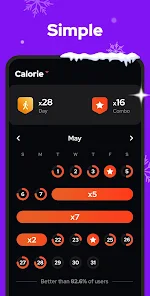
- 📊 Simple weekly history and goal setting: A straightforward graph shows your daily steps for the past seven days, making it easy to spot patterns. You can set a daily step goal and get a gentle notification when you hit it.
- 🗂️ No account or sign-up required: Unlike Google Fit or Samsung Health, this app works completely offline. You open it, grant permission, and start counting. For users who hate creating accounts, this is a big plus.
- 🔋 Low battery impact compared to GPS-heavy apps: Because it relies on the accelerometer rather than constant GPS polling, the battery drain is significantly lower than what you see with Strava or MapMyWalk.
pros
- 👍 Truly offline and private: Unlike Google Fit, which syncs everything to the cloud, Step Counter keeps your data on your device. No login, no data collection worries, just your steps on your phone.
- 👍 No bloat or social features: Apps like Pacer push community challenges, friend comparisons, and ad-heavy feeds. Step Counter keeps it simple, just steps and distance, which is refreshing if you only want the numbers.
- 👍 Background step counting works reliably: Once you grant the permission, the app counts steps even when you are not looking at it. Some competitors like Pedometer++ can sometimes stop updating if the phone goes idle for too long.
cons
- 👎 No heart rate or GPS integration: Unlike Google Fit or Samsung Health, this app cannot pull data from wearables or map your walking route. It is purely step counting, so users who want distance accuracy or GPS maps will be disappointed.
- 👎 Basic user interface feels dated: The design looks like a stock Android app from a few years ago. Pacer and Stepz have more modern, colorful interfaces with better animations and visual feedback.
- 👎 Ads in the free version can be intrusive: While you can remove them with a small in-app purchase, the free version shows banner ads and occasional pop-ups. Google Fit has no ads at all, which makes it feel cleaner.
- 👎 No export or backup options for your data: If you switch phones or uninstall the app, your step history is gone. Google Fit stores your history in the cloud, so you can access it from any device later.
Recommended Apps
![]()
16Personalities
16Personalities4
![]()
Zodiac Palm Reader: MagicWay
Reatility Media4.6
![]()
Moblo - 3D furniture modeling
MYTIforge4.1![]()
Magnifier Plus with Flashlight
Digitalchemy, LLC4.6![]()
QR Code Scanner
QR Code Scanner & Barcode Reader4.7![]()
FalFal: Astrology, Tarot, Love
FalFal Team4.8![]()
Christmas Photo Frames
PhotoFramesApps4.6![]()
AI Video Art Creator - Livensa
FERASET4.5![]()
Horoscope of Birth
Denimaks4.4![]()
Make Me Bald Prank
AppTornado2.5![]()
Kling AI: AI Image&Video Maker
Lohas Games Pte. Ltd.4.4![]()
Japan Timetable & Route Search
NAVITIME JAPAN CO., LTD.4.3![]()
Prank Call & Funny Video
TeH Software0![]()
Parallax 3D Live Wallpapers
TarrySoft4.3![]()
AI Chatbot - Nova
ScaleUp4.7















Disclaimer
1.AppInfoLibrary does not represent any developer, nor is it the developer of any App or game.
2.AppInfoLibrary provide custom reviews of Apps written by our own reviewers, and detailed information of these Apps, such as developer contacts, ratings and screenshots.
3.All trademarks, registered trademarks, product names and company names or logos appearing on the site are the property of their respective owners.
4. AppInfoLibrary abides by the federal Digital Millennium Copyright Act (DMCA) by responding to notices of alleged infringement that complies with the DMCA and other applicable laws.
5.If you are the owner or copyright representative and want to delete your information, please contact us info@appinfolibrary.com.
6.All the information on this website is strictly observed all the terms and conditions of Google Ads Advertising policies and Google Unwanted Software policy .














