
Anime Avatar Creator

1M+
Installs
Beauty Mania Apps and Games
Developer
-
Social
Category
-
Rated for 3+
Content Rating
-
animeavatarcreatorapp@gmail.com
Developer Email
-
https://beautymaniaapps.wixsite.com/bmaag/privacy-policy
Privacy Policy
Screenshots
editor reviews
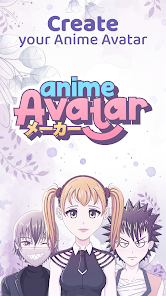
Anime Avatar Creator is a mobile tool that lets you design and build your own anime-style character from scratch, falling squarely into the avatar-maker and self-expression genre. I stumbled across it on Google Play one evening, curious after seeing friends share stylized profile pics on social media. With over 10 million downloads and a free download option, it felt like a no-brainer to install. Once I launched the app, the splash screen popped with bright, cartoony colors, and right away I spotted a few cheeky in-app purchase prompts for extra hairstyles and outfits, but the core editor didn't lock me out. Registration wasn't required to start messing around, which was a relief early on.
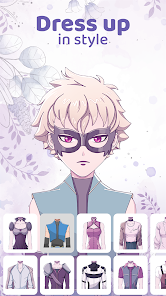
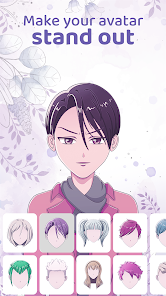
Opening the editor, you land on a simple base face with sliders for everything: eye shape, nose size, mouth style, and skin tone. The interface isn't cluttered, but some icons felt a bit ambiguous at first look. You tap on facial features, then use a sliding bar to adjust, and the avatar updates instantly. I started with a spiky hairstyle and swapped the eye color to violet, then moved on to clothing. There's a drag-and-drop wardrobe section where you pick tops, bottoms, and accessories like cat ears or glasses. The whole process is fast, and within five minutes I had a character that genuinely looked like a drawn version of myself. A small tip: if you want a more unique look, scroll past the preset hairstyles and fiddle with the bar sliders, since the popular defaults are a bit overused by others.
After using this app off and on for about a week, I think it hits a sweet spot for casual anime fans who want quick customization without opening a full art program. It's definitely not for someone looking to draw their own character line by line, since the tools are preset-based. Compared to something like Avatar Maker: Anime or Charat, this one leans heavily into speed and simplicity, which I appreciate, but the limited hair color palettes started bugging me after a few designs. I'd keep it installed for making random profile icons, but if you want deeper editing or to share outfits with a community, you might drift toward other apps.
features
- 👁️ The hair editor includes separate layers for bangs, side locks, and back hair, letting you tweak parts individually rather than picking a single preset. I found this useful when I wanted side pieces but not full bangs, something Charat doesn't offer as smoothly.
- 👁️ There's a randomize button that cycles through all combos in one tap, which is fun for inspiration or quick laughs, and it actually produces wearable looks instead of weird mismatches like in some similar apps.
- 👁️ The outfit section has a surprising variety of casual and fantasy clothes, including school uniforms, hoodies, and even wings, which covers more genres than Avatar Maker: Anime typically does.
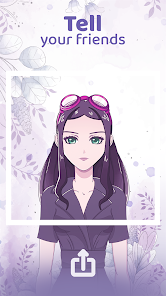
- 👁️ You can export your avatar as a transparent PNG directly to your gallery or share it to social media without heavy compression, saving time compared to other editors that force a border or watermark.
pros
- 🌟 The setup is incredibly fast; I made my first complete avatar in under three minutes, whereas a tool like Charat requires clicking through multiple menus before seeing any preview.
- 🌟 The slider-based customization feels natural and precise, letting you fine-tune eye width or mouth curvature smoothly, something that feels clunky in Avatar Maker: Anime which relies on fixed icon swaps.
- 🌟 There's no forced account creation to start designing, so you can jump right in and play, which honestly feels refreshing compared to apps that nag you to sign up immediately.
cons
- ⚠️ The free version has a ton of locked items behind in-app purchases, so you end up seeing a lot of grayed-out hairstyles and clothing pieces, which can feel discouraging compared to Charat's more open free offerings.
- ⚠️ The background options are very limited, only a handful of solid colors and no custom uploads, while some similar apps let you drop in your own photos or patterns.
- ⚠️ Hair color customization feels shallow; you can only pick from around 15 preset shades, and there's no saturation or brightness slider, which made my orange hair look a bit flat.
- ⚠️ The app crashes occasionally when I try to export a high-res image, especially on an older phone, and it doesn't auto-save drafts, so I lost a design once.
Recommended Apps
![]()
16Personalities
16Personalities4
![]()
Zodiac Palm Reader: MagicWay
Reatility Media4.6
![]()
Moblo - 3D furniture modeling
MYTIforge4.1![]()
Magnifier Plus with Flashlight
Digitalchemy, LLC4.6![]()
QR Code Scanner
QR Code Scanner & Barcode Reader4.7![]()
FalFal: Astrology, Tarot, Love
FalFal Team4.8![]()
Christmas Photo Frames
PhotoFramesApps4.6![]()
AI Video Art Creator - Livensa
FERASET4.5![]()
Horoscope of Birth
Denimaks4.4![]()
Make Me Bald Prank
AppTornado2.5![]()
Kling AI: AI Image&Video Maker
Lohas Games Pte. Ltd.4.4![]()
Japan Timetable & Route Search
NAVITIME JAPAN CO., LTD.4.3![]()
Prank Call & Funny Video
TeH Software0![]()
Parallax 3D Live Wallpapers
TarrySoft4.3![]()
AI Chatbot - Nova
ScaleUp4.7















Disclaimer
1.AppInfoLibrary does not represent any developer, nor is it the developer of any App or game.
2.AppInfoLibrary provide custom reviews of Apps written by our own reviewers, and detailed information of these Apps, such as developer contacts, ratings and screenshots.
3.All trademarks, registered trademarks, product names and company names or logos appearing on the site are the property of their respective owners.
4. AppInfoLibrary abides by the federal Digital Millennium Copyright Act (DMCA) by responding to notices of alleged infringement that complies with the DMCA and other applicable laws.
5.If you are the owner or copyright representative and want to delete your information, please contact us info@appinfolibrary.com.
6.All the information on this website is strictly observed all the terms and conditions of Google Ads Advertising policies and Google Unwanted Software policy .














