

Photoleap: AI Photo Generator

10M+
Installs
Lightricks Ltd.
Developer
-
Generative AI
Category
-
Everyone
Content Rating
-
Photoleap.Android.support@lightricks.com
Developer Email
-
https://static.lightricks.com/legal/privacy-policy.html
Privacy Policy
Screenshots


editor reviews
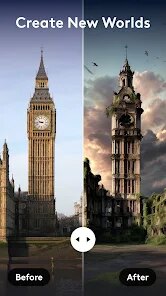
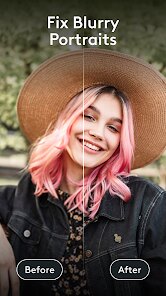
Photoleap is an AI-driven photo editing app from Lightricks, the same team behind popular tools like Facetune. It's basically a creative playground for turning ordinary snapshots into something more artistic or surreal. You can download it for free on both Google Play and the App Store, though it does come with in-app purchases for the full set of features. The first time you launch Photoleap, the interface feels bright and intuitive, almost like stepping into a mini studio where everything is just a tap away. It didn't ask for registration upfront, which was a nice surprise, and you can start playing with filters and AI effects immediately without any paywall blocking the entry point.
After using it for a few days, the hands-on experience is pretty smooth. The onboarding walks you through the main tools without being pushy, and you quickly get to the fun part: uploading a photo and applying one of the many AI effects. I started with a simple portrait and used the "Art" style to turn it into an oil painting, which took only a few seconds. The more complex features, like the "Text to Image" generator, are straightforward too. You type a description, and the app creates an image from scratch, though the results can be hit or miss when you want something very specific. Swiping between different styles is satisfying, and the undo button is always handy when an effect goes overboard. One small tip: the "Generate" button sometimes takes a bit longer if the server is busy, so patience helps.
After spending more time with Photoleap, I think it's a solid choice for casual creators who enjoy experimenting with AI filters and quick edits, but it might feel limited for serious photographers who need precise controls. Compared to apps like Picsart or Meitu, Photoleap focuses more on AI-driven transformations rather than manual tools like brushing or masking. That makes it great for someone who wants a fast, fun result without learning layers or curves. What really sets it apart is how seamless the text-to-image generation feels inside a photo editor instead of a standalone AI tool. I kept it installed because it's perfect for spicing up social media posts, but I could see uninstalling it if the paid features become too tempting or if the free options get stale.
features
- 🎨 AI Art Styles – Photoleap offers over 30 artistic filters that transform photos into paintings, sketches, or comic-style art with one tap. In contrast, Picsart requires multiple manual steps or extensions to achieve similar looks, making Photoleap faster for pure artistic flair.
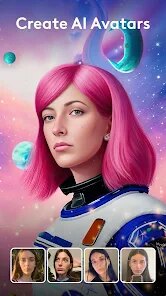
- 🤖 Text to Image – This feature lets you generate images from descriptions like "a cat on a moonlit beach" without leaving the editing interface. Meitu has something similar but produces less detailed results, so Photoleap shines in variety and quality of generated scenes.
- 🖌️ Background Replacement – You can swap out backgrounds using AI that automatically cuts out the subject. Compared to Canva's manual cropping, Photoleap's tool is more precise for complex edges like hair or leaves, though it occasionally misses fine details.
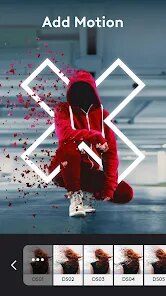
- 🎞️ Animation Tools – Photoleap includes a "Living Image" feature that adds subtle movement to static photos, like flowing water or moving clouds. Facetune lacks this entirely, while apps like ImgPlay focus only on GIFs, so Photoleap bridges creative motion with editing nicely.
pros
- 🌟 User-Friendly Interface – Everything is designed for quick access without clutter, which beats Picsart's sometimes overwhelming menu layout for beginners.
- 🌟 High-Quality AI Output – The generated images often look more polished than what you get from Meitu, with better color matching and fewer distortions in faces.
- 🌟 All-in-One Studio – You don't need to switch between separate apps for text-to-image or animation; Photoleap bundles these into one smooth workflow, saving time compared to using multiple tools like Canva and ImgPlay together.
cons
- ⚠️ Free Version Limitations – Many advanced features are locked behind a subscription, making heavy users feel restricted. Picsart offers more free tools and stickers without a paywall.
- ⚠️ Inconsistent Text-to-Image – While fun, it sometimes generates odd details, like extra limbs in characters. Meitu's similar tool is more reliable for human figures but less creative with scenes.
- ⚠️ No Layer Editing – You can't fine-tune individual elements separately. Canva and Picsart allow layer-based editing for complex projects, which Photoleap lacks entirely.
- ⚠️ Pricey Subscription – The monthly cost for full access is higher than apps like Facetune or Picsart's premium tiers, which might not feel justified unless you use it heavily.
Recommended Apps
![]()
16Personalities
16Personalities4
![]()
Zodiac Palm Reader: MagicWay
Reatility Media4.6
![]()
Moblo - 3D furniture modeling
MYTIforge4.1![]()
Magnifier Plus with Flashlight
Digitalchemy, LLC4.6![]()
QR Code Scanner
QR Code Scanner & Barcode Reader4.7![]()
FalFal: Astrology, Tarot, Love
FalFal Team4.8![]()
Christmas Photo Frames
PhotoFramesApps4.6![]()
AI Video Art Creator - Livensa
FERASET4.5![]()
Horoscope of Birth
Denimaks4.4![]()
Make Me Bald Prank
AppTornado2.5![]()
Kling AI: AI Image&Video Maker
Lohas Games Pte. Ltd.4.4![]()
Japan Timetable & Route Search
NAVITIME JAPAN CO., LTD.4.3![]()
Prank Call & Funny Video
TeH Software0![]()
Parallax 3D Live Wallpapers
TarrySoft4.3![]()
AI Chatbot - Nova
ScaleUp4.7















Disclaimer
1.AppInfoLibrary does not represent any developer, nor is it the developer of any App or game.
2.AppInfoLibrary provide custom reviews of Apps written by our own reviewers, and detailed information of these Apps, such as developer contacts, ratings and screenshots.
3.All trademarks, registered trademarks, product names and company names or logos appearing on the site are the property of their respective owners.
4. AppInfoLibrary abides by the federal Digital Millennium Copyright Act (DMCA) by responding to notices of alleged infringement that complies with the DMCA and other applicable laws.
5.If you are the owner or copyright representative and want to delete your information, please contact us info@appinfolibrary.com.
6.All the information on this website is strictly observed all the terms and conditions of Google Ads Advertising policies and Google Unwanted Software policy .














