

Future You: See your old face

1M+
Installs
Future Self Studio
Developer
-
Lifestyle
Category
-
Rated for 3+
Content Rating
-
guojeric@gmail.com
Developer Email
-
https://sites.google.com/view/faceart-privacy
Privacy Policy
Screenshots
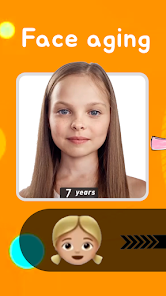
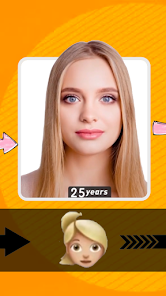
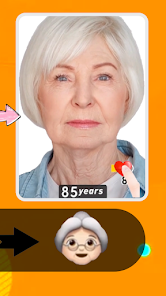

editor reviews
I first came across Future You on the Google Play Store while browsing for something a bit different from the usual photo editors and filters. It's a specialized AI aging simulation app, so its main trick is taking a current photo of your face and showing you what you might look like in 10, 20, or even 30 years. You just download it, install it, and launch it—there's no mandatory sign-up at the start, which I appreciated. The app is free to use, though there are some in-app purchases for higher-resolution exports and extra aging packs. Right after opening it, my first impression was that the interface felt clean but a little sparse, almost like a prototype. The main screen just had a big "Start Aging" button, so it wasn't intimidating, though it didn't exactly scream "advanced tech" at first glance.
After tapping that button, you snap a selfie or pick one from your gallery, and then you adjust a few sliders for how far into the future you want to go. The app processes the image on-device (no cloud uploads, which is a nice privacy touch), and within about 10 to 15 seconds, you see the aged version pop up. I ran through it with a few different photos: one with good front-facing lighting, one from a weird angle, and one where I was smiling. The results were surprisingly consistent on the well-lit shots, but dimmer photos gave it trouble, making the skin look waxy and weird. The actual interaction is limited—there is no tutorial or overlay explaining what's happening, so you just trust the magic. A small tip I found useful was to avoid photos with heavy makeup or glasses, as the software seems to struggle with accessories and details around the eyes and mouth.
After using it for about a week, I think Future You nails the novelty factor, but it feels like a one-trick pony. If you're curious about aging or just want a fun party trick to show friends, it's worth the free download. However, someone looking for a comprehensive photo tool or even a full-fledged face swap app might find it too limited. Compared to something like FaceApp, which has a similar aging filter but also tons of other effects, Future You is laser-focused on just the aging simulation. What keeps it on my phone is how uncanny the results look when the lighting is right—it genuinely feels like looking at a relative. What might make me uninstall it is the lack of variety: once you've seen yourself old a few times, the magic wears off, and you start noticing how it tends to add generic wrinkles and grey hair without really modeling bone structure changes.
features
- 🧬 The standout feature is obviously the on-device machine learning engine. Unlike many apps that send your photos to a server for processing (which often feels slow and raises privacy concerns), Future You processes everything locally. This makes it incredibly snappy, usually taking just a few seconds, and it also means your facial data never leaves your phone. The end result is a clean, pixel-level transformation that adjusts skin texture, hair color, and even eye area wrinkles with surprising depth. Many competing aging apps, including the aging filter in FaceApp, require an internet connection and sometimes even a subscription for the best results, which can be a dealbreaker for people with slower networks or privacy worries.
- 🧬 Another impressive element is the sliders for aging depth. You get a decade-by-decade preview: 10 years, 20 years, then 30 years. The 30-year outcome is genuinely jarring—it adds sagging and more pronounced lines without making you look like a cartoon. The app also lets you compare the aged version alongside the original in a side-by-side view, which is great for sharing side-by-side "before and after" images on social media.
- 🧬 Finally, the app takes into account your gender and age range from the photo itself. For example, an older user won't get dramatically unrealistic wrinkles, and a younger face will see more subtle changes like slight skin dulling. This sense of personalization makes each result feel unique and not just a generic filter slapped on top of your face.
pros
- ✅ Privacy-first processing: No cloud uploads, so your face is never stored on a server. This is a huge advantage over apps like Remini or FaceApp, which charge for premium features while handling your photos online. Future You gives you peace of mind if you're queasy about facial data leaving your pocket.
- ✅ High-quality aging details: The wrinkles, sunspots, and hair graying are more natural-looking than most free alternatives. Many apps just blur the skin and add a few lines, but Future You adds volume changes under the chin and around the eyes, giving it a more realistic, almost medical feel.
- ✅ Simple, distraction-free UI: There are no ads popping up every five seconds, no confusing menus, and no unnecessary editing tools. It's purely aging simulation with a clean interface, which feels respectful of your time compared to bloated editors full of stickers and text tools.
cons
- ❌ Limited to one function: It does one thing—aging simulation—and nothing else. If you want to reverse your age, swap genders, or apply any other effects, you'll need a different app entirely. FaceApp and YouCam Perfect offer a whole suite of facial transformations for the same price or even less, making Future You feel feature-poor in comparison.
- ❌ Inconsistent results in bad lighting: The app strongly relies on high-quality, front-facing lighting. If your photo is a bit shadowed, has a grain, or is taken from a side angle, the output often looks artificial, with waxy patches and mismatched skin tones. Competing apps handle bad lighting better thanks to more robust pre-processing algorithms.
- ❌ No export control without payment: The free version exports images with a small watermark and at a reduced resolution. To get a clean, high-resolution version (which is the only real reason to use the app for a presentation or profile picture), you have to pay for the in-app purchase. This feels a little greedy given how narrow the app's focus already is.
Recommended Apps
![]()
16Personalities
16Personalities4
![]()
Zodiac Palm Reader: MagicWay
Reatility Media4.6
![]()
Moblo - 3D furniture modeling
MYTIforge4.1![]()
Magnifier Plus with Flashlight
Digitalchemy, LLC4.6![]()
QR Code Scanner
QR Code Scanner & Barcode Reader4.7![]()
FalFal: Astrology, Tarot, Love
FalFal Team4.8![]()
Christmas Photo Frames
PhotoFramesApps4.6![]()
AI Video Art Creator - Livensa
FERASET4.5![]()
Horoscope of Birth
Denimaks4.4![]()
Make Me Bald Prank
AppTornado2.5![]()
Kling AI: AI Image&Video Maker
Lohas Games Pte. Ltd.4.4![]()
Japan Timetable & Route Search
NAVITIME JAPAN CO., LTD.4.3![]()
Prank Call & Funny Video
TeH Software0![]()
Parallax 3D Live Wallpapers
TarrySoft4.3![]()
AI Chatbot - Nova
ScaleUp4.7















Disclaimer
1.AppInfoLibrary does not represent any developer, nor is it the developer of any App or game.
2.AppInfoLibrary provide custom reviews of Apps written by our own reviewers, and detailed information of these Apps, such as developer contacts, ratings and screenshots.
3.All trademarks, registered trademarks, product names and company names or logos appearing on the site are the property of their respective owners.
4. AppInfoLibrary abides by the federal Digital Millennium Copyright Act (DMCA) by responding to notices of alleged infringement that complies with the DMCA and other applicable laws.
5.If you are the owner or copyright representative and want to delete your information, please contact us info@appinfolibrary.com.
6.All the information on this website is strictly observed all the terms and conditions of Google Ads Advertising policies and Google Unwanted Software policy .














