

Pretty Makeup - Beauty Camera

50M+
Installs
Photo Editor Perfect Corp.
Developer
-
Video Players & Editors
Category
-
Rated for 3+
Content Rating
-
baiwang2013@gmail.com
Developer Email
-
http://makeupcamera.photoeditorperfect.top/PrivacyPolicy/
Privacy Policy
Screenshots
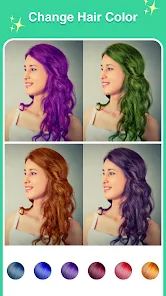
editor reviews
Pretty Makeup is a beauty camera app from the team behind the YouCam series, so right away you know it's about digital touch-ups and virtual makeovers. It's basically a one-stop shop for anyone who wants to snap a selfie and instantly tweak their look without diving into heavy editing software. When I grabbed it from Google Play (it's free to download with around 50 million installs and plenty of in-app purchases), the first thing that hit me was how glossy the interface is. You open it up, and there's this prompt to either take a photo or pull one from your gallery, which feels straightforward enough. The registration is optional for basic use, but you'll see ads pop up here and there, especially if you're not paying for a subscription. My first impression was that it's very polished, maybe a little too busy with all the stickers and filters staring at you right away.
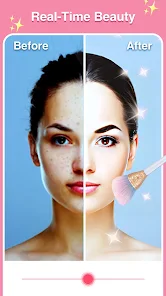
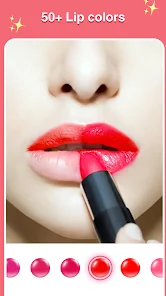
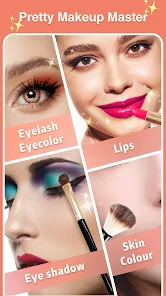
After actually using Pretty Makeup for a few days, the hands-on experience is a mixed bag of slick tools and some clunky moments. The onboarding is quick—just a swipe or two to show you the main features like skin smoothing, face reshaping, and virtual makeup. For a normal user, you'd probably start by snapping a selfie or picking one from your camera roll, and then you're thrown into this editing screen with sliders for brightness, contrast, and all the beauty tweaks. The skin smoothing is shockingly good; it doesn't turn your face into a plastic mask like some other apps do. You can adjust the intensity with a slider, which is nice. The virtual makeup is where it shines—you can add lipstick shades, blush, or even fake eyelashes with pretty realistic results. One practical tip: if you're going for a natural look, keep the “Smooth” slider below 50% to avoid that airbrushed weirdness. The app has a ton of stickers and frames too, but navigating through them can feel sluggish sometimes, especially if your phone is older. There's a “Makeup Try-On” section that uses your live camera to apply stuff in real time, but it lags a bit unless you're under great lighting.
After spending a couple of weeks with Pretty Makeup, I've got a pretty clear sense of who'd love it and who might skip it. If you're someone who posts selfies regularly on social media and wants quick, impressive results without learning Photoshop, this app is a solid fit. The virtual makeup is way more realistic than what you'd get from apps like BeautyPlus or the basic filters in Instagram—those can feel heavy-handed, whereas Pretty Makeup gives you more control. But honestly, if you're just looking for a few easy filters, you might find all the extra features overwhelming, especially with the constant nudges to buy premium packs for specific looks. The free version is usable, but the ads are frequent and some of the best makeup styles are locked behind a paywall. What keeps me from uninstalling it is the face reshaping tool—it's subtle enough to fix uneven eyebrows or slightly slim your jawline without screaming “edited.” After a while, though, I noticed the app drains battery faster than expected during live previews, and the storage space it eats up with cached stickers can be annoying. It's a fun toy for occasional use, but I'd probably only keep it if I'm in a selfie-heavy phase.
features
- 💄 Virtual Makeup Realism: Pretty Makeup lets you apply lipstick, eyeshadow, and blush that actually follow your face contours. The tech feels miles ahead of something like Facetune, where makeup tends to look like a flat sticker pasted on top. You can blend shades and adjust opacity, which makes the final photo look painted on rather than clipped in.
- ✨ AI-Powered Skin Smoothing: The skin tool doesn't just blur everything. It detects blemishes, dark circles, and uneven texture, then smooths only those areas. Compared to YouCam Perfect, which sometimes smooths the whole face into plastic, Pretty Makeup keeps pores and skin texture intact if you want that natural finish.
- 🖼️ Real-Time Try-On: You can test makeup styles through your camera before taking a shot. It tracks your face in motion, so turning your head shifts the lipstick or eyeshadow realistically. Most other beauty apps freeze or lag when you move, but this one holds up okay unless you're in dim light.
- 🔧 Face Shaping Precision: The reshape tool works on specific points—like lifting one eyebrow slightly or narrowing the nose bridge. In apps like BeautyPlus, you often get an overall “slim face” slider that messes up proportions. Here, you have more targeted control without distorting the whole face.
pros
- 👍 Realistic Output: Unlike Meitu or Camera360, which sometimes give you that overly processed doll face, Pretty Makeup keeps skin texture and shadows. The results look more like good lighting than heavy editing.
- 👍 Wide Makeup Library: The app has hundreds of pre-set looks, from everyday natural to dramatic evening styles. YouCam Makeup has a similar library, but Pretty Makeup organizes them better with searchable categories like “oxblood lips” or “glass skin.”
- 👍 Batch Editing Support: You can apply the same beauty edits to multiple photos in one go, which saves time if you're posting a series. Most apps only let you edit one image at a time.
- 👍 No Watermark on Free Version: Unlike many free beauty apps that stamp a logo on your photo, Pretty Makeup lets you save images without one. That's a big plus for sharing directly on social media without extra cropping.
cons
- 👎 Battery Drain During Live Preview: Using the real-time try-on feature chews through battery life fast. On my Galaxy S22, the app drained 15% in 20 minutes of live preview. Instagram's own filters do the same but not as aggressively.
- 👎 Frequent Ads in Free Mode: You get a full-screen ad every 3-4 uses, and some pop up right when you're trying to adjust a slider. BeautyPlus shows fewer ads overall, though it has a watermark you have to remove.
- 👎 Premium Locking of Essentials: Key makeup shades and skin tools are locked behind a subscription. For example, the “Pink Blush” shade is free, but real nude or berry shades require purchase. Facetune offers more free core tools before hitting the paywall.
- 👎 Occasional Lag on Older Devices: On a phone like the iPhone XR, the app stutters when applying real-time makeup with high resolution. Apps like Snapseed have zero lag because they focus on basic corrections instead of virtual beauty.
Recommended Apps
![]()
16Personalities
16Personalities4
![]()
Zodiac Palm Reader: MagicWay
Reatility Media4.6
![]()
Moblo - 3D furniture modeling
MYTIforge4.1![]()
Magnifier Plus with Flashlight
Digitalchemy, LLC4.6![]()
QR Code Scanner
QR Code Scanner & Barcode Reader4.7![]()
FalFal: Astrology, Tarot, Love
FalFal Team4.8![]()
Christmas Photo Frames
PhotoFramesApps4.6![]()
AI Video Art Creator - Livensa
FERASET4.5![]()
Horoscope of Birth
Denimaks4.4![]()
Make Me Bald Prank
AppTornado2.5![]()
Kling AI: AI Image&Video Maker
Lohas Games Pte. Ltd.4.4![]()
Japan Timetable & Route Search
NAVITIME JAPAN CO., LTD.4.3![]()
Prank Call & Funny Video
TeH Software0![]()
Parallax 3D Live Wallpapers
TarrySoft4.3![]()
AI Chatbot - Nova
ScaleUp4.7















Disclaimer
1.AppInfoLibrary does not represent any developer, nor is it the developer of any App or game.
2.AppInfoLibrary provide custom reviews of Apps written by our own reviewers, and detailed information of these Apps, such as developer contacts, ratings and screenshots.
3.All trademarks, registered trademarks, product names and company names or logos appearing on the site are the property of their respective owners.
4. AppInfoLibrary abides by the federal Digital Millennium Copyright Act (DMCA) by responding to notices of alleged infringement that complies with the DMCA and other applicable laws.
5.If you are the owner or copyright representative and want to delete your information, please contact us info@appinfolibrary.com.
6.All the information on this website is strictly observed all the terms and conditions of Google Ads Advertising policies and Google Unwanted Software policy .














