

Skin Editor 3D for Minecraft

10M+
Installs
Remoro Studios
Developer
-
Productivity
Category
-
Rated for 3+
Content Rating
-
remoro.studios@gmail.com
Developer Email
-
http://remoro-studios.com/privacy_policy
Privacy Policy
Screenshots
editor reviews
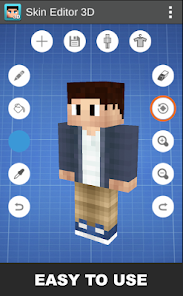
I started using Skin Editor 3D for Minecraft after getting tired of the default Steve skin. It's a mobile app made for designing custom skins for the game, and it's pretty straightforward for anyone who plays Minecraft on their phone. You can download it from the Google Play Store, and from what I remember, it's free to install with a decent number of downloads, though there are in-app purchases and occasional ads that pop up. When I first launched the app, I was honestly surprised by how clean the interface looked—there's a 3D model of the character right away, and you can start painting on it almost immediately without any confusing tutorials. That first impression made me want to stick around and mess with the tools.
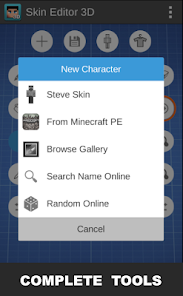
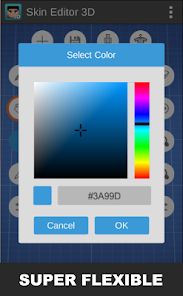
Once I actually started using it, the hands-on experience felt pretty smooth. The main screen shows a fully rotatable 3D model of a Minecraft player, and you can tap on different body parts like the head, arms, or legs to edit them. There's a color picker and a brush tool, so you can paint pixel by pixel, which is exactly how Minecraft skins work. I spent a while just zooming in and adjusting tiny details, and it felt responsive with no lag on my phone. The app also lets you import existing skin files or export your finished work directly into Minecraft, which saves a lot of time. A small tip I picked up is using the undo button regularly, because one accidental swipe can mess up a whole area. The only slightly confusing part was finding the layers option—it's tucked away, but once you know where it is, you can add shadows or highlights easily.
After using it for a week, I think it's a solid choice for Minecraft players who enjoy customizing their look without needing a PC. If you're someone who just plays casually and doesn't care about skins, you probably don't need it, but for players who want to stand out in servers, it's worth keeping. Compared to apps like Nova Skin Editor or Skinseed, Skin Editor 3D feels more polished on mobile because it actually shows the 3D model while you edit, instead of a flat 2D map. I've kept it installed because it's easy to open and make quick changes, but I've heard some people uninstall it because they find the ads annoying during longer sessions. Overall, it's not a game-changer, but it does the job well for what it is.
features
- 🎨 The 3D real-time preview is the biggest standout. Unlike Nova Skin Editor, which mostly shows a flat 2D layout, Skin Editor 3D lets you rotate the model while painting, so you see exactly how the skin will look in-game without guessing.
- 🖌️ The brush tools are simple but effective. You can switch between a single pixel brush and a larger fill tool, and there's a color picker that works smoothly. Skinseed has similar tools, but the responsiveness on this app feels faster and more accurate for precise edits.
- 🔄 Direct export into Minecraft is a huge time-saver. You don't need to save a file and then manually import it—the app does it instantly. Other apps like Skincraft require extra steps, which can get annoying when you just want to test a new look quickly.
pros
- 👍 The interface is beginner-friendly. I never had to guess where tools were, and the 3D model made it obvious what each body part does. Skinseed feels more cluttered with menus, so this app wins for simplicity.
- 👍 It runs well on older phones. I tested it on a mid-range device from a few years ago, and there was no lag or crashing. Nova Skin Editor sometimes stutters during heavy editing, but this one stays smooth.
- 👍 The color palette is decent right out of the box. You get a wide range of pre-set colors that match Minecraft's block palette, which saves time compared to apps like Pigstep where you have to input custom hex codes manually.
cons
- 👎 The free version has too many ads. They pop up every few clicks, especially when you're saving or exporting. Apps like Nova Skin Editor have ads too, but they're less intrusive and don't interrupt the workflow as much.
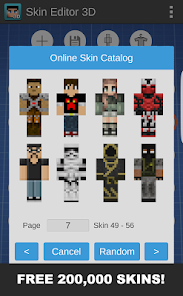
- 👎 There's no community gallery. You can't browse other people's skins for inspiration or download them directly. Skinseed has a huge library of user-created skins, so this app feels isolated if you're out of ideas.
- 👎 Limited advanced features. You can't edit the skin's model shape (like adding extra layers for armor or hats), which some other apps like Skincraft let you do. It's purely for flat color changes, which might not be enough for creative players.
Recommended Apps
![]()
16Personalities
16Personalities4
![]()
Zodiac Palm Reader: MagicWay
Reatility Media4.6
![]()
Moblo - 3D furniture modeling
MYTIforge4.1![]()
Magnifier Plus with Flashlight
Digitalchemy, LLC4.6![]()
QR Code Scanner
QR Code Scanner & Barcode Reader4.7![]()
FalFal: Astrology, Tarot, Love
FalFal Team4.8![]()
Christmas Photo Frames
PhotoFramesApps4.6![]()
AI Video Art Creator - Livensa
FERASET4.5![]()
Horoscope of Birth
Denimaks4.4![]()
Make Me Bald Prank
AppTornado2.5![]()
Kling AI: AI Image&Video Maker
Lohas Games Pte. Ltd.4.4![]()
Japan Timetable & Route Search
NAVITIME JAPAN CO., LTD.4.3![]()
Prank Call & Funny Video
TeH Software0![]()
Parallax 3D Live Wallpapers
TarrySoft4.3![]()
AI Chatbot - Nova
ScaleUp4.7















Disclaimer
1.AppInfoLibrary does not represent any developer, nor is it the developer of any App or game.
2.AppInfoLibrary provide custom reviews of Apps written by our own reviewers, and detailed information of these Apps, such as developer contacts, ratings and screenshots.
3.All trademarks, registered trademarks, product names and company names or logos appearing on the site are the property of their respective owners.
4. AppInfoLibrary abides by the federal Digital Millennium Copyright Act (DMCA) by responding to notices of alleged infringement that complies with the DMCA and other applicable laws.
5.If you are the owner or copyright representative and want to delete your information, please contact us info@appinfolibrary.com.
6.All the information on this website is strictly observed all the terms and conditions of Google Ads Advertising policies and Google Unwanted Software policy .














