
Custom Skin Creator Minecraft

10M+
Installs
Blakzero
Developer
-
Productivity
Category
-
Rated for 3+
Content Rating
-
support@blakzero.com
Developer Email
-
https://blakzero.com/privacy-policy/
Privacy Policy
Screenshots
editor reviews
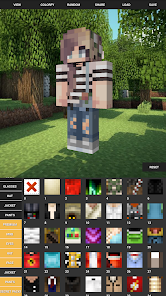
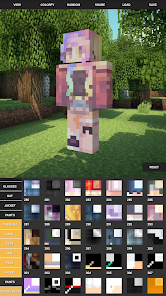
I've been messing around with Custom Skin Creator Minecraft by Blakzero for a bit now, and honestly, it's exactly what it sounds like: a mobile app that lets you design your own skins for Minecraft. It's not an official Mojang tool or anything, just a third-party utility that lives on Google Play. You download it for free, and right after installing, it asks for storage permissions so it can save your creations. The first time you open it, you're greeted with a simple workspace that's not flashy at all—just a blocky 3D model of a Steve-like character. No complicated splash screens or tutorials pop up, which was kind of refreshing. I guess most people grab this because they're tired of the default skins or don't want to pay for premium packs. It feels barebones at first, but that also means it loads fast and doesn't throw ads in your face immediately. There's no forced registration either, so you can jump straight into drawing, which is nice if you just want to test it out.
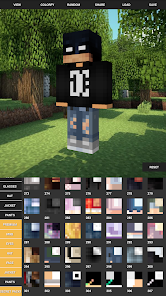
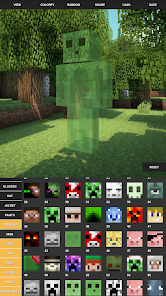
Once you start using it, the app is pretty hands-on. You tap on different parts of the character—head, torso, arms, legs—and each section opens up a pixel grid on the right side of the screen. You can zoom in, pick colors from a basic palette, and paint block by block. It's not super smooth, honestly. The controls feel a bit stiff on a small phone screen, and there's no undo button that I could find at first, which made me mess up a few times and just start over. But once you get the hang of it, you can copy layers for the left and right arms or legs separately, so things don't have to be symmetrical if you don't want them to be. That's a neat touch. After you finish a skin, you can save it, share the file, or import it directly into Minecraft. I ran into a small hiccup where the saved skin didn't load in the game right away—I had to restart Minecraft for it to show up. Little things like that make it feel a bit amateur, but for a free app, it gets the job done.
After using it for a couple of weeks, I think it's best for kids or casual players who just want a quick custom look without using a desktop editor. It's definitely not for serious pixel artists because you're limited to a tiny grid and a very basic color set, and you can't export high-resolution versions. Compared to something like Skinseed or Nova Skin's mobile app, this one feels way less polished. Those apps have more templates, community skins, and smoother drawing tools. But what sets this app apart is how minimal it is—no clutter, no login, no social feed trying to get you to share stuff. That can be a plus if you just want a private, distraction-free editor. I personally kept it installed because I use it for quick tweaks to existing skins, but I wouldn't use it for anything complex. It's a decent little tool if your expectations aren't too high.
features
- 🎨 The pixel editor is straightforward but limited. You paint directly on a 3D model, which helps visualize changes as you go. In contrast, Skinseed on mobile offers a much larger canvas and smoother zoom, plus pre-made templates to start from. Custom Skin Creator feels more like a basic MS Paint for skins—functional, but missing undo, layer blending, or a color dropper. The standout here is the 3D preview updating in real time, which isn't always stable in other free editors.
- 🔄 Layer copying for body parts is useful and not common in all similar apps. You can duplicate your arm design to the other arm easily, saving time. Nova Skin on a phone doesn't have this feature built into its editor, so you'd have to manually mirror everything. Still, the app lacks symmetry mode, so you can't automatically mirror left and right as you draw, which some competitors offer.
- 📦 Direct export to Minecraft is a highlight. After saving, you can tap a button and the app places the skin into your game files. In my test, it worked most of the time, but occasionally the skin didn't appear until a full restart. Apps like Skins: Master for Minecraft do this more reliably with a one-click import without extra steps.
pros
- 👍 Completely free with no paywalls. Unlike Skinseed, where you need a subscription to remove ads or access certain brushes, this app gives you everything from the start. No nagging prompts to upgrade either.
- 👍 No account required. You don't have to sign up or log in, which is rare among skin editors. Nova Skin forces a login for saving, so this feels more private and hassle-free.
- 👍 Lightweight and loads instantly. The app is under 10 MB and opens without delays, unlike Some other skin tools that bundle gallery features and run slowly on older phones.
cons
- 👎 No undo function. If you make a mistake, you have to erase manually or start over. Even the most basic editors like Pixelmon have undo, so this feels like a core missing feature.
- 👎 Very limited color palette. You only get about 24 preset colors with no custom RGB picker. Apps like Skins: Master allow you to pick any hex color, which is crucial for matching specific shades.
- 👎 No search or community gallery. You cannot browse skins made by others or even see examples in the app itself. Skinseed has a huge library, so this app feels isolated and uninspiring.
- 👎 Occasional import glitches. Skins sometimes fail to load into Minecraft, especially on the first try. Similar apps rarely have this issue after years of updates.
Recommended Apps
![]()
16Personalities
16Personalities4
![]()
Zodiac Palm Reader: MagicWay
Reatility Media4.6
![]()
Moblo - 3D furniture modeling
MYTIforge4.1![]()
Magnifier Plus with Flashlight
Digitalchemy, LLC4.6![]()
QR Code Scanner
QR Code Scanner & Barcode Reader4.7![]()
FalFal: Astrology, Tarot, Love
FalFal Team4.8![]()
Christmas Photo Frames
PhotoFramesApps4.6![]()
AI Video Art Creator - Livensa
FERASET4.5![]()
Horoscope of Birth
Denimaks4.4![]()
Make Me Bald Prank
AppTornado2.5![]()
Kling AI: AI Image&Video Maker
Lohas Games Pte. Ltd.4.4![]()
Japan Timetable & Route Search
NAVITIME JAPAN CO., LTD.4.3![]()
Prank Call & Funny Video
TeH Software0![]()
Parallax 3D Live Wallpapers
TarrySoft4.3![]()
AI Chatbot - Nova
ScaleUp4.7















Disclaimer
1.AppInfoLibrary does not represent any developer, nor is it the developer of any App or game.
2.AppInfoLibrary provide custom reviews of Apps written by our own reviewers, and detailed information of these Apps, such as developer contacts, ratings and screenshots.
3.All trademarks, registered trademarks, product names and company names or logos appearing on the site are the property of their respective owners.
4. AppInfoLibrary abides by the federal Digital Millennium Copyright Act (DMCA) by responding to notices of alleged infringement that complies with the DMCA and other applicable laws.
5.If you are the owner or copyright representative and want to delete your information, please contact us info@appinfolibrary.com.
6.All the information on this website is strictly observed all the terms and conditions of Google Ads Advertising policies and Google Unwanted Software policy .














