

Old Me:simulate old face

1M+
Installs
happy.ai.app
Developer
-
Lifestyle
Category
-
Rated for 3+
Content Rating
-
happy.ai.app@outlook.com
Developer Email
-
https://sites.google.com/view/happy-ai-team-privacy-policy
Privacy Policy
Screenshots

editor reviews
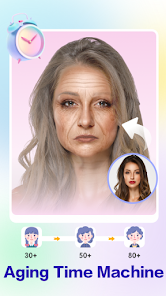
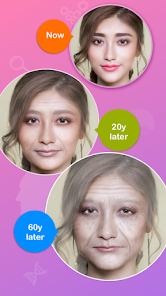
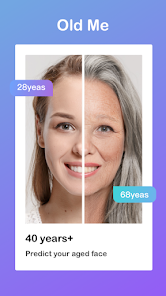
Old Me: Simulate Old Face is one of those apps you stumble upon when curiosity gets the better of you. It belongs to the photo editing and face-aging genre, letting users upload a picture and see what they might look like decades down the road. A normal person might download it from Google Play or the App Store after seeing friends share results or just for a laugh during a quiet evening. The app is free to download, and it has racked up a decent number of installs, though exact figures are not mentioned. The first impression after launching is straightforward: you grant camera and photo permissions, and it immediately nudges you to pick a selfie. There is no registration wall, which feels refreshing, although the free experience comes with occasional ads between renders.
Once you get into using it, the interface is surprisingly minimal. You either snap a fresh photo or choose one from your gallery, and then the app processes it using its aging algorithms. The process takes about ten to fifteen seconds, which feels reasonable for something running on-device. During that wait, you see a simple loading bar, and the result pops up with realistic wrinkles, gray hair, and slight skin sagging. I found that well-lit, front-facing photos give the best results, while group shots or side profiles tend to confuse the AI. One practical tip: if you want the most believable old version of yourself, use a clear, straight-on selfie with no sunglasses. The app also offers limited options to adjust the aging intensity or add fun backgrounds, but these feel more like afterthoughts. The whole experience is smooth for what it is, though sometimes the rendering stalls if your phone is older or low on storage.
After playing around with it for a while, I can see why people keep it installed for the occasional party trick or social media post. It is not an app you open daily, but it delivers exactly what it promises without unnecessary complexity. Someone who loves gimmicky photo filters or enjoys surprising friends with funny transformations will get a kick out of it. On the flip side, if you are looking for a serious photo editing tool or something with professional-grade aging effects, this may feel too shallow. Compared to similar apps like FaceApp or AgingBooth, Old Me feels simpler and more focused, lacking the polished subscription models of bigger competitors but also avoiding their overwhelming menus. You might keep it around for the novelty, but once you have aged your entire contact list, the chances of uninstalling are high. For what it sets out to do, it is harmless fun that respects your time.
features
- 😀 Instant Aging Simulation: The core feature is dead simple. You upload a photo, and within seconds you get a realistic aged version. Unlike FaceApp which buries aging behind a paywall for high-quality results, Old Me keeps this free and fast, no account needed.
- 😀 On-Device Processing: The app runs its aging model locally on your phone. This means you do not need a constant internet connection, and your photos stay private. Apps like AgingBooth require cloud uploads, which can feel sketchy for personal pictures.
- 😀 No Signup Needed: You can jump right in without creating an account or giving up your email. That is rare among similar tools nowadays. It makes the initial download feel like a no-commitment tryout.
pros
- 🔥 Fast and Lightweight: The app takes up very little storage and loads quickly. FaceApp, in comparison, is heavy and often lags on older devices. Old Me stays nimble.
- 🔥 Privacy First: Since everything processes locally, you are not uploading your face to unknown servers. Other apps like AgingBooth often force you to upload before seeing results, which is a big turnoff for privacy-minded users.
- 🔥 Genuinely Free Core: Many similar apps tease aging effects in ads but then hide the good results behind a subscription. Old Me delivers the aging feature without tricking you into paying.
cons
- ❌ Limited Features: The app only does one thing, age faces. Unlike FaceApp which also offers hair color changes, smile adjustments, or gender swaps, Old Me feels barebones after the initial wow wears off.
- ❌ Inconsistent Output: On some photos, the aging effect looks very natural, but on others, especially side angles or poorly lit shots, the result can look cartoonish. AgingBooth handles different angles a bit more gracefully.
- ❌ Forced Ads: Although the app is free, you will see an ad every few renders. Other free apps tend to show fewer or shorter videos, making the experience feel less interruptive here.
Recommended Apps
![]()
16Personalities
16Personalities4
![]()
Zodiac Palm Reader: MagicWay
Reatility Media4.6
![]()
Moblo - 3D furniture modeling
MYTIforge4.1![]()
Magnifier Plus with Flashlight
Digitalchemy, LLC4.6![]()
QR Code Scanner
QR Code Scanner & Barcode Reader4.7![]()
FalFal: Astrology, Tarot, Love
FalFal Team4.8![]()
Christmas Photo Frames
PhotoFramesApps4.6![]()
AI Video Art Creator - Livensa
FERASET4.5![]()
Horoscope of Birth
Denimaks4.4![]()
Make Me Bald Prank
AppTornado2.5![]()
Kling AI: AI Image&Video Maker
Lohas Games Pte. Ltd.4.4![]()
Japan Timetable & Route Search
NAVITIME JAPAN CO., LTD.4.3![]()
Prank Call & Funny Video
TeH Software0![]()
Parallax 3D Live Wallpapers
TarrySoft4.3![]()
AI Chatbot - Nova
ScaleUp4.7















Disclaimer
1.AppInfoLibrary does not represent any developer, nor is it the developer of any App or game.
2.AppInfoLibrary provide custom reviews of Apps written by our own reviewers, and detailed information of these Apps, such as developer contacts, ratings and screenshots.
3.All trademarks, registered trademarks, product names and company names or logos appearing on the site are the property of their respective owners.
4. AppInfoLibrary abides by the federal Digital Millennium Copyright Act (DMCA) by responding to notices of alleged infringement that complies with the DMCA and other applicable laws.
5.If you are the owner or copyright representative and want to delete your information, please contact us info@appinfolibrary.com.
6.All the information on this website is strictly observed all the terms and conditions of Google Ads Advertising policies and Google Unwanted Software policy .














