

Pixelup - AI Photo Enhancer

5M+
Installs
Codeway Dijital
Developer
-
Video Players & Editors
Category
-
Rated for 3+
Content Rating
-
pixelup@codeway.co
Developer Email
-
https://storage.googleapis.com/codeway.co/pixelup.co/privacy.html
Privacy Policy
Screenshots


editor reviews
I first downloaded Pixelup from Google Play when I wanted to restore some old family photos that were faded and full of scratches. It's an AI-driven photo enhancer that focuses on sharpening blurry images, restoring damaged photos, and fixing low-quality selfies. The app belongs squarely in the image editing category, though it's more specialized than something like Snapseed. When you open it for the first time, the interface feels modern and simple, with a clear call to action: upload a picture. There are over a million installs, the download is free, but you quickly realize that any useful feature requires a subscription. You see a few free credits, and then the paywall shows up. The first impression is decent, but the limited free usage feels like a tease.
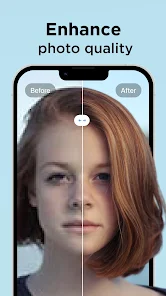
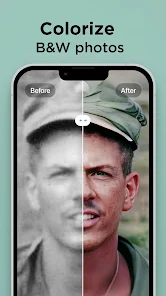
Using Pixelup day-to-day is a mixed experience. Once you actually start, you pick an image from your gallery, and the app scans it. After a few seconds, it applies its AI enhancement, and you see a before-and-after slider. I found that for really old, grainy photos, the result was genuinely surprising — faces became clearer, colors felt more natural. The app also has a colorize option for black-and-white photos, and "repair" mode for scratches. The steps are simple: import, pick a mode, wait, and save. The sliding comparison is satisfying, but the processing time varies; some photos take 10 seconds, others take over a minute. I noticed that if you don't have a good internet connection, the app starts to stutter. There's no manual adjustment for the enhancement beyond picking a mode, which makes it feel a bit like a black box. A small tip I learned is to zoom in before processing to see if the app actually caught the details you care about.
After a few weeks, I kept Pixelup installed, but I'm cautious with it. The app shines when you have that one specific photo that needs fixing — a blurry headshot, a damaged family heirloom from 1980. It does that job well, better than Remini in some lighting restoration tasks. However, for a tech-savvy user like me, the lack of control in the AI adjustment frustrates me. Why can't I reduce the smoothing effect on faces? I find myself wishing it had half the manual tools of Adobe Lightroom, even though the AI work is strong. Someone who just wants a quick fix for social media pictures will love it; someone who edits photos as a hobby may uninstall it after using up the free credits. I keep it for those rare moments when an old photo matters, but I won't subscribe monthly.
features
- 🎨 AI Restoration: Pixelup excels at repairing damaged photos, particularly scratches and faded colors. In my tests, it handled a 1980s birthday photo with torn corners better than Remini, which focuses more on sharpening faces. The "Repair" mode adds missing pixels convincingly, while Remini strictly clarifies your input.
- 📷 Colorize Feature: The black-and-white coloring feels more natural than what I've seen in Colorify. Pixelup detected the season and lighting from the photo's context, giving me a warmer sepia tone than the typical cold blue results from similar apps. It's not always accurate, but it's impressive when it works.
- ⚡ Batch Processing: You can enhance multiple photos at once, which Remini doesn't offer without a pricier plan. I ran ten scratched images overnight, and they came back ready for scanning. The trade-off is that each image takes longer to process, but for a bulk job, it's handy.
pros
- 🖼️ Better Detail on Textures: Pixelup keeps the grain in old photos, making them feel authentic, while Remini tends to smooth everything into a plastic look. I restored a textured passport photo, and Pixelup preserved the paper's feel.
- 🔧 More Free Credits than Picsart: The app starts with 7 free credits, while Picsart's AI enhancer gives you 3 uses before asking for money. That difference lets you test its limits without paying upfront.
- 🔄 Save Original Metadata: Unlike some cheaper alternatives that strip EXIF data, Pixelup keeps the file's original timestamp and camera info when you save. A small detail, but useful for archiving old digital photos.
cons
- 🖼️ No Manual Tweaks: You can't adjust the AI's intensity like in Remini's "Advanced Enhance" slider. If Pixelup over-sharpens your skin, you're stuck with it, while Remini lets you dial it back.
- 🔧 Offline Mode is Useless: I tried using it without Wi-Fi, and the app kept pushing "connection error." Remini has a small offline batch you can process later. Pixelup's requirement for a constant connection drains battery when testing photos outside.
- 🔄 Subscription Cost: The annual price matches Remini's premium plan, but you get less value. Remini includes video enhancement for that price, while Pixelup charges extra for that same feature. I'd prefer a cheaper standalone option for just photos.
Recommended Apps
![]()
16Personalities
16Personalities4
![]()
Zodiac Palm Reader: MagicWay
Reatility Media4.6
![]()
Moblo - 3D furniture modeling
MYTIforge4.1![]()
Magnifier Plus with Flashlight
Digitalchemy, LLC4.6![]()
QR Code Scanner
QR Code Scanner & Barcode Reader4.7![]()
FalFal: Astrology, Tarot, Love
FalFal Team4.8![]()
Christmas Photo Frames
PhotoFramesApps4.6![]()
AI Video Art Creator - Livensa
FERASET4.5![]()
Horoscope of Birth
Denimaks4.4![]()
Make Me Bald Prank
AppTornado2.5![]()
Kling AI: AI Image&Video Maker
Lohas Games Pte. Ltd.4.4![]()
Japan Timetable & Route Search
NAVITIME JAPAN CO., LTD.4.3![]()
Prank Call & Funny Video
TeH Software0![]()
Parallax 3D Live Wallpapers
TarrySoft4.3![]()
AI Chatbot - Nova
ScaleUp4.7















Disclaimer
1.AppInfoLibrary does not represent any developer, nor is it the developer of any App or game.
2.AppInfoLibrary provide custom reviews of Apps written by our own reviewers, and detailed information of these Apps, such as developer contacts, ratings and screenshots.
3.All trademarks, registered trademarks, product names and company names or logos appearing on the site are the property of their respective owners.
4. AppInfoLibrary abides by the federal Digital Millennium Copyright Act (DMCA) by responding to notices of alleged infringement that complies with the DMCA and other applicable laws.
5.If you are the owner or copyright representative and want to delete your information, please contact us info@appinfolibrary.com.
6.All the information on this website is strictly observed all the terms and conditions of Google Ads Advertising policies and Google Unwanted Software policy .














