
ThemeKit - Themes & Widgets

10M+
Installs
ThemeKit
Developer
-
Productivity
Category
-
Rated for 3+
Content Rating
-
ThemeKit.Studio@gmail.com
Developer Email
-
https://doc.themekit.live/Privacy-Policy.html
Privacy Policy
Screenshots


editor reviews
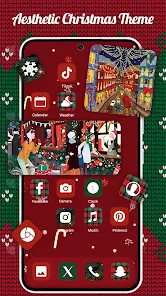
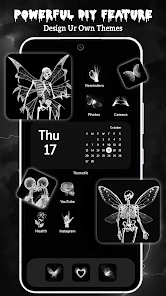
ThemeKit is basically a one-stop shop for anyone who wants to give their phone a fresh look without rooting it or spending hours fiddling with settings. It's a customization app, sitting right alongside heavy hitters like Nova Launcher or KWGT on Google Play and the App Store. When you first download and install it, which is free by the way, you're greeted with a pretty clean interface. My immediate impression was that it wasn't overwhelming—there are a lot of themes out there, but the app does a decent job of sorting them into neat categories like "Retro," "Minimal," or "Anime." You don't need to sign up for an account right away, which is a huge plus. You can browse, preview, and even apply some basic stuff without any in-app purchase prompts bombarding you, although some of the cooler widget packs are locked behind a paywall.
Once you actually start using it, the experience is pretty smooth for the most part. After launching it, you tap on a theme you like, and it shows you a preview with all the icons, wallpapers, and optional widgets. The app then guides you through a step-by-step process to apply things through your phone's default launcher settings, which is a bit of a dance but it's standard for non-root customization. I found the widget editor to be the real star here. You pick a widget pack, say "Neon Clock," and then you can resize it, change the font color, or even make the background transparent right on your home screen. A nice little tip: if you long-press a widget after placing it, you can edit it again without going back into the main ThemeKit app. It's these small workflow touches that make daily use feel less like a chore.
After a few weeks, I think this app is great for someone who likes to change their phone's aesthetic every couple of weeks but doesn't want to learn a complex launcher. It's not for power users who want total control over every animation or folder icon, as you might get with Nova Launcher Prime. What sets it apart is how curated the themes feel compared to the wild west of some free theming apps on the Play Store. There's less garbage. The ads are there, but they're mostly banner ads at the bottom, not full-screen interruptions. I could see someone keeping it installed just for the widget packs alone, especially if they find a good free set. I took it off after a bit because I got comfortable with my setup, but I'd definitely redownload it for a seasonal refresh.
features
- ⚙️ Dynamic Widget Editor: Unlike competitor apps like KWGT where you have to learn a separate scripting language to make a clock change color, ThemeKit lets you do it with simple sliders and color wheels inside a dedicated editor. It's instant and visual.
- ⚙️ Auto-Apply Launcher: Most customization apps just ask if you want to set a wallpaper. ThemeKit actually integrates with its own simple launcher (or your existing one) to batch apply icon packs, wallpapers, and widgets in one tap. That beats downloading separate files like in older apps like GO Launcher.
- ⚙️ Curated Icon Cache: The app automatically scans your installed apps and matches them to the theme's icon set. If it can't find a match, it doesn't just show an ugly white box; it tries to adapt a color. This is way less frustrating than manually assigning icons like in CandyCons.
pros
- ✅ No Root Required: Unlike heavy hitters like Substratum, which needed root access to change system themes, ThemeKit works on any stock Android or iOS device. It's basically plug-and-play for average users.
- ✅ Regular Updates: The developers push new widget packs every few weeks. Compared to apps like UCCW (Ultimate Custom Widget), which feel abandoned, ThemeKit still feels alive with new content.
- ✅ Better Granularity: Unlike the all-or-nothing approach of some launchers, you can apply just the wallpaper from a theme, or just the icons. This gives you a lot of freedom to mix and match.
cons
- ❌ Resource Heavy: Running the widget editor can slow down an older phone. Compared to the lightweight feel of Nova Launcher, ThemeKit's background processes can feel a bit bloated on budget devices.
- ❌ Limited iOS Support: On the App Store, the experience is much more restricted than on Android. You can't change default icons without their clunky shortcuts system, while apps like Widgetsmith are pure widgets without this hassle.
- ❌ Inconsistent Category Filtering: The "New" theme category often just shows sponsored packs you need to pay for, instead of actually new free content. Apps like Zedge do a better job of separating promoted from organic content.
Recommended Apps
![]()
16Personalities
16Personalities4
![]()
Zodiac Palm Reader: MagicWay
Reatility Media4.6
![]()
Moblo - 3D furniture modeling
MYTIforge4.1![]()
Magnifier Plus with Flashlight
Digitalchemy, LLC4.6![]()
QR Code Scanner
QR Code Scanner & Barcode Reader4.7![]()
FalFal: Astrology, Tarot, Love
FalFal Team4.8![]()
Christmas Photo Frames
PhotoFramesApps4.6![]()
AI Video Art Creator - Livensa
FERASET4.5![]()
Horoscope of Birth
Denimaks4.4![]()
Make Me Bald Prank
AppTornado2.5![]()
Kling AI: AI Image&Video Maker
Lohas Games Pte. Ltd.4.4![]()
Japan Timetable & Route Search
NAVITIME JAPAN CO., LTD.4.3![]()
Prank Call & Funny Video
TeH Software0![]()
Parallax 3D Live Wallpapers
TarrySoft4.3![]()
AI Chatbot - Nova
ScaleUp4.7















Disclaimer
1.AppInfoLibrary does not represent any developer, nor is it the developer of any App or game.
2.AppInfoLibrary provide custom reviews of Apps written by our own reviewers, and detailed information of these Apps, such as developer contacts, ratings and screenshots.
3.All trademarks, registered trademarks, product names and company names or logos appearing on the site are the property of their respective owners.
4. AppInfoLibrary abides by the federal Digital Millennium Copyright Act (DMCA) by responding to notices of alleged infringement that complies with the DMCA and other applicable laws.
5.If you are the owner or copyright representative and want to delete your information, please contact us info@appinfolibrary.com.
6.All the information on this website is strictly observed all the terms and conditions of Google Ads Advertising policies and Google Unwanted Software policy .














