

Pencil Photo Sketch : Drawing

50M+
Installs
Minerva Studios Private Limited
Developer
-
Video Players & Editors
Category
-
Rated for 3+
Content Rating
-
hqgames1080@gmail.com
Developer Email
-
https://www.iubenda.com/privacy-policy/57988305
Privacy Policy
Screenshots
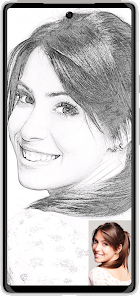
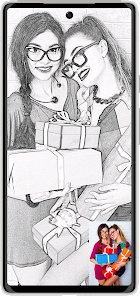
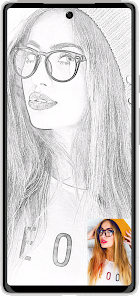
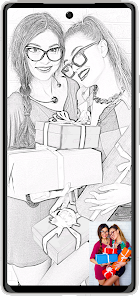
editor reviews
Pencil Photo Sketch is a mobile app that lets you turn any photo from your gallery into a drawing that looks like it was made with a pencil. It's basically an image editing tool that focuses on one specific style of art—sketching. You can use it to edit portraits, landscapes, or even random selfies into black-and-white or color pencil drawings. I found it on Google Play with over 10 million downloads, and it's free to download, though there are in-app purchases and occasional ads. After installing and launching it, the first thing that hit me was how simple the interface is. There's no sign-up wall or tutorial—just a big button that says “Start” and a few options at the bottom. That kind of immediate access was refreshing, because I just wanted to try it out without any fuss.
Once I uploaded a photo, the app processed it within a few seconds and gave me several sketch styles to choose from. I tapped on one of the presets, like “Pencil Sketch,” and it transformed my ordinary photo into something that looked hand-drawn. You can adjust the intensity of the lines or add a paper texture effect, which makes it feel more authentic. The onboarding was practically nonexistent, which is fine for a straightforward tool like this, although power users might wish for a quick guide. The main workflow is pretty simple: pick a photo, choose a filter, tweak a bit, and save. I did notice that some of the fancier effects require watching an ad or paying for the premium version, which was a minor annoyance. A small tip that helped—turning up the contrast in your original photo before applying the sketch effect gives you sharper, more defined lines.
After using this app for a few days, I think it's a fun little tool for people who enjoy playing with photos or want to create quick digital art without learning complex software. It's not for anyone looking to do serious editing—there are no layers, no brush tools, just filters. Compared to apps like Prisma or PicsArt, which offer tons of artistic styles, this one is much more limited, focusing only on pencil sketches. But that narrow focus is also what makes it good; if you specifically want a pencil drawing effect, this does it faster and cleaner than most general-purpose apps. I'd probably keep it installed because it's handy for making custom profile pics or sharing something artistic on social media, but if I were a serious artist looking for control, I'd uninstall it quickly.
features
- ✨ One-click sketch conversion: The app processes your photo into a pencil drawing in seconds, with no manual editing required. This makes it faster than tools like Adobe Photoshop Sketch, where you'd need to trace or manually apply effects.
- ✦ Multiple sketch styles: You get options like “Classic Pencil,” “Color Sketch,” and “Charcoal,” each with adjustable intensity. That gives you a bit more variety than a simpler app like Sketch Me!, which only offers basic black-and-white filters.
- 💡 Paper texture overlay: You can add a real paper grain effect to the final image, which makes the sketch look more physical and less digital. This is something ArtFlow doesn't have built-in—you'd need to layer textures manually.
- 🖌️ Instant preview and undo: Every adjustment shows in real time, and you can step back if you mess up. That's smoother than some desktop alternatives like GIMP, where undo steps can be sluggish or limited.
pros
- ⚡ Speed and simplicity: The app turns a photo into a sketch in under five seconds, even on older phones. In comparison, Prisma often takes longer to process and requires an internet connection for server-side filtering.
- 🎯 Focused functionality: Unlike PicsArt, which bombards you with stickers, collages, and text tools, Pencil Photo Sketch sticks to one clear purpose—making your photos look like hand-drawn sketches. That makes it much less overwhelming for beginners.
- 🆓 Generous free access: You get a handful of filters and effects without paying a cent, whereas apps like Clip Studio Paint have a steep learning curve and require a subscription for similar stylized output.
cons
- 🔒 Limited customization: You can't draw by hand or add your own strokes. This is a huge drawback compared to apps like Ibis Paint X, where you can literally trace over a photo with a pencil tool and control every line.
- 📺 Ad interruptions: Every time you save a high-resolution image without paying, you're forced to watch a 30-second ad. Competitors like Snapseed don't lock exports behind ads at all.
- 🎨 No advanced editing features: There's no layer support, no brush size adjustments, and no ability to erase parts of the sketch effect selectively. Software like Autodesk Sketchbook gives you way more control for free.
- 🌐 Requires gallery photos only: You can't start from a blank canvas or import images from cloud storage directly. SketchClub lets you work with blank canvases and import from more sources, which is more flexible.
Recommended Apps
![]()
16Personalities
16Personalities4
![]()
Zodiac Palm Reader: MagicWay
Reatility Media4.6
![]()
Moblo - 3D furniture modeling
MYTIforge4.1![]()
Magnifier Plus with Flashlight
Digitalchemy, LLC4.6![]()
QR Code Scanner
QR Code Scanner & Barcode Reader4.7![]()
FalFal: Astrology, Tarot, Love
FalFal Team4.8![]()
Christmas Photo Frames
PhotoFramesApps4.6![]()
AI Video Art Creator - Livensa
FERASET4.5![]()
Horoscope of Birth
Denimaks4.4![]()
Make Me Bald Prank
AppTornado2.5![]()
Kling AI: AI Image&Video Maker
Lohas Games Pte. Ltd.4.4![]()
Japan Timetable & Route Search
NAVITIME JAPAN CO., LTD.4.3![]()
Prank Call & Funny Video
TeH Software0![]()
Parallax 3D Live Wallpapers
TarrySoft4.3![]()
AI Chatbot - Nova
ScaleUp4.7















Disclaimer
1.AppInfoLibrary does not represent any developer, nor is it the developer of any App or game.
2.AppInfoLibrary provide custom reviews of Apps written by our own reviewers, and detailed information of these Apps, such as developer contacts, ratings and screenshots.
3.All trademarks, registered trademarks, product names and company names or logos appearing on the site are the property of their respective owners.
4. AppInfoLibrary abides by the federal Digital Millennium Copyright Act (DMCA) by responding to notices of alleged infringement that complies with the DMCA and other applicable laws.
5.If you are the owner or copyright representative and want to delete your information, please contact us info@appinfolibrary.com.
6.All the information on this website is strictly observed all the terms and conditions of Google Ads Advertising policies and Google Unwanted Software policy .














