
Face Changer 2

10M+
Installs
Scoompa
Developer
-
Video Players & Editors
Category
-
Rated for 3+
Content Rating
-
contact+fc2@scoompa.com
Developer Email
-
https://docs.google.com/document/d/1-10tckt_YRWuRjuUMeLfxLPrwauzGOhfz2_038S1pU4/edit?usp=sharing
Privacy Policy
Screenshots



editor reviews
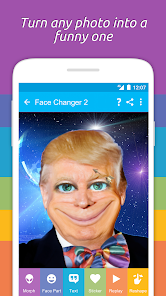
Face Changer 2 is a photo editing app from Scoompa that lets you swap faces in pictures with just a few taps. It falls into the utility and entertainment category, and most people grab it for laughs or to mess around with friends' photos. You download it from Google Play or the App Store, and after install, the first thing that hits you is this super stripped-back interface, no clutter or confusing menus. It's free to download, but you'll run into watermarked exports unless you pay up, and there are ads that pop up now and then, which is pretty standard for this kind of tool.
When you actually open the app and pick a photo, the process feels almost too easy. You tap to select a face, then choose the one you want to swap in, and it does the rest automatically. The onboarding is basically nonexistent, which can be good or bad depending on what you want. Sometimes the alignment is spot-on, other times it looks a bit off, especially if the faces aren't facing the same direction. I found that tweaking the angle of the source photo before importing helps a ton, it saves you from having to redo things later. The app runs smoothly on my phone, no crashes so far, but the ads do interrupt the flow right when you're about to save.
After using Face Changer 2 for a bit, I'd say it's great if you just want quick results without fussing over details. It's not for people who need precise control, those folks should look at something like Photoshop Express instead. What makes it stand out is how fast it works compared to similar apps, like FaceApp, which sometimes takes longer to process. I can see someone keeping this installed for party tricks or silly group photos, but I'd probably uninstall it after a week once the novelty wears off. It does the job, but it's not something you'd rely on for serious editing.
features
- 🤖 Face swapping works with a single tap, no manual masking or selection needed. Other apps like FaceApp require more steps to get the same result.
- 🤖 The app processes images fast, usually under a second on my device. Reface can be slower when handling multiple faces in one shot.
- 🤖 It supports swapping faces between live photos and videos, not just static images. Most competitors limit this to still pictures only.
pros
- 🌟 The interface is incredibly simple, no learning curve at all. FaceApp has more features but feels cluttered in comparison.
- 🌟 It handles lighting mismatches better than I expected. Snapchat's face swaps often look washed out, but this keeps colors close to natural.
- 🌟 You can save high-resolution images if you pay for the pro version. Free alternatives like Cupace only export lower quality.
cons
- ⚠️ The watermark on free exports is huge and placed dead center. Reface puts theirs in the corner, which is way less annoying.
- ⚠️ Editing existing swaps is impossible, you have to start over if it looks wrong. FaceApp lets you adjust the mask after placement.
- ⚠️ There's no batch processing feature. If you want to swap faces in ten photos, you're doing them one by one, unlike Picsart which has a bulk edit option.
Recommended Apps
![]()
16Personalities
16Personalities4
![]()
Zodiac Palm Reader: MagicWay
Reatility Media4.6
![]()
Moblo - 3D furniture modeling
MYTIforge4.1![]()
Magnifier Plus with Flashlight
Digitalchemy, LLC4.6![]()
QR Code Scanner
QR Code Scanner & Barcode Reader4.7![]()
FalFal: Astrology, Tarot, Love
FalFal Team4.8![]()
Christmas Photo Frames
PhotoFramesApps4.6![]()
AI Video Art Creator - Livensa
FERASET4.5![]()
Horoscope of Birth
Denimaks4.4![]()
Make Me Bald Prank
AppTornado2.5![]()
Kling AI: AI Image&Video Maker
Lohas Games Pte. Ltd.4.4![]()
Japan Timetable & Route Search
NAVITIME JAPAN CO., LTD.4.3![]()
Prank Call & Funny Video
TeH Software0![]()
Parallax 3D Live Wallpapers
TarrySoft4.3![]()
AI Chatbot - Nova
ScaleUp4.7















Disclaimer
1.AppInfoLibrary does not represent any developer, nor is it the developer of any App or game.
2.AppInfoLibrary provide custom reviews of Apps written by our own reviewers, and detailed information of these Apps, such as developer contacts, ratings and screenshots.
3.All trademarks, registered trademarks, product names and company names or logos appearing on the site are the property of their respective owners.
4. AppInfoLibrary abides by the federal Digital Millennium Copyright Act (DMCA) by responding to notices of alleged infringement that complies with the DMCA and other applicable laws.
5.If you are the owner or copyright representative and want to delete your information, please contact us info@appinfolibrary.com.
6.All the information on this website is strictly observed all the terms and conditions of Google Ads Advertising policies and Google Unwanted Software policy .














