

Stickman: draw animation maker

10M+
Installs
Appache apps and games ltd
Developer
-
Art & Design
Category
-
Rated for 3+
Content Rating
-
tools@appache.games
Developer Email
-
https://appache.games/policy
Privacy Policy
Screenshots
editor reviews
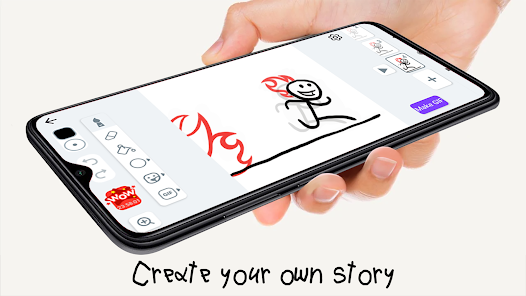
Stickman: Draw Animation Maker is exactly what it sounds like – a mobile tool for creating frame-by-frame stick figure animations. It's a drawing and animation app, perfect for anyone who wants to make quick, simple cartoons or short loops right on their phone. You mainly use it to sketch characters, add new frames, and string them together into a moving sequence. A normal user might download it because they see a funny little idea in their head and want to bring it to life without needing a complex desktop program. The first impression after launching it is actually a bit pleasant; the interface keeps things clean and uncluttered, focusing on a dark canvas and a straightforward toolbar. It doesn't throw a million options at you, which makes the whole thing feel accessible from the start.
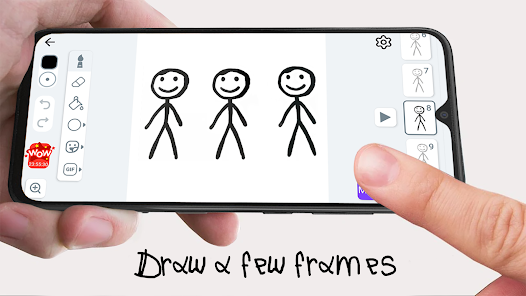
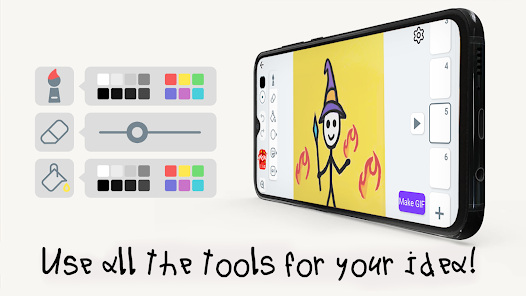
Once you get into actually using it, the experience is pretty hands-on and tactile. You start by drawing your stickman on a blank frame, then you add a new frame and tweak the drawing slightly – like moving an arm or bending a leg. The app gives you a simple set of brushes, an eraser, and a color picker, so you're not overwhelmed with layers or complex tools. The onion skin feature, which shows a faint ghost of the previous frame, is a huge help for keeping your movements smooth. For a beginner, the process is surprisingly smooth, though you might fumble a bit with the exact button to play your animation back. A small practical tip: keep your drawings very simple, because complex details take forever to redraw and don't add much to the stickman style.
After spending some time with it, I can see exactly who would love this. If you have kids who are just getting into cartoons, or if you enjoy making silly, short gifs for social media, this app is a perfect fit. It's also great for storyboard artists who need a fast, mobile way to block out a scene. On the flip side, if you're looking for something with polished graphics, bone rigging, or auto-tweening like you get in RoughAnimator or FlipaClip, this will feel too basic. What sets it apart is its pure simplicity – there's almost no learning curve, just draw and play. That's why I kept it installed for a while, but eventually I uninstalled it because I wanted more advanced features. It's great for a specific, casual purpose, but not a long-term tool for serious animation.
features
- 🎨 Frame-by-frame control feels very direct. You can see each drawing layer, and the onion skin preview helps you line up movements perfectly. Compared to FlipaClip, Stickman skips the extra bells and whistles like layers or audio tracks, focusing solely on the drawing and playback loop, which feels cleaner for basic work.
- ✏️ The brush set is simple but sufficient. You have a few sizes and colors, and the eraser works well for touch-ups. Unlike RoughAnimator, which offers pressure sensitivity and vector tools, Stickman keeps everything pixel-based and straightforward – great for quick sketches.
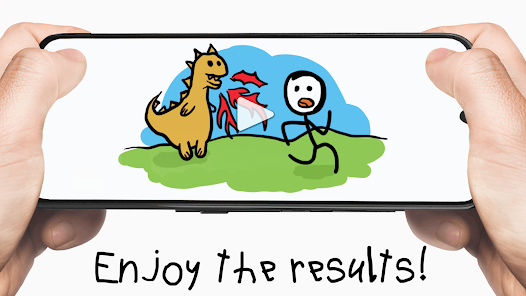
- ⏩ Playback is instant and doesn't lag. You can tap the play button right after drawing a few frames and see your animation loop smoothly. This immediate feedback is a standout feature, as some similar apps like Pencil2D require exporting before previewing.
- 📱 The export options are basic. You can save your animation as a GIF or an MP4 video. While FlipaClip allows for higher resolution exports and custom frame rates, Stickman keeps it simple with standard options, which is enough for short social media posts.
pros
- 🌟 Extremely fast to learn. You don't need to watch a tutorial or read a manual. Just open the app and start drawing, which is much quicker than getting started with professional tools like Toon Boom or even Sketchbook.
- 🌟 Low file size and battery drain. Unlike heavy apps like Procreate or RoughAnimator, Stickman doesn't demand much from your phone. It runs smoothly on older devices and won't drain your battery in an hour.
- 🌟 Regularly updated. The developers from Appache Apps and Games Ltd push frequent updates that fix bugs and add small quality-of-life improvements, which is more than what you get from many abandoned stickman apps on the store.
cons
- ⚠️ No bone rigging or tweening. For longer animations, drawing every single frame manually becomes tedious. Apps like RoughAnimator or Pivot Animator offer automatic in-betweening, which saves a ton of time.
- ⚠️ Limited export quality. The maximum resolution and frame rate options are lower than what FlipaClip or Stop Motion Studio offer, so your final video might look pixelated if you plan on sharing it on larger screens.
- ⚠️ No support for custom import. You cannot import images, backgrounds, or pre-made sprites. This is a big letdown if you want to make more complex scenes. Other apps like Animation Desk allow for image tracing and import, which Stickman lacks.
Recommended Apps
![]()
16Personalities
16Personalities4
![]()
Zodiac Palm Reader: MagicWay
Reatility Media4.6
![]()
Moblo - 3D furniture modeling
MYTIforge4.1![]()
Magnifier Plus with Flashlight
Digitalchemy, LLC4.6![]()
QR Code Scanner
QR Code Scanner & Barcode Reader4.7![]()
FalFal: Astrology, Tarot, Love
FalFal Team4.8![]()
Christmas Photo Frames
PhotoFramesApps4.6![]()
AI Video Art Creator - Livensa
FERASET4.5![]()
Horoscope of Birth
Denimaks4.4![]()
Make Me Bald Prank
AppTornado2.5![]()
Kling AI: AI Image&Video Maker
Lohas Games Pte. Ltd.4.4![]()
Japan Timetable & Route Search
NAVITIME JAPAN CO., LTD.4.3![]()
Prank Call & Funny Video
TeH Software0![]()
Parallax 3D Live Wallpapers
TarrySoft4.3![]()
AI Chatbot - Nova
ScaleUp4.7















Disclaimer
1.AppInfoLibrary does not represent any developer, nor is it the developer of any App or game.
2.AppInfoLibrary provide custom reviews of Apps written by our own reviewers, and detailed information of these Apps, such as developer contacts, ratings and screenshots.
3.All trademarks, registered trademarks, product names and company names or logos appearing on the site are the property of their respective owners.
4. AppInfoLibrary abides by the federal Digital Millennium Copyright Act (DMCA) by responding to notices of alleged infringement that complies with the DMCA and other applicable laws.
5.If you are the owner or copyright representative and want to delete your information, please contact us info@appinfolibrary.com.
6.All the information on this website is strictly observed all the terms and conditions of Google Ads Advertising policies and Google Unwanted Software policy .














