
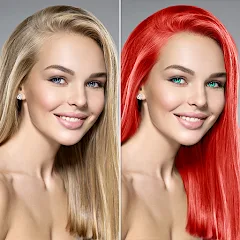
Change Hair And Eye Color

10M+
Installs
Csmartworld
Developer
-
Video Players & Editors
Category
-
Rated for 3+
Content Rating
-
csmartworld@gmail.com
Developer Email
-
http://csmartworldprivacypolicy.blogspot.in/2017/03/privacy-policy-of-csmartworldterms-and.html
Privacy Policy
Screenshots
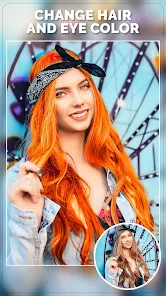
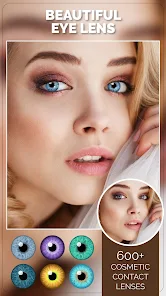
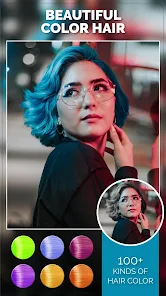
editor reviews
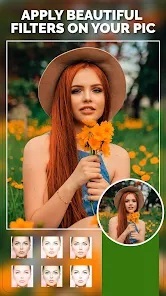
Change Hair And Eye Color is a photo-editing tool that focuses specifically on altering facial features in selfies and portraits. You download it from app stores when you want to quickly experiment with different looks without using a full editing suite. After installing it, the first impression is that it keeps things simple — the main screen just asks you to pick a photo or take one, and the buttons are clearly labeled with icons for hair and eyes. It has free downloads available, and while I did spot some ads popping up between edits, they weren't too aggressive for a free app. There's no forced registration, which is nice for someone who just wants to try it out once.
Using the app feels straightforward once you get past the loading screens. You select a face photo, and the app automatically detects the hair and eye areas. Tapping on hair brings up a color wheel and some preset shades, similar to how you'd pick a filter. The eye color change works the same way, but I noticed the selection sometimes slips off the iris if you're not looking directly at the camera. A practical tip I picked up is to zoom in slightly on the face before applying changes, which helps the tool lock onto the right spots. The editing process itself is quick — you swipe through colors, and the preview updates in real time. After saving, the app offers basic sharing options, but there's no undo button once you exit, so double-check before moving on.
After spending some time with it, I think this app is great for casual users who want a fun, low-commitment way to change their look in photos for social media. Someone who edits portraits professionally might find it too limited since you can't adjust lighting or blend edges naturally. Compared to FaceApp, this one feels more focused and less overwhelming because it doesn't try to do everything at once — you just change hair and eye colors, and that's it. What keeps it on my phone is the speed and simplicity; I'd uninstall it if I needed finer control like masking individual strands or smoothing unnatural color transitions. It does what it promises, but it's not trying to replace Photoshop.
features
- 🎨 The app accurately detects hair and eye regions in most front-facing selfies, which saves you from manually selecting areas like you have to do in PicsArt.
- 🎨 You get a solid range of preset colors plus a color wheel for custom shades, making it more flexible than YouCam Makeup's limited palette for hair dyes.
- 🎨 The real-time preview updates instantly as you swipe through options, so you're not waiting around after each tap like in older versions of Adobe Photoshop Express.
- 🎨 Unlike BeautyPlus, which often crashes when processing high-resolution portraits, this app handles 12MP photos without slowing down or freezing during edits.
pros
- 👍 The interface is clean and uncluttered, so you're not overwhelmed by dozens of tools like in AirBrush or FaceTune2 — you just pick hair or eyes and go.
- 👍 It works offline after the initial download, unlike YouCam Makeup which requires an internet connection for most color options, making it handy for editing on the go.
- 👍 The app doesn't force you to create an account or log in, which is a relief compared to Perfect365 that nags you to sign up before you even try a filter.
- 👍 Changes apply smoothly to the photo without leaving obvious cut-out edges, something that Snapseed's selective color tools struggle with when altering small areas like pupils.
cons
- 👎 The eye color tool frequently misaligns on side-profile shots or when glasses are present, whereas FaceApp handles these angles with more reliable tracking.
- 👎 There's no manual mask or brush correction option, so if the auto-detection misses a section, you're stuck with that error — unlike in Adobe Lightroom where you can refine selections.
- 👎 Saved images are compressed noticeably, reducing quality especially on darker hair colors, while Meitu's export options let you choose higher resolution before saving.
- 👎 The app doesn't remember your last used color or setting, so you have to start from scratch each time you open it, which feels less intuitive than PicsArt's session history feature.
Recommended Apps
![]()
16Personalities
16Personalities4
![]()
Zodiac Palm Reader: MagicWay
Reatility Media4.6
![]()
Moblo - 3D furniture modeling
MYTIforge4.1![]()
Magnifier Plus with Flashlight
Digitalchemy, LLC4.6![]()
QR Code Scanner
QR Code Scanner & Barcode Reader4.7![]()
FalFal: Astrology, Tarot, Love
FalFal Team4.8![]()
Christmas Photo Frames
PhotoFramesApps4.6![]()
AI Video Art Creator - Livensa
FERASET4.5![]()
Horoscope of Birth
Denimaks4.4![]()
Make Me Bald Prank
AppTornado2.5![]()
Kling AI: AI Image&Video Maker
Lohas Games Pte. Ltd.4.4![]()
Japan Timetable & Route Search
NAVITIME JAPAN CO., LTD.4.3![]()
Prank Call & Funny Video
TeH Software0![]()
Parallax 3D Live Wallpapers
TarrySoft4.3![]()
AI Chatbot - Nova
ScaleUp4.7















Disclaimer
1.AppInfoLibrary does not represent any developer, nor is it the developer of any App or game.
2.AppInfoLibrary provide custom reviews of Apps written by our own reviewers, and detailed information of these Apps, such as developer contacts, ratings and screenshots.
3.All trademarks, registered trademarks, product names and company names or logos appearing on the site are the property of their respective owners.
4. AppInfoLibrary abides by the federal Digital Millennium Copyright Act (DMCA) by responding to notices of alleged infringement that complies with the DMCA and other applicable laws.
5.If you are the owner or copyright representative and want to delete your information, please contact us info@appinfolibrary.com.
6.All the information on this website is strictly observed all the terms and conditions of Google Ads Advertising policies and Google Unwanted Software policy .














